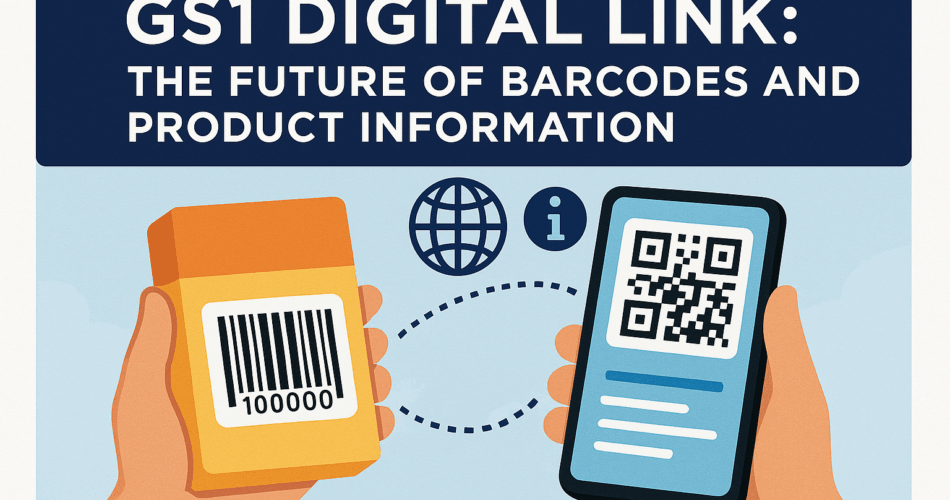
In a nutshell: GS1 Digital Link is a new barcode standard that turns a product’s code into a web link. It connects physical products to real-time digital information with a simple scan. In short, it makes barcodes as smart as websites.
Modern brands and retailers are starting to use GS1 Digital Link. It bridges the gap between a physical product and its online data.
Think of it as giving every product package a tiny portal to the internet. Scan the code on a product to quickly access its details.
The same code is displayed at checkout counters to identify product prices, similar to a regular UPC barcode.
This dual ability makes GS1 Digital Link a game-changer.
A. What is a GS1 Digital Link?
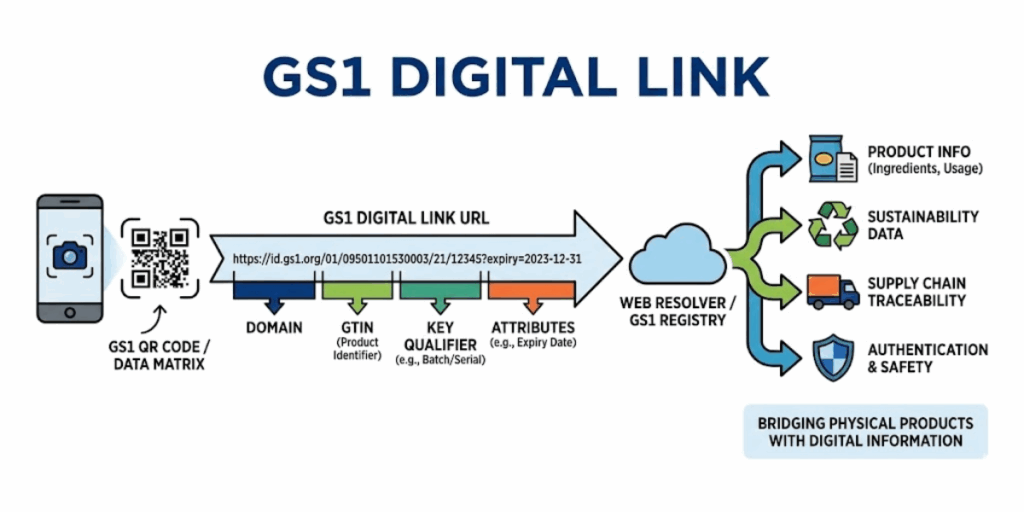
GS1 Digital Link is a standard from GS1 (the organization behind UPC barcodes). It transforms barcodes into web links.
It takes the product identifier (such as a GTIN, the number under a barcode) and formats it into a URL or web address.
This URL is then scanned via a QR Code or similar 2D Code on the package. When scanned by a smartphone, it opens a webpage or online info about the product.
Why was it created?
Traditional barcodes (like the 12-digit UPC) are great for identifying a product.
The limitation is that they cannot provide detailed information directly.
Shoppers now crave information. They check where a product came from, if it has allergens, or if there’s a promotion.
GS1 Digital Link was introduced to meet these needs. It upgrades the old barcode for the internet age. It is also backward-compatible with older systems.
In other words, it “web-enables” the barcode. It turns it into a gateway to online sources of real-time information that brands control.
Key Takeaways
- GS1 Digital Link is a GS1 standard. It turns traditional barcodes into web-enabled links.
- It converts a product identifier, such as a GTIN, into a URL.
- Traditional UPC barcodes only identify products and cannot share detailed information.
- Today’s shoppers expect origin details, allergen info, and live promotions.
- GS1 Digital Link bridges this gap by upgrading barcodes for the internet age.
- It remains backward-compatible, so existing retail systems still work.
- In short, it web-enables barcodes, giving brands control over real-time product information.
B. How does GS1 digital link work?
1. URL structure
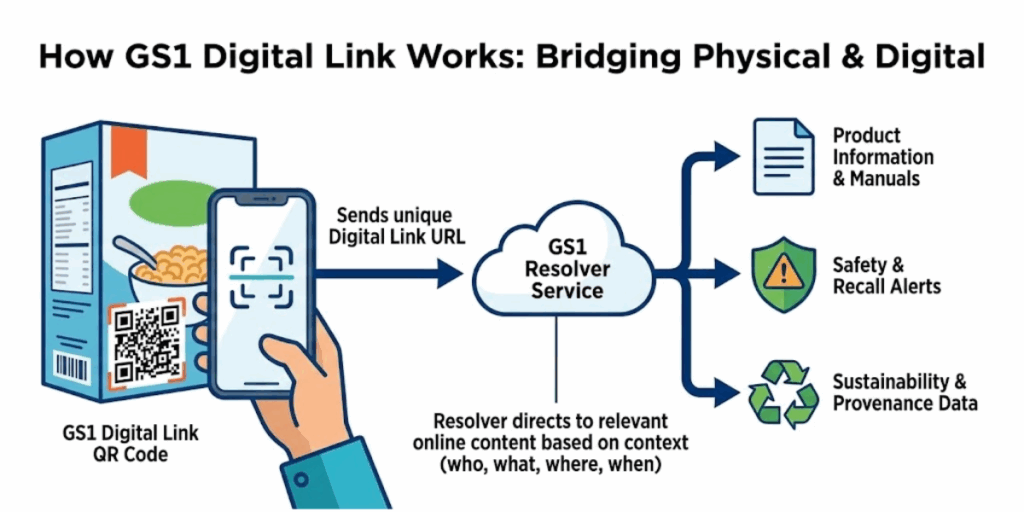
At the heart of GS1 Digital Link is a standardized URL format. For example, a GS1 Digital Link might look like:
https://id.gs1.org/gtin/0123456789012/lot/12345/expiry/20231231
This URL includes: the domain (here, id.gs1.org, which signals a GS1 resolver service).
Also, it has the product’s GTIN (Global Trade Item Number), a batch/lot number, and an expiration date.
Each piece of data is tagged in the URL path (for example, GTIN indicates that the next digits are the product code, LOT indicates the lot number, etc.).
2. QR Codes as carriers
The GS1 Digital Link URL is embedded in a 2D barcode. It could be a QR Code or Data Matrix code on the product packaging.
The QR Code represents that URL. Smartphones have native QR scanning capabilities, allowing customers to scan the code.
Their phone will recognize it as a web link. No special app is needed. The phone then opens the link in a browser.
3. Dual use (Backward Compatibility)
A clever feature of GS1 Digital Link is that existing checkout scanners can still read it.
The 2D code is such that a point-of-sale scanner can extract the GTIN. It doesn’t need an internet connection.
This means that one code can serve two roles. It functions like the old UPC/EAN barcode for sales, and also acts as a QR Code for consumers.
This dual use prevents “code clutter.” You don’t need separate barcodes for price, loyalty, or other information.
4. Resolver service
When a GS1 Digital Link is scanned via smartphone, the URL often points to a GS1 Digital Link Resolver.
A resolver is like a smart internet directory. It receives the product’s URL and redirects the user to the content.
For example, id.gs1.org is a public GS1 resolver domain.
A brand can register what web page or data corresponds to its product’s GTIN in the resolver.
Then, if a user scans the code, the resolver “looks up” the product. It then forwards the phone to the product’s information page or a menu of options.
In simple terms, the resolver ensures the scan leads to the correct location.
GS1 provides a free, high-performance resolver service that anyone can use.
The GS1 Digital Link standard allows anyone to operate a resolver for flexibility.
Key Takeaways
- GS1 Digital Link uses a structured URL to encode GTIN, batch or lot number, expiry date, and more.
- The URL sits inside a QR Code or Data Matrix, works with smartphone cameras, and remains backward compatible with POS scanners, even offline.
- One 2D code replaces multiple barcodes, reducing clutter and aligning with retailers’ upgrades to scanners ahead of 2027.
- Scans pass through a GS1 Digital Link Resolver, allowing brands to redirect users and update content at any time without reprinting the code.
C. Why is the GS1 digital link important?
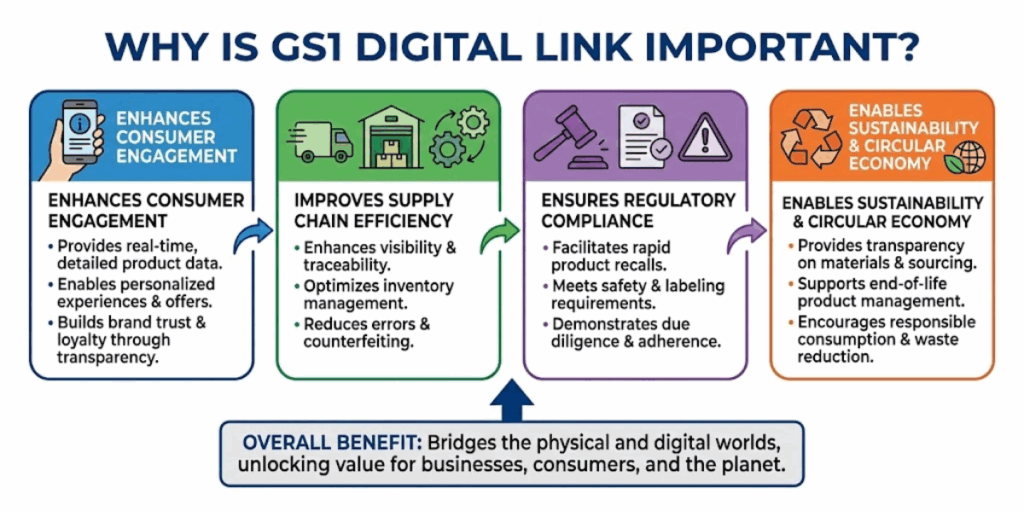
GS1 Digital Link offers many benefits for both businesses and consumers. Here are some key advantages:
1. Rich product information
A single scan can reveal much more than a price.
Consumers can access ingredients, nutritional facts, and more. The brands can choose what to share.
This empowers shoppers to make informed choices and engage with the brand.
For example, scanning a sauce bottle’s GS1 code might bring up recipe ideas or a video of its farm-to-table story.
2. Dynamic updates
Brands can update the content at any time without needing to change the printed code.
Brands can update or redirect content on the web; the QR Code on the package remains the same.
3. Single code for all needs
The GTIN, lot, serial, etc., are all embedded in one code. This reduces clutter on packaging and avoids scanner confusion. It simplifies inventory and packaging design.
4. Traceability and safety
The GS1 Digital Link can encode batch numbers, serial numbers, and expiration dates. This means a scan can identify a product’s batch and expiry.
A consumer or retailer scanning the code could be alerted if that specific item is recalled or has expired.
5. Consumer engagement and trust
Scanning a GS1 Digital Link code with a phone is a direct bridge between the brand and the consumer.
Brands can use it to tell their story or show authenticity. Also, they can reward consumers with loyalty points, among other uses.
6. Analytics for brands
When users scan the QR Code, they are taken to a URL.
This allows brands to collect anonymous analytics, including scan counts, locations, and timestamps.
This is how they track website traffic.
It provides valuable insights into consumer behavior. These insights are beneficial for marketing and supply chain optimization.
Key Takeaways
- GS1 Digital Link reveals detailed, trusted product information instantly from a single code.
- Content updates happen without reprinting, while one code replaces many barcodes for cleaner, more accurate scanning.
- Embedded batch, serial, and expiry data support traceability, recalls, and product authenticity.
- As an open GS1 standard, it enables worldwide interoperability and provides brands with scan analytics to inform decisions.
D. GS1 digital link vs. traditional barcodes
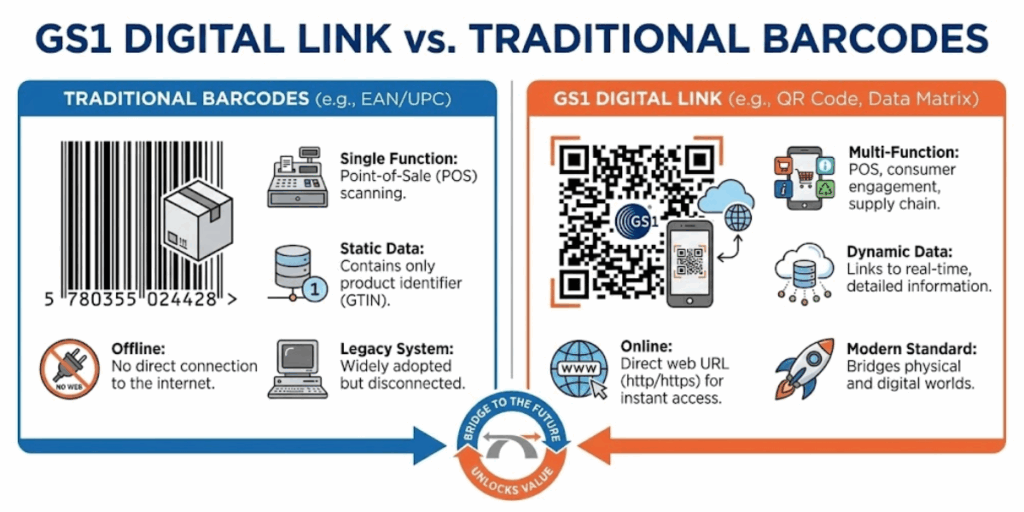
It’s helpful to compare the new GS1 Digital Link approach with old-school barcodes:
1. Data capacity
A traditional 1D barcode (UPC/EAN) carries just an identifier (typically 12 or 13 digits).
GS1 Digital Link can carry both the identifier and other data. It includes a lot of numbers, expiry date, and even links to many online resources.
2. Functionality
Old barcodes help in checkout and inventory management. GS1 Digital Link codes serve multiple functions. Those include point-of-sale, product information, marketing, and traceability all in one.
For example, a single GS1 QR Code can be scanned at checkout and by a customer at home to get instructions.
3. Updateability
Once printed, a traditional barcode’s meaning can’t be changed.
With Digital Link, the printed code can stay the same, but the destination content can update on the web.
4. Customer experience
A UPC on a package isn’t something a customer interacts with – it’s for the store. A GS1 Digital Link QR Code invites customer interaction.
It can be scanned by anyone with a phone, creating a new channel for engagement. It turns the passive barcode into an interactive touchpoint.
5. Backward compatibility
The best part is that GS1 Digital Link doesn’t make the old system obsolete overnight. The new 2D codes can carry the same old IDs. This allows older scanners to still fetch the basic information.
Meanwhile, new systems can get richer info. This compatibility means the transition can be gradual and non-disruptive. During the changeover period, packages might carry both a 1D and 2D code, or a 2D code if the retailer is ready.
Key Takeaways
- Traditional barcodes store only a basic product ID. GS1 Digital Link carries rich data like lot, expiry, and web links.
- Old barcodes support checkout and inventory. GS1 Digital Link combines POS, product info, marketing, and traceability in one code.
- UPC/EAN barcodes are static once printed. Digital Link content can be updated online at any time.
- A UPC is store-facing, but a GS1 Digital Link QR Code is consumer-facing. This turns the barcode into an interactive engagement channel.
E. What is a GS1 digital link resolver?
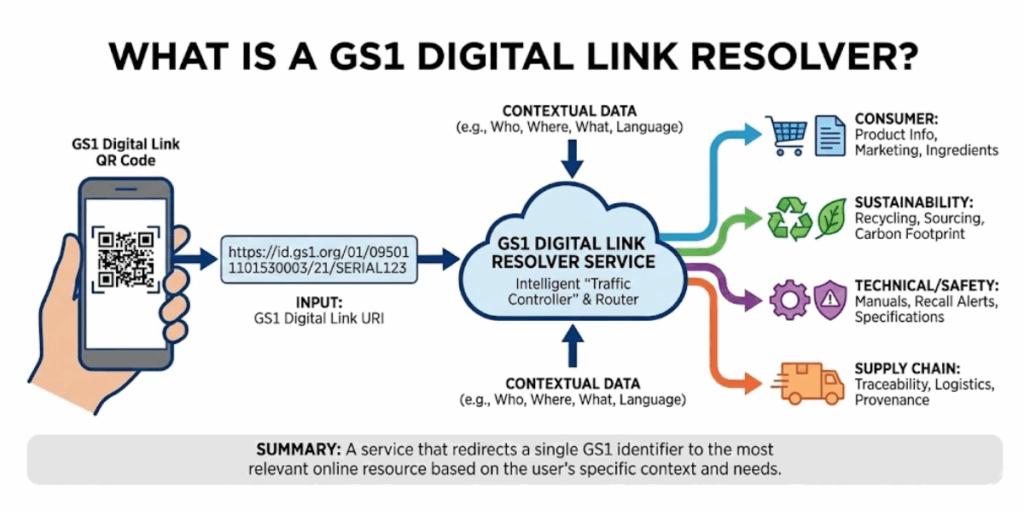
A GS1 Digital Link Resolver is a software service that works behind the scenes when you scan a GS1 Digital Link URL.
Think of it as a traffic director for the web addresses. Here’s how it works in plain language:
When you scan the QR Code with your phone, the encoded URL (for example, the id.gs1.org/… link) is accessed by your browser. The resolver receives that URL request and checks what online resource it should point to.
It then instantly redirects your browser to the actual webpage or data source that the brand has set up for that product. Often, a resolver can even offer a menu of links.
For instance, scanning might direct you to a page where you can choose between “Product info”, “Allergen details”, “User manual PDF”, and so on, all tailored to that specific product code.
The GS1 Digital Link standard enables anyone to set up a resolver; but, GS1 offers a free global resolver at id.gs1.org.
Many brands might use that, especially when starting out. Others could use third-party solution providers or their own IT systems to resolve the links. What’s important is that the resolver ensures long-term flexibility.
If a brand changes its website or wants to add new experiences (like a new video or a new language page), it can update the resolver’s configuration. All the printed QR Codes will then automatically point to the updated content.
Without a resolver, a QR Code might be stuck pointing to a fixed URL that could break over time. With a resolver, the links are persistent and manageable.
Key Takeaways
- A GS1 Digital Link Resolver works behind the scenes when a GS1 QR Code is scanned.
- It acts as a traffic director, receiving the Digital Link URL and determining where it should direct traffic.
- The resolver redirects users to the correct product page, data source, or menu of options.
- Brands can offer many experiences from a single scan, such as product information, allergen details, or manuals.
- GS1 offers a free global resolver at id.gs1.org; but, brands can also use their own or third-party resolvers.
- The resolver enables long-term flexibility, allowing brands to update destinations at any time.
- This keeps printed QR Codes permanent, links reliable, and digital content scalable.
F. How to get started: GS1 digital link generator and implementation
So, how can your business start using GS1 Digital Link? Here’s a simple roadmap:
1. Ensure you have GS1 identifiers
First, you need a GS1-issued product identifier, like a GTIN.
If you already sell products with barcodes, you likely have these numbers. GS1 Digital Link builds on these existing IDs, so this step is crucial.
2. Create the digital link URL
Using the standard format, combine your identifier and any more data (like batch or serial numbers) into a URL. This can be done manually by following GS1 guidelines or automatically with a tool.
For example, to include a GTIN, your URL might be https://yourdomain.com/01/GTINNUMBER (here 01 is the code indicating a GTIN).
For adding a lot number, you’d insert /10/LOTNUMBER (since “10” is the GS1 code for batch/lot). You can also append query parameters for dates, etc., if needed (e.g., ?17=EXPIRYDATE for the end date).
If this sounds technical, don’t worry. GS1 has tools and documentation to help.
Also, many solution providers can generate the proper links for you.
3. Choose a domain/resolver
Decide if you will use a GS1-provided domain (like id.gs1.org) or your own web domain to host these links.
Using GS1’s domain is easiest to start – your links will look like the example and be handled by the global GS1 resolver.
If you use your own domain, you’ll need a resolver service or software running to direct scans to the right content. Some companies prefer their own domain for branding (e.g., products.mybrand.com/01/GTIN…).
Either way works as long as the link conforms to the GS1 format.
4. Generate the QR Code
Once you have the URL, use a GS1 Digital Link-capable QR Code generator to create the 2D barcode image. Not all generic QR Code tools know the GS1 format.
Some online platforms and GS1 member organizations provide these. For example, GS1 has a free generator for test purposes.
Scanova also stays up-to-date with QR Code standards. The process of creation is similar to making any QR Code: paste the URL and get a QR image.
5. Test the code
Always test your GS1 Digital Link QR Code before printing in mass. Use a smartphone to scan it. See if it directs you to the correct webpage or displays the expected information.
Also, test with a 2D barcode scanner (or at a store’s POS system, if possible) to ensure the GTIN and other data is usable for inventory or checkout purposes.
6. Print on products
Integrate the new code on your packaging or labels. You might print it alongside the old barcode. Ensure it’s a suitable size and contrast for easy scanning.
Many brands start by adding the GS1 Digital Link QR besides to the traditional UPC. Eventually, they may drop the old barcode when everyone along the chain can handle the 2D codes.
7. Leverage the digital content
Finally, ensure that the online content the code leads to is valuable. Update it according to the need.
For example, create a mobile-friendly product page that consumers see.
You can even personalize content. The resolver could direct different audiences to different pages.
Key Takeaways
- Start by securing GS1 identifiers, such as a GTIN, which form the foundation of GS1 Digital Link.
- Create a Digital Link URL using the GS1 standard format, with optional data such as lot or expiry.
- Choose a domain and resolver, either GS1’s global resolver or your own branded domain.
- Generate a GS1 Digital Link–compatible QR Code using a tool that supports POS-readable encoding.
- Test the code on both smartphones and checkout scanners before printing.
- Print the code on product packaging or labels, alongside existing barcodes if needed.
- Use the link to deliver valuable, updatable digital content.
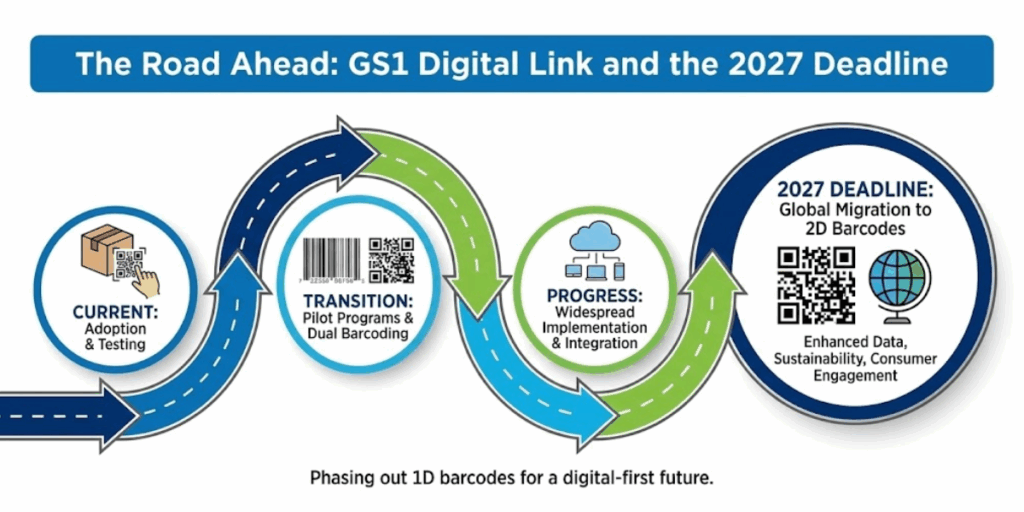
H. The Road Ahead: GS1 Digital Link and the 2027 Deadline
You may wonder when this will become commonplace. The answer is: very soon.
The global industry has set a target, often referred to as “Sunrise 2027.” The new 2D barcode standard is expected to be widely adopted at retail points of sale. This will replace traditional 1D UPC barcodes.
This doesn’t mean all old barcodes vanish overnight, but it signals a major shift. Many countries and companies are already testing or rolling out 2D codes on products.
According to GS1, dozens of countries are pilot-testing these next-generation barcodes as of mid-decade.
Why 2027? It allows the entire retail ecosystem to upgrade scanners and systems to handle the richer data.
Major retailers, including Walmart, have started trials to ensure a smooth transition.
The extra time also lets brands get on board and start printing these codes on their packaging.
Key Takeaways
- GS1 Digital Link adoption is imminent, driven by the Sunrise 2027 initiative.
- By 2027, retailers aim to scan 2D barcodes at checkout, gradually replacing 1D UPC barcodes.
- This shift is already underway, with dozens of countries piloting 2D codes.
- Major retailers, such as Walmart, are testing systems to ensure a smooth transition.
- The timeline allows retailers time to upgrade their scanners and brands’ time to update their packaging.
- Businesses should start preparing now to avoid falling behind.
- Early adopters gain a competitive edge through better engagement and operational efficiency.
I. FAQs: GS1 QR Code
1. What is a GS1 QR Code?
A GS1 QR Code is a standardized QR Code that follows GS1 rules to encode product identifiers, such as GTIN, along with additional information, including batch number, expiry date, or serial number, using a structured URL.
2. How is a GS1 QR Code different from a regular QR Code?
A regular QR Code can link to any content without standards. A GS1 QR Code adheres to global GS1 standards, ensuring interoperability and compatibility across retail scanners, supply chains, and consumer smartphones.
3. What information can a GS1 QR Code contain?
It can include GTIN, lot or batch number, expiry date, serial number, and links to product pages, recalls, sustainability info, or regulatory data.
4. What is GS1 Digital Link?
GS1 Digital Link is the URL format used inside a GS1 QR Code. It connects a product’s barcode data to online information through a single standardized web link.
5. Can GS1 QR Codes replace traditional barcodes?
Yes. GS1 QR Codes are designed to eventually replace 1D barcodes, such as UPC and EAN, by combining checkout scanning and digital engagement in one code.
6. Do GS1 QR Codes work at checkout?
Yes. With 2D-enabled scanners, POS systems can read the GTIN from a GS1 QR Code even when offline, just like a traditional barcode.
Conclusion
GS1 Digital Link is transforming the traditional barcode into a smart code. A quick scan provides shoppers with the necessary information. This enables brands to track and manage their products.
By 2027, you’ll see more of these square codes in stores. It’s a simple shift that makes shopping easier and keeps products connected.