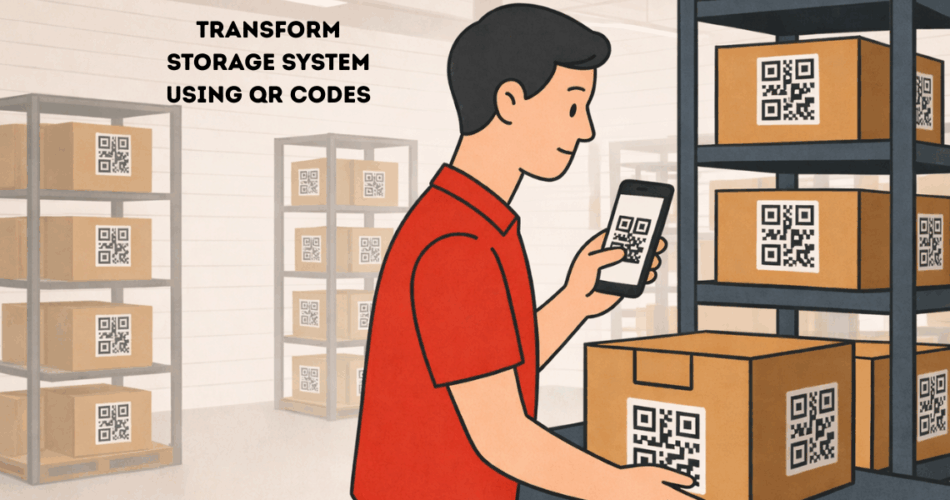
In a nutshell: A QR Code storage system is a smart labeling method that utilizes QR Codes to track stored items or data. It’s a modern way to organize boxes, inventory, or files by linking them to digital information. A quick scan with a smartphone reveals the contents of a box or record, making storage management simple and efficient.
Modern homes and businesses are embracing QR Code storage systems. This approach transforms ordinary labels into interactive information tags.
With everyone now having a smartphone, scanning a QR Code is a quick and easy process. Many organizations are now using QR Codes to streamline their storage and retrieval processes.
Clearly, QR Codes are transforming how we organize and retrieve information in storage.
A. What is a QR Code storage system?
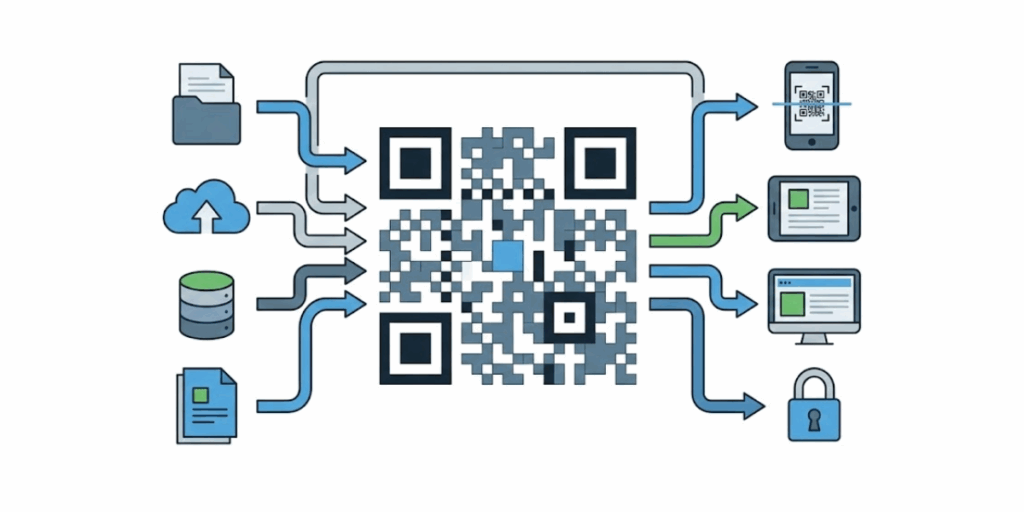
A QR Code storage system refers to using QR Codes as a tool to store or retrieve data about physical items.
It can encode detailed information or a link to that information.
In simple terms, you attach QR Code labels to your storage boxes, bins, or shelves. Scanning the code with a phone instantly pulls up details about the contents or related data.
There are two ways to use QR Codes in this system: static and dynamic. A static QR Code stores the data within the code (for example, a short text or a list of items).
This means the information is stored in the black-and-white pattern itself. The drawback is that static data can’t be changed once the code is created.
In contrast, a dynamic QR Code doesn’t store the full data in the code. Instead, it contains a short URL that points to an online resource.
Dynamic codes allow you to update or edit the linked information at any time, and even track scans.
Both types are useful: static codes work offline and are great for fixed info. While dynamic codes are flexible and ideal if you need to update content.
One reason QR Codes excel in storage systems is their storage capacity. A single QR Code can store significantly more information than a traditional barcode.
Barcodes hold only around 20 characters, but a QR Code can store thousands of characters.
In fact, one QR Code can encode up to about 7,000 digits or 3,000 text characters. That’s enough to embed a detailed inventory list or notes about the items in a box.
This means you can use a QR Code to convey extensive details in a single small square.
The ability to scan from any direction, even with some damage, makes QR Codes a perfect “smart label” for storage needs.
Key Takeaways
- A QR Code storage system links physical items to digital information with a quick scan.
- You can use static QR Codes for fixed, offline data or dynamic QR Codes for editable, trackable content.
- Dynamic QR Codes enable you to update information at any time without needing to reprint labels.
- QR Codes store far more data than barcodes and still scan easily, even if partly damaged.
B. How to set up a QR Code storage system?
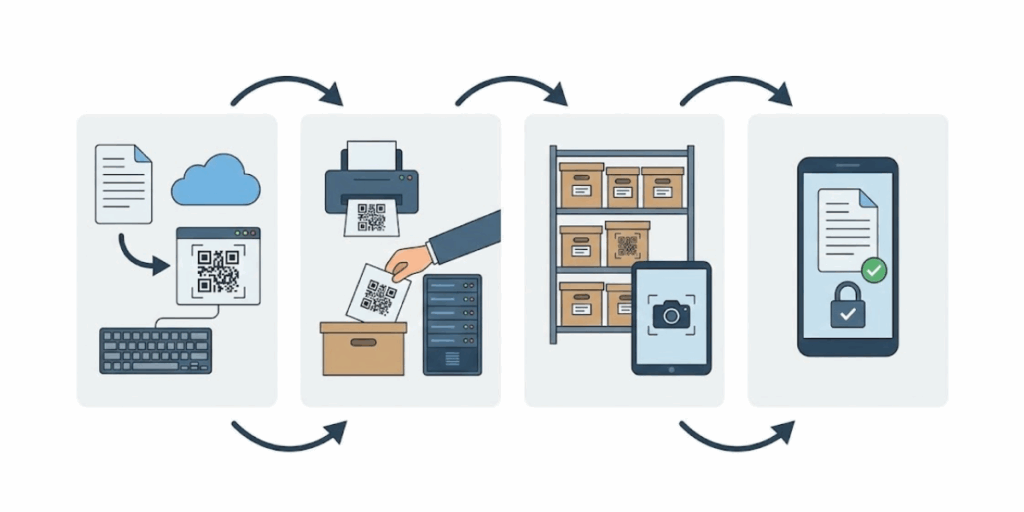
Setting up your own QR Code storage system is straightforward. Here’s how you can create one in a few simple steps:
Step 1: Catalog your items or contents
First, decide what information you want each QR Code to show when scanned. This could be a list of contents in a box, product details, or an asset ID linked to a database. Create a digital log for each item or container.
For a home storage example, you might use a spreadsheet or Google Sheet listing the items in each box.
For a business, you might use an inventory management software or even a simple document that details stock numbers, locations, or contents. The key is to have your information organized and ready.
Step 2: Choose a QR Code generation method
Once your data is prepared, you need to generate QR Codes that will deliver this information. You have a couple of options here:
- Direct data in QR Code: If the information is short (e.g., a brief text or a small list), you can embed it directly in a static QR Code. For instance, a text QR Code could contain a list like “Winter Clothes: Jackets, Sweaters, Boots”.
- Link to data source: If the info is lengthy or you want future editability, use a dynamic QR Code that links to an online resource. For example, upload your inventory list to Google Drive or Dropbox and use the share URL to create a QR Code. Or if you have the data on a webpage or database, use that link. Dynamic codes are preferable in most cases because they allow you to update the content later without requiring code changes.
To generate the codes, go to Scanova’s QR Code Generator (Scanova provides an easy-to-use online generator). Select the QR Code type that best suits your needs.
For a link or file, choose a URL QR Code or File QR Code option. If you want to embed plain text (like a short note or list), choose Text QR Code.
If you plan to update info or track scans, opt for the Dynamic QR Code feature. (Note: Dynamic codes will require a free sign-up on Scanova or another service, since they need to be managed online.)
Scanova’s platform lets you create both static and dynamic QR Codes. For instance, you can create a dynamic Website URL QR Code that points to your online inventory list – this way, you can edit that list at any time.
Step 3: Enter the content and create the QR Code
After selecting the type, input the data or link. Double-check that the link or text is correct. If it’s a URL, ensure it’s accessible (test the link in your browser for safety). Then click the generate button to create your QR Code. In just a few seconds, you’ll see your QR Code ready.
Step 4: Customize the QR Code (optional)
Many QR Code generators (including Scanova) allow design customization. While optional, customizing can be useful, especially for businesses.
You can add a label or a color to make the code more recognizable. For example, you might add a small title, such as “Box A1,” under the code, or use your brand colors for a professional look.
You can even add a logo in the center of the code. Just be cautious: keep the design clear enough to be easily scanned.
High contrast (dark code on light background) works best, and avoid making the code too dense or altering the square patterns too much.
Step 5: Print and attach the QR Code labels
Once you’re happy with the QR Code, download it in a suitable format (PNG is common for printing, or SVG if you need to resize without losing quality). Print the code on label paper or regular paper (and then tape it on the item). For multiple items, you can print a whole set of QR Codes as stickers.
Ensure the printed size is reasonable – not too small to scan from a normal distance. For boxes and bins, a code of around 1.5 to 2 inches square is usually fine.
Use durable labels if the environment requires it (waterproof or tear-resistant labels for warehouses or outdoor storage).
Place the QR label on a visible, easy-to-scan area of the item (like the side of a box, not tucked in a corner).
Step 6: Test the QR Codes
Before finalizing everything, conduct a quick test to ensure everything is in order. Use your smartphone’s camera (or a QR scanning app) to scan each code.
Ensure it correctly brings up the intended information.
It’s best to test with a couple of different phones, if possible, to ensure the codes are easily scannable (especially if you’ve customized the design or printed in bulk).
If a code is not scanning correctly, you may need to print it larger or verify that the linked content is accessible (for dynamic codes, an internet connection is required to retrieve the information).
Step 7: Maintain and update as needed
Now your QR Code storage system is up and running! Going forward, keep the digital information up to date. Whenever you add or remove items from a box or rearrange them, update the list or database that the QR Code corresponds to.
C. Why use a QR Code storage system?
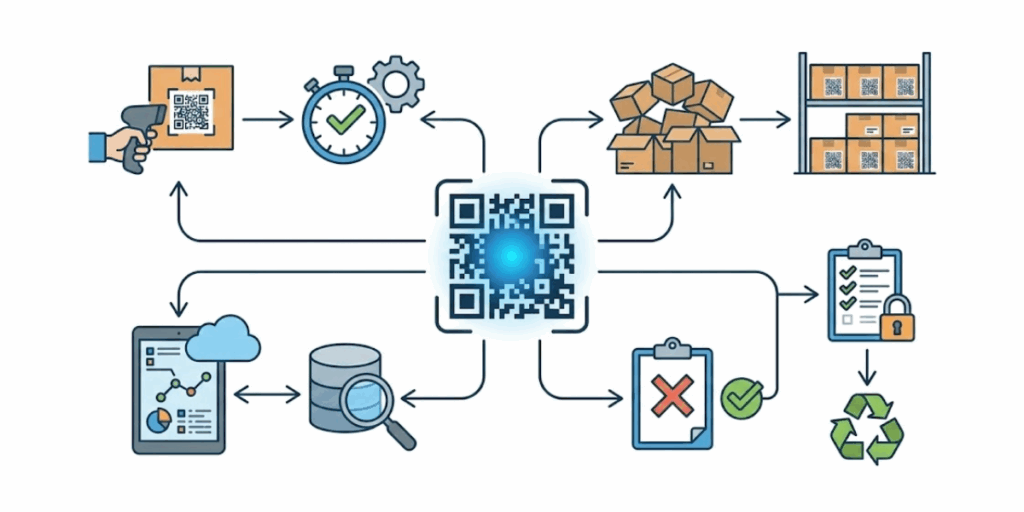
A QR Code storage system comes with major benefits for both personal and business storage:
1. Instant access to information
With QR Codes, you no longer need to guess what’s inside a box or sift through paper lists. A quick scan reveals the stored information immediately on your phone.
For example, scanning a storage bin’s QR Code can show a list of its contents or an inventory spreadsheet in seconds. This instant access makes it effortless to find what you need.
2. Time savings and efficiency
A QR Code system saves a lot of time compared to manual methods.
Instead of logging items or opening each box to check contents, you can scan codes to update or view inventory. This speeds up tasks like taking stock or locating an item.
Warehouse employees can scan codes on bins to update inventory status in real-time. This saves time compared to old manual techniques.
For home users, it means no more opening every box in the attic to find your winter clothes.
3. Better organization & less clutter
QR Codes bring order to chaos. By tagging every box or shelf with a code, everything has a recorded place. It becomes easy to group and catalog items.
This leads to more organized spaces. In businesses, it optimizes storage usage.
Frequently used items can be tagged and placed for quick access. Other rarely used items are recorded and stored efficiently.
4. Reduced errors and easy tracking
Because data retrieval is digital, the chances of human error drop. Scanning a QR Code eliminates errors associated with manual data entry. You can be confident you’re looking at the correct info for the correct item or box.
Businesses find that using QR Codes leads to more accurate inventory counts.
It also provides a real-time tracking benefit. Whenever someone scans a code, you can log that activity.
Dynamic QR Codes enable you to track the frequency of access to a specific box or asset. This level of tracking is hard to achieve with traditional labels.
5. Flexibility and updatability
A QR Code storage system is very flexible.
If you label items with dynamic QR Codes, you can update the linked content at any time without needing to change the physical label.
For example, if the contents of a box change, you simply update the online list or file that the QR Code links to. There’s no need to print a new label each time. This keeps your system adaptable.
QR Codes can also link to various types of content, such as a Google Sheet inventory, a PDF document, images of the items, or a cloud database. Everything stays centralized and up to date for all users.
6. Cost-effective and easy tool
Setting up a QR Code system doesn’t need expensive, specialized equipment. Most people already have the basic tools: a printer for labels and a smartphone for scanning.
Many QR Code generators (like Scanova’s) are free to use for basic needs, so you can create QR Codes without a big budget.
QR Codes can be scanned with a simple phone camera. This lowers the entry barrier. Additionally, printing QR Code stickers or labels is cost-effective, and they can be produced in bulk if needed.
7. Use in any environment
QR Code labels are versatile. With proper printing, they can withstand warehouse conditions or outdoor storage.
Durable, waterproof QR Code stickers can be used in harsh conditions, and they will remain scannable.
The codes can be made large for scanning from afar or kept small for personal item boxes. This adaptability means the system can work in a tiny home closet or a huge industrial warehouse alike.
Key Takeaways
- Instant access to item details with a single scan, no guessing or manual lists.
- Faster workflows and time savings by scanning instead of opening boxes or updating logs.
- Better organization with fewer errors, thanks to digital records and accurate tracking.
- Flexible and cost-effective system that works anywhere, from homes to large warehouses.
D. Tips and best practices for an effective QR Code storage system
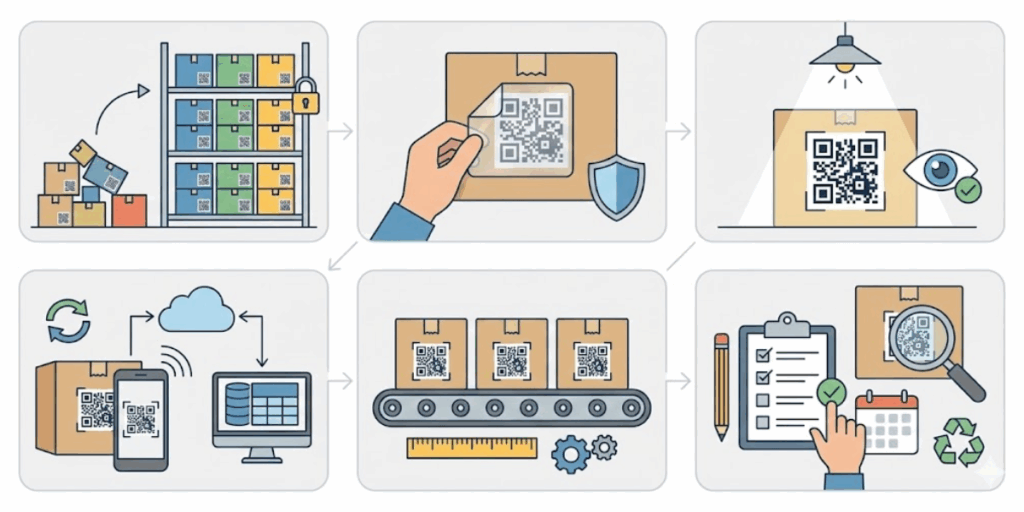
Implementing a QR Code storage system is easy, but following a few best practices will make it even more successful and user-friendly:
1. Use clear naming and organization
Maintain a consistent naming convention for your digital lists or databases.
Consistent labels in both the physical and digital records help everyone know what they’re scanning.
A standardized system makes it easy to search and sort items.
The QR Code can either encode this naming or link to a record with that name. Clarity will prevent confusion later.
2. Print durable and scannable labels
The usefulness of a QR Code label is only as good as its legibility. Print your QR Codes on high-quality material suitable for the storage conditions.
Ensure the code’s size is appropriate. Larger codes are suitable for scanning from a distance, while standard-size codes are ideal for close-up items. Always test each printed code.
Consider using a label printer or a bulk generation and mail merge tool to speed up the process.
For large-scale operations, you can print thousands of QR Codes in bulk and even utilize templates for precise placement. However, regardless of the scale, ensure that the final prints scan easily under real-world conditions (including lighting, distance, etc.).
3. Keep the data updated
A QR Code system is only effective if the information it provides is current. Make it a habit to update digital content whenever changes occur.
If you remove items from a box, add new files to an archive. You can also move the bin to a new location and update the linked list or database accordingly.
For businesses, assign someone the responsibility for keeping the inventory records up to date. You can maintain a simple check-in/check-out log using the QR Code link for frequently moved items.
Dynamic QR Codes excel here because you can edit the content at any time.
If using static code, you may need to update the code when changes occur.
Another reason dynamic solutions are preferred for long-term use. Regular audits can help ensure accuracy over time.
4. Train your team or inform users
If many people will use the system, provide a brief guide. It can be as simple as a one-page note or a quick demo showing how to scan the codes and where the information pops up.
Ensure that everyone knows how to use their phone’s camera or a QR Code app to scan.
For larger organizations, you can create an SOP for the QR Code storage system. Include what to do if a code doesn’t scan (e.g., check lighting, distance, or try another device) and how to update records.
When everyone follows the same process, the system will run well, and people will trust the information it provides.
5. Secure sensitive information
If your QR Codes link to confidential data (like sensitive documents or private inventory), take security precautions. Dynamic QR services often allow adding a password or access control to the content. You can also encrypt data before putting it into a QR Code, though that adds complexity.
For most, simply ensure the shared links are only given to authorized people. Some advanced setups even track who scans each code and when, which can be useful for security audits.
In a home setting, security might not be a big concern, but in a business, treat QR Codes as keys to information and protect them accordingly (for example, avoid placing them in public-facing areas if they link to internal data).
Key Takeaways
- Use clear naming and a consistent structure so everyone understands what they scan.
- Print durable, well-sized QR labels and always test scans in real conditions.
- Keep linked data updated and accurate, ideally with dynamic QR Codes.
- Add basic training, security, and analytics to build trust and improve efficiency.
E. FAQs: QR Code storage system
1. How does a QR Code storage system work?
You create a QR Code for each item or container. That code links to a digital record stored online. Scanning the code opens the record on your phone or computer.
2. What information can be stored in a QR Code storage system?
You can store item descriptions, photos, documents, dates, locations, ownership details, and notes. The QR Code usually links to this data instead of storing it directly.
3. Do QR Codes store the data themselves?
No. Most QR Code storage systems use QR Codes as links. The actual data is stored in a secure digital database or web page that you can update at any time.
4. Can I update information without changing the QR Code?
Yes, if you use dynamic QR Codes. You can edit the linked data at any time without reprinting the QR Code label.
5. Is a QR Code storage system suitable for businesses?
Yes. Businesses use it for inventory tracking, warehouse management, document storage, asset tracking, and equipment labeling.
6. Can a QR Code storage system be used at home?
Absolutely. It works well for organizing storage boxes, files, tools, seasonal items, and personal collections.
7. Do I need a special app to scan QR Codes?
No. Most smartphones can scan QR Codes using the default camera app. No additional software is required for basic scanning.
8. Is a QR Code storage system secure?
Security depends on where the data is stored. You can protect records with passwords, restricted access, or login controls for added security.
Conclusion
A QR Code storage system digitizes storage and removes guesswork. You scan a code to view the item’s details, including its location and the date it was last updated.
It works for homes and large warehouses, scales easily, and has a low startup cost. Each box gets a digital record, which cuts errors and lost items.
With Scanova, you can set this up in minutes and keep storage organized with every scan.