QR Code Asset Tags: All You Need to Know

In a nutshell (TL; DR): QR Code asset tags are scannable labels attached to physical assets for quick identification, tracking, and management. Compared to traditional barcodes or RFID tags, they’re cheaper, more flexible, and easier to update, especially dynamic QR Codes, which let you change the linked data without reprinting the label. You can create them using any free or paid QR Code generator and print them on standard label stock. From IT and healthcare to education, hospitality, warehousing, and construction, asset tags are widely used across industries.
I used to work with a team that managed over 400 laptops across three office floors. Every time an IT audit happened, someone spent three days walking around with a spreadsheet, squinting at stickers on the bottom of machines. Half the sticker data was wrong. A few laptops had no label at all. The whole process was a mess.
That problem has a simple fix: QR Code asset tags.
According to a 2023 report by Wasp Barcode Technologies, 43% of small businesses either use manual tracking or have no tracking at all for their assets.
That means nearly half of all businesses are still running their asset management the way my old team did, with spreadsheets, sticky notes, or nothing at all.
QR Code asset tags change all of that. They are fast to scan, cheap to print, and easy to update.
In this guide, I am going to walk you through everything you need to know: what they are, why they are better than other options, how to create them, and how businesses across industries are already using them.
A. What Are QR Code Asset Tags?

A QR Code asset tag is a label with a QR Code that you attach to a physical asset. When someone scans the QR Code with a smartphone, it pulls up information about that asset: its name, location, purchase date, owner, maintenance history, and any other data you store.
They work exactly like any QR Code you have seen on a menu or a product package. The difference is that instead of pointing to a restaurant website, the code points to a record for a specific piece of equipment, furniture, vehicle, or tool.
Asset tags have existed for decades. The earliest versions were plain barcodes. Then came RFID chips. QR Codes are the latest standard and, in many ways, the most practical one.
B. QR Codes vs Barcodes vs RFID: Which Is Best for Asset Tagging?
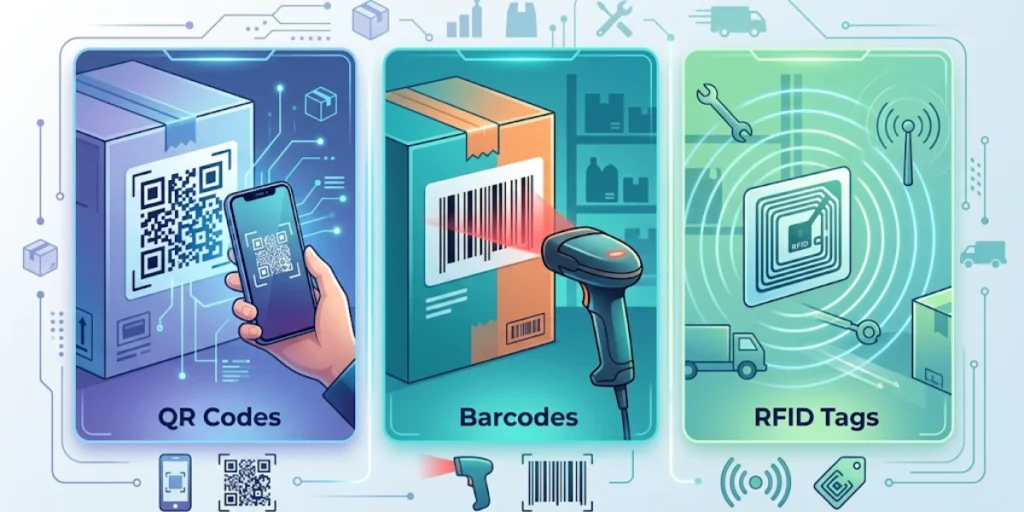
Before I tell you how to get started, it is worth understanding why QR Codes have become the preferred choice for so many businesses.
Here is a quick comparison:
|
Feature |
QR Code |
Barcode |
RFID |
|
Scan distance |
0-30 cm |
0-30 cm |
Up to 10 m |
|
Data capacity |
Up to 4,296 chars |
~20 chars |
Variable |
|
Update data |
Yes (dynamic) |
No |
Yes (some) |
|
Cost per tag |
Very low |
Very low |
High |
|
Smartphone scan |
Yes (native) |
Needs app |
Needs reader |
|
Works if dirty |
Partially |
No |
Yes |
The biggest advantage QR Codes have over traditional barcodes is data capacity and smartphone compatibility. Anyone with a phone can scan a QR Code in seconds. No dedicated scanner. No app required on modern iOS and Android devices.
RFID also has advantages, such as a longer scan range and the ability to scan multiple tags at once. But RFID readers can cost anywhere from $500 to $3,000.
For most small and mid-sized businesses, that is simply not a realistic investment. QR Codes deliver 80% of the benefit at roughly 1% of the cost.
C. What Information Should You Put on a QR Code Asset Tag?

The QR Code itself is just a link. What matters is what it links to. When creating a QR Code asset tag system, you need to decide what data each tag will display when scanned.
Here is what most businesses include:
- Asset name and model number
- Unique asset ID or serial number
- Purchase date and warranty expiry
- Assigned department or employee
- Current location (building, floor, room)
- Last maintenance date and next scheduled service
- Condition status (good, needs repair, retired)
- Link to the asset manual or support documentation
Not every business needs all of these fields. A school-tracking tablet will prioritize student assignments and room locations.
A construction company tracking heavy equipment will prioritize maintenance records and inspection dates. Start with what your team actually needs to look up quickly.
“The QR Code on an asset tag looks identical whether you’re in a hospital, a warehouse, or a school, but the data behind it is completely different. That’s the point. Asset management isn’t one-size-fits-all, and the best QR Code solutions don’t pretend it is.” – Siddharth Pangtey, Product Manager, Scanova
D. Dynamic vs Static QR Code Asset Tags: Which Should You Use?

This is one of the most important decisions you will make when setting up your asset tagging system. Let me explain both options clearly.
1. Static QR Code Asset Tags
A static QR Code has its destination baked in permanently. The data cannot change once the QR Code is generated. If you print a static QR Code that links to a spreadsheet row, and that spreadsheet row changes, the QR Code still points to the same (now outdated) location.
Static QR Codes work fine for simple use cases, like linking to a PDF manual that never changes. But for asset management, they quickly become a problem.
2. Dynamic QR Code Asset Tags
A dynamic QR Code uses a short redirect URL. You can update where that URL points at any time, without ever reprinting the physical label. This is what makes dynamic QR Codes so powerful for asset tagging.
Say you use Scanova to create dynamic QR Codes for 200 pieces of equipment. Six months later, you move your asset database to a new platform. With static codes, you would need to reprint all 200 labels. With dynamic codes, you just update the redirect in your dashboard, and every existing label instantly points to the right place.
Dynamic QR Codes also give you scan analytics: how many times a tag was scanned, from which device, and at what time. That data can be valuable during audits or investigations.
Pro tip: If your asset data will ever change (locations, ownership, maintenance records), always use dynamic QR Code asset tags. The small extra cost today saves you from having to reprint hundreds of labels later.
E. How to Create QR Code Asset Tags using Scanova?
Here is the exact process I would follow using Scanova QR Code Generator.
Step 1: List your assets and decide what data to track
Do a full inventory before you open Scanova. Walk through your space and note every asset you want to tag. For each one, decide what information matters: asset ID, name, location, assigned user, purchase date, and maintenance schedule are the most common fields.
Put this in a spreadsheet first. The QR Code is only as useful as the data behind it.
Step 2: Sign in to Scanova and create a QR Code
Go to scanova.io and log in or create a free account. Click Create QR Code and select Website URL as the QR Code type. Paste in the URL of the asset record, whether that is a spreadsheet row, an asset management tool profile, or any other live page.
Give the QR Code a clear internal name, like “Laptop IT-001” or “Projector RM-203”. This name appears in your Scanova dashboard, making bulk management much easier later.
Select the Dynamic QR Code before generating. This is the key step. Dynamic codes let you update the linked URL at any time from the Scanova dashboard without reprinting the physical label. If your asset database ever moves or changes, the existing labels still work.
Step 3: Use bulk creation for large inventories
If you have 50 or more assets, skip creating codes one by one. Prepare a CSV file with one row per asset, each containing the asset name and its URL. Upload it through Scanova’s bulk QR Code creation tool. Scanova generates all codes in a single batch and lets you download them as individual files or as a print-ready sheet.
Step 4: Design your labels in Scanova
Once the QR Code is generated, open Scanova’s Design Studio. Add the asset ID as a text label below the QR Code. This is your human-readable backup. If the code ever gets scratched, staff can still look up the asset using the printed ID.
Add your logo or department name for branded labels. Keep the QR Code at least 2 cm x 2 cm in the final printed size. Download as a PNG at 300 DPI minimum, or as an SVG if you need to resize later.
Step 5: Print on the right label material
Match the material to where the asset lives.
For indoor office equipment, matte polyester labels work well and last far longer than plain paper. For outdoor equipment or vehicles, use vinyl or laminated polyester labels that withstand water, UV, and temperature changes.
For machinery or tools that get oily or hot, aluminum labels are the right call. For high-value assets, tamper-evident labels leave a visible mark in the event of tampering.
Print a test sheet first, scan every code, and confirm everything links correctly before running the full batch.
Step 6: Affix labels consistently and test every scan
Pick a standard placement spot for each asset type and stick to it. Laptops on the underside, monitors on the back panel, tools on the handle. Consistent placement makes audits faster.
Once labels are on, scan every single one. Do not sample and assume. A print issue or smudged code can affect any individual label. Open each link and confirm it pulls the correct asset record.
Step 7: Build scanning into your team’s workflows
The system only works if people use it. Introduce it during onboarding so new staff know assets are tagged from day one. Make it part of the maintenance process so technicians scan before and after every service visit. Use it during audits so the review is just scan, confirm, update.
Scanova also logs every scan with time, device, and location. That data builds a passive audit trail over time, without any manual entry from your team.
F. Which Industries are Using QR Code Asset Tags Today?

QR Code asset tags are not a niche solution. They work across a huge range of sectors. Here are the most common use cases I have come across:
1. IT and Office Equipment
Laptops, monitors, phones, servers, and peripherals are the most commonly tagged assets in corporate environments. IT teams use QR Codes to track device assignments, warranty status, and maintenance history without walking the floor with a clipboard.
2. Healthcare and Hospitals
Medical equipment is subject to strict maintenance schedules and audit requirements. The Joint Commission and other bodies require documented maintenance records for critical devices. QR Code tags give technicians instant access to those records from anywhere in the facility.
3. Education
Schools and universities manage large inventories of tablets, projectors, AV equipment, and lab tools. QR Code asset tags make it easy to track what is in each classroom and flag damaged or missing items quickly.
4. Hospitality
Hotels track furniture, appliances, and amenity kits across dozens of rooms. A QR Code on a television or coffee machine links to its purchase record, last service date, and the room it belongs to.
5. Construction and Field Services
Tools and heavy machinery leave sites, move between projects, and get serviced by third parties. QR Code tags help teams confirm what is on-site, who signed it out, and when it was last inspected.
6. Warehousing and Logistics
Beyond individual asset tags, warehouses use QR Codes to track pallets, bins, shelving units, and loading equipment. Scan at receipt, scan at dispatch: a complete movement record without a single manual data entry.
G. What Makes a Good QR Code Asset Tag?

Not all asset tags are equal. Here is what separates a system that actually works from one that gets abandoned after three months:
- Scannable from a distance: The QR Code should be at least 2 cm x 2 cm. Smaller codes are harder to scan, especially on dirty or worn surfaces.
- Human-readable backup: Always print the asset ID in text alongside the QR Code. If the code gets damaged, someone can still look up the asset manually.
- Durable label material: Match the label material to the environment. Paper labels in a warehouse will last weeks. Polyester or aluminium labels last years.
- Tamper-evident options: For high-value assets, use tamper-evident label stock that shows visible damage if the label is removed.
- Consistent placement: Pick a standard spot for each asset type and stick to it. Consistent placement means faster audits.
- Dynamic, not static: As covered above, dynamic QR Codes save you from reprinting when your data changes.
H. What to Look For in Printable QR Code Asset Tag Templates?
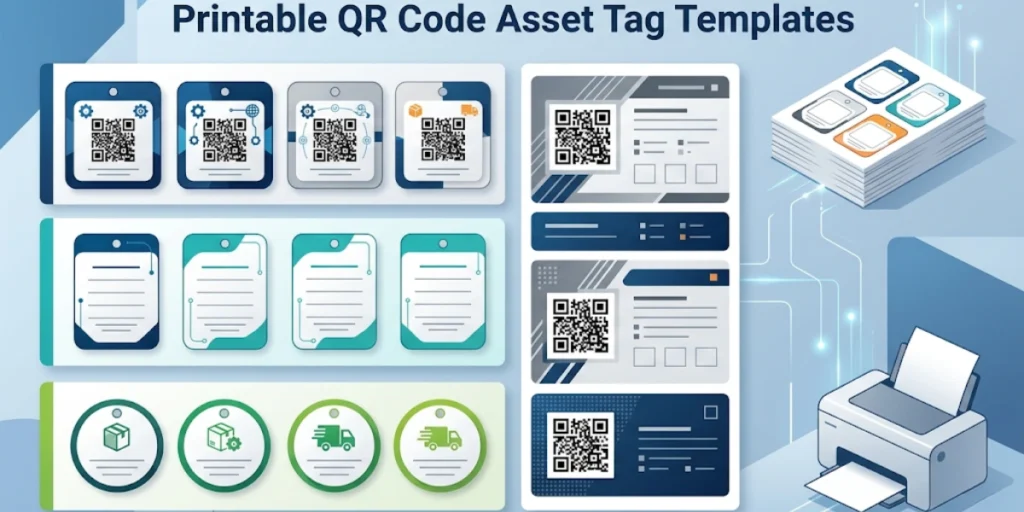
If you are setting up QR Code asset tags for the first time, you do not need to design your labels from scratch.
Most QR Code generators, including Scanova, include built-in design tools that let you add text, logos, and brand colors directly to your label before export.
When choosing or building a template, look for:
- Clear QR Code zone with enough quiet zone (white space) around the code
- Space for asset ID in printed text below the code
- Optional space for a company logo or department name
- Export in PNG or SVG format for high-resolution printing
- Label sizes that match standard label stock (e.g., 50mm x 25mm, 75mm x 37.5mm)
Scanova’s Design Studio lets you customize QR Code labels with your brand colors and text. You can export print-ready files in multiple sizes, making it straightforward to match any label format your printer requires. See how Scanova’s QR Code generator works.
I. What are the common mistakes to avoid?

I have seen asset tagging systems fail for avoidable reasons. Here are the ones that come up most often:
- Using static QR Codes for mutable data. If your linked data will ever change, static codes will become wrong. Always use dynamic codes for asset management.
- Printing on paper for outdoor use. Paper labels warp, fade, and peel. Use polyester or laminated labels for anything that lives outside or in a workshop.
- Skipping the text backup. A QR Code with no human-readable ID is useless if it gets scratched. Always print the asset ID in text.
- No scan testing before rollout. Print a batch, scan every single one, and confirm the linked data is correct before you put them on 300 pieces of equipment.
- Not training the team. If your maintenance staff and auditors do not know how to scan the tags, the system fails. Make it part of the workflow from day one.
J. How to Manage QR Code Asset Tags at Scale?

Creating 20 QR Codes is easy. Managing 2,000 is a different challenge.
Scanova is built for exactly this. From a single dashboard, you can create, edit, and monitor hundreds of dynamic QR Codes at once.
If an asset moves locations or your database URL changes, you update the destination in bulk without touching a single physical label.
You can also manage code status across your entire inventory, marking codes as active, paused, or retired, and download scan reports to see which assets are being accessed, when, and from which devices.
For teams running regular audits, that scan data becomes its own record. You are not just tracking assets. You are tracking who interacted with them and when, without asking anyone to fill out a form.
Based on usage patterns, customers who switched from static to dynamic QR Codes for asset tags update their QR Code destination or data an average of 3–5 times per asset per year, each update avoiding a reprint.
K. What are the frequently asked questions related to QR Code Asset Tags?

1. What is a QR Code asset tag?
A QR Code asset tag is a label containing a QR Code that is affixed to a physical asset. When scanned, it links to a record containing information about that asset, such as its ID, location, owner, and maintenance history.
2. Can I create QR Code asset tags for free?
Yes. Basic static QR Code asset tags can be created for free using most QR Code generators, including Scanova’s free plan. For dynamic QR Codes with editable destinations and scan analytics, a paid plan is typically required.
3. What is the difference between a static and dynamic QR Code asset tag?
A static QR Code has a fixed destination that cannot be changed after printing. A dynamic QR Code uses a redirect URL that you can update at any time without reprinting the label. For asset management, dynamic codes are almost always the better choice.
4. What material should I print QR Code asset tags on?
For indoor office equipment, standard paper or matte labels work well. For outdoor equipment, machinery, or environments with moisture or heat, use polyester, polypropylene, or aluminium label stock. Laminated labels add an extra protective layer.
5. How small can a QR Code asset tag be?
The minimum recommended size for a scannable QR Code is about 2 cm x 2 cm. Codes smaller than this can fail to scan, especially on surfaces that may be dirty or damaged. For reliable scanning, 2.5 cm x 2.5 cm or larger is ideal.
6. Can QR Code asset tags replace RFID?
For most small and mid-sized businesses, yes. QR Codes offer much lower cost per tag and can be scanned with any smartphone, requiring no dedicated reader hardware. RFID is still preferred for scenarios where bulk scanning at a distance (like loading dock checkpoints) is needed.
Final Thoughts
QR Code asset tags are one of the highest-leverage improvements you can make to how your business manages physical assets.
They are cheap to create, easy to print, fast to scan, and, when done with dynamic codes, simple to update without ever touching the physical label.
Whether you are managing 50 laptops or 5,000 pieces of warehouse equipment, the core principle is the same: give every asset a unique, scannable identity, link it to accurate data, and make that data accessible to anyone who needs it.
If you are ready to get started, Scanova’s QR Code generator lets you create dynamic QR Codes, customize your label designs, and manage everything from one place. It is built for exactly this kind of work.