QR Code Stamp: Tech-Savvy Touch for Traditional Mails

Stamps have been an inherent part of postal mail since ever. They are little pieces of paper that mark authority.
In fact, not just mails but many other important documents are also marked with stamps. For example, bills, invoices, official documents, etc. In fact, many artists have started using stamps as art too.
Amidst advancements in technology and the latest trends, stamps are becoming engaging too. In 2022, Royal Mail—a British courier company and postal service—started using QR Code stamps.
QR Codes are barcode-like elements that store information. It could be text, numbers, web links, etc. They have an edge over barcodes. How? Because they can store a lot more content than traditional barcodes.
In this article, we’ll discuss QR Code technology can help make stamps engaging and tech-savvy. Keep reading.
A. What can I do with a QR Code?
There are endless possibilities of what you can do with a QR Code. Use cases can be endless, but we assure you that QR Codes can fit into any of them.
To start with, here are a couple of possibilities to make stamps smarter with QR Codes:
1. Easily bring people to your website
Have you ever scanned a QR Code that took you to a website? This is one of the most common use cases that QR Codes are leveraged for.
With QR Codes, you can direct your target audience to the desired website without having them type the web link. All they need to do is—take a scan and visit the website.
So the next time you plan on using a stamp, think if you’d like to make it interactive for your audience. Some QR Codes even help you link to multiple websites together. These are called multi-URL QR Codes. Isn’t that interesting?
2. Get traction on your social media accounts
Social media is an excellent way to connect with your customers and keep them engaged. Many businesses do it to keep in touch with their customers to build a strong brand recall.
But getting people to follow you on social media isn’t that simple. You can’t just give them your social media handles and expect that they’ll follow you. That’s because they need to put manual effort into finding your account and following it.
Since it’s a long process, people don’t bother doing it. And it’s a well-known fact that the longer the process, the lower the engagement rate.
That’s why many marketers use QR Codes to gain social media followership. It’s called a Social Media QR Code. On scanning, it shows a landing page with button links to all your social media profiles.
The end-users, hence, get the freedom to select their favorite platform to follow you online. And they don’t need to type anything to do it. They just need to launch open their phone’s camera and hold it in front of the QR Code.
This means an optimized user journey for your audience. And when that happens, your campaign’s engagement and conversions improve.
Generate a QR Code For Your Unique Case
START TODAY!
3. Share special messages as audio and video
We all love receiving mails with our names and messages from dear ones. When simply a text-based message can make us feel so loved, imagine what would a personalized audio or video can do.
Yes, a QR Code based stamp can help you share such messages even via printed mails.
For example, an Audio QR Code can help you send voice messages, songs, audiobooks, etc. to the receiver. Similarly, a Video QR Code helps you share a video with a quick scan.
That means you can now share audio-visual messages even via stamps making your mails more personalized than ever!
4. Share images and infographics
While you can print an image on your mails, a QR Code can help you a great deal. How?
Because mails and other printed documents are limited by space constraints. Imagine you’re sending a postcard to a dear one and you want to share fond memories as an album of your pictures together.
While you’ll be able to some of them printed, you won’t be able to do add all of them. But simple a QR Code stamp can help solve the problem here.
Yes, an Image QR Code helps you share multiple images, infographics, and GIFs. No need to get anything physically printed (other than the stamp).
As the receiver scans it, she’ll see all the pictures on her phone’s screen. Pretty easy, right?
5. Create a customized webpage for the recipient
Did you know that you can create a landing page on the internet without having a website of your own?
Yes, you can create a space for your loved ones on the internet without having to hire a software developer. To do it, you just need a Custom Page QR Code and add it as a stamp to your creatives.
Wondering what can you do with it? Well, think of it as a website that you can design on your own. You can add text, images, button links, social media buttons, videos, and files to it.
As the recipients scan the QR Code, they see the landing page having all the details you added. And the best part is you can do it all in minutes. Just add all that you want to share and design the page as per your will.
6. Share documents digitally
A tiny stamp can also help you share multiple documents with the recipients. This is made possible by a Document QR Code.
A single QR Code here can help you share up to 20 documents together. This could include PDFs, XLS, DOCX, etc.
As people scan it, they see all the documents on their phones. Many marketers and manufacturers use them to share user manuals, e-books, and warranty-related documents with their audience.
7. Ensure authenticity of official documents
For certain documents, it’s not just about sharing information; it’s about making sure the file is genuine and hasn’t been tampered with.
This is especially true for official certificates, licenses, or government-issued notices that often carry a stamp.
In such cases, you can use a verification-focused solution like QR Mark. It allows you to add a QR Code that links to a secure verification page hosted on your own domain.
When scanned, the recipient can instantly confirm the document’s details, such as the issuer, date of issue, or even view the original version online.
Now you’ve seen six ways how QR Code technology can make stamps better. Let’s move on to the next step:
B. How to create a QR Code stamp
You’ll first need a QR Code generator to get started. And to help you find the best one, here’s a comparison chart of the top service providers available online.
Using Scanova for a demo, here’s a quick brief on how you can generate a QR Code:
1. Go to Scanova and do a quick sign-up
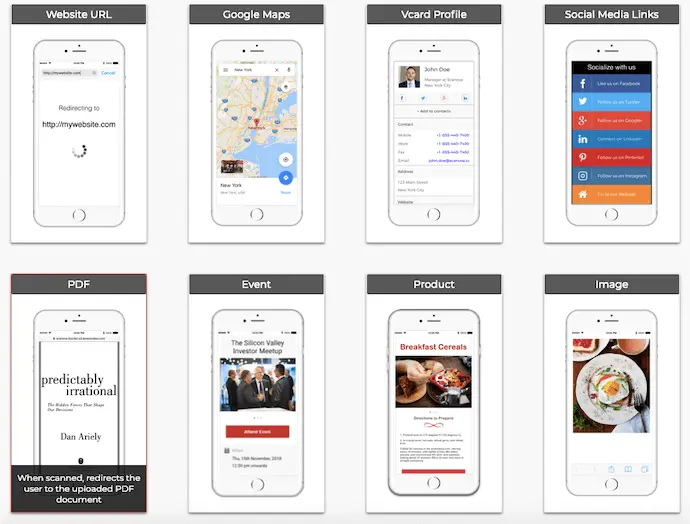
2. Select a relevant QR Code category and add the content you want to share
3. Move ahead and name the QR Code
4. Next, you can add a design to your QR Code in two different ways. The first is by adding colors and a logo to it. The second is by adding a background image to it
5. After you’re done, proceed to download the QR Code. You’ll be able to choose the format and size of the QR Code image you’re downloading
Once done, make sure you test scan the QR Code to see if it’s working fine.
The next step here is to find a suitable vendor who’d help you create the stamp. One such example is Simply Stamps. They allow you to upload the QR Code image and select the stamp type. You can choose from self-inking, pre-inked, and wooden-handled (inkless) stamps.
You can also specify the stamp quantity in the same step. They spreading, you know everything about a QR Code stamp. You can now start creating your first one. Here’s a quick way for you to get started:
Generate a QR Code For Your Unique Case
START TODAY!
