What Is a Micro QR Code? Versions, Uses, and How to Generate One

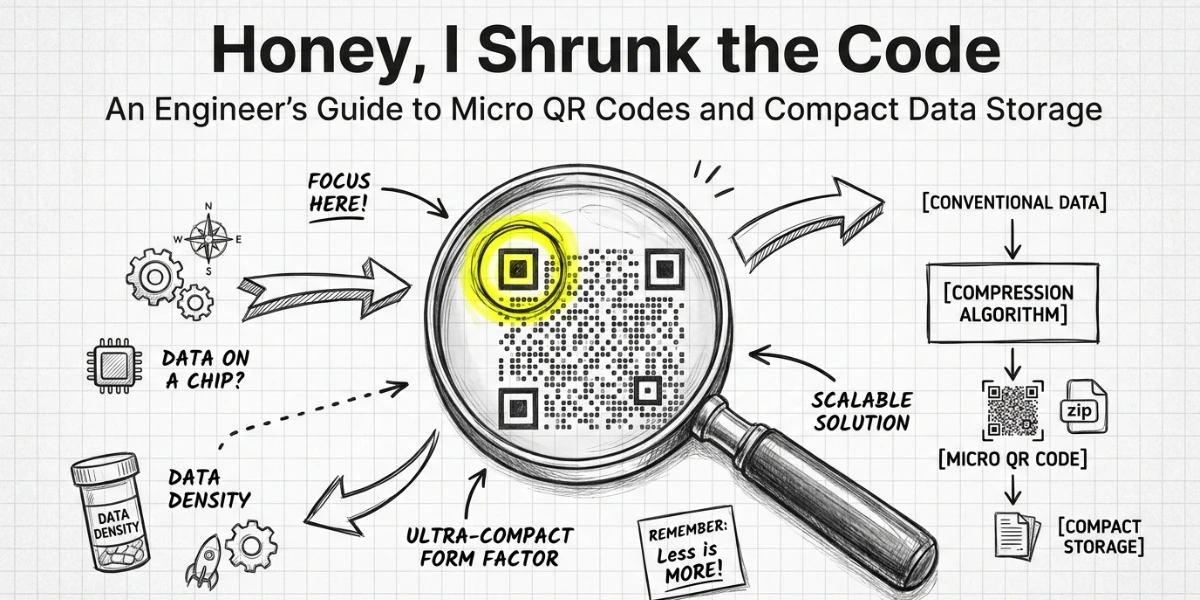
In a nutshell (TL;DR): If you have ever tried to label a circuit board, a pill bottle, or a tiny component and found that a standard QR Code is simply too large, Micro QR Codes were built for exactly that problem. According to Mordor Intelligence, the global QR Code market is projected to reach $33.14 billion by 2031, driven largely by serialization mandates in the pharmaceutical and electronics industries. Micro QR Codes are a key part of that story. This guide covers what they are, how they work, all four versions, where they are used, and when to use a standard QR Code instead.
A. What is a Micro QR Code?
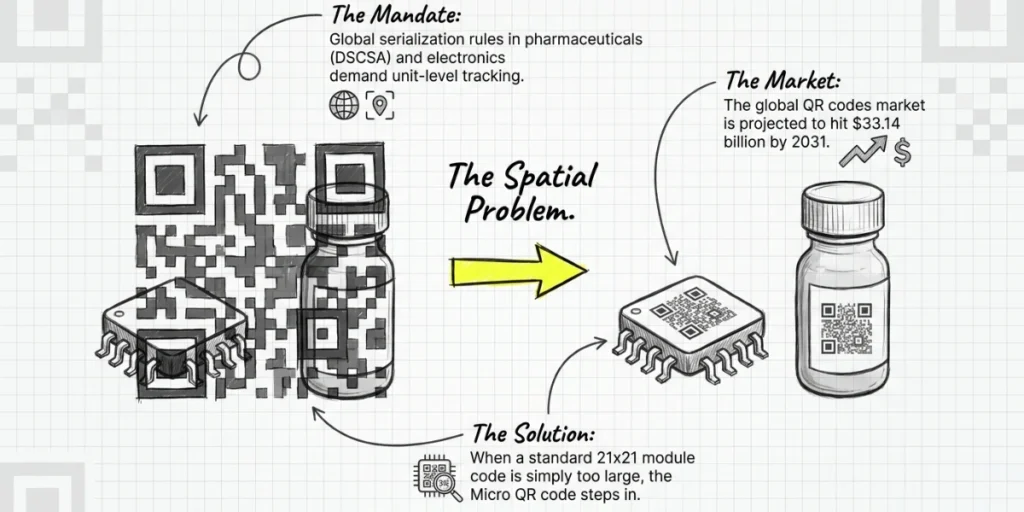
A Micro QR Code is a compact, two-dimensional barcode built for surfaces where a standard QR Code is too large.
It was created by Denso Wave in Japan, the same company behind the original QR Code in 1994. Micro QR Codes were standardized as JIS X 0510 in 2004 and are now defined under ISO/IEC 18004:2024.
Like a standard QR Code, it stores data in a grid of dark and light square modules. But it is significantly smaller and holds less data. ‘
The smallest version is just 11 x 11 modules. The largest is 17 x 17 modules. A standard QR Code starts at 21 x 21 modules and scales up to 177 x 177.
The trade-off is deliberate. When you only need to store a short serial number, a lot number, or a small alphanumeric string, a Micro QR Code uses a fraction of the space.
“Micro QR Codes are valuable because they solve a very specific industrial problem: fitting traceable data into extremely small physical spaces. At Scanova, we increasingly see manufacturers and product teams looking for compact, editable QR solutions that work on electronics, medical packaging, and serialized product labels without compromising traceability workflows.” — Siddharth Pangtey, Product Manager at Scanova
B. How does a micro QR Code work?
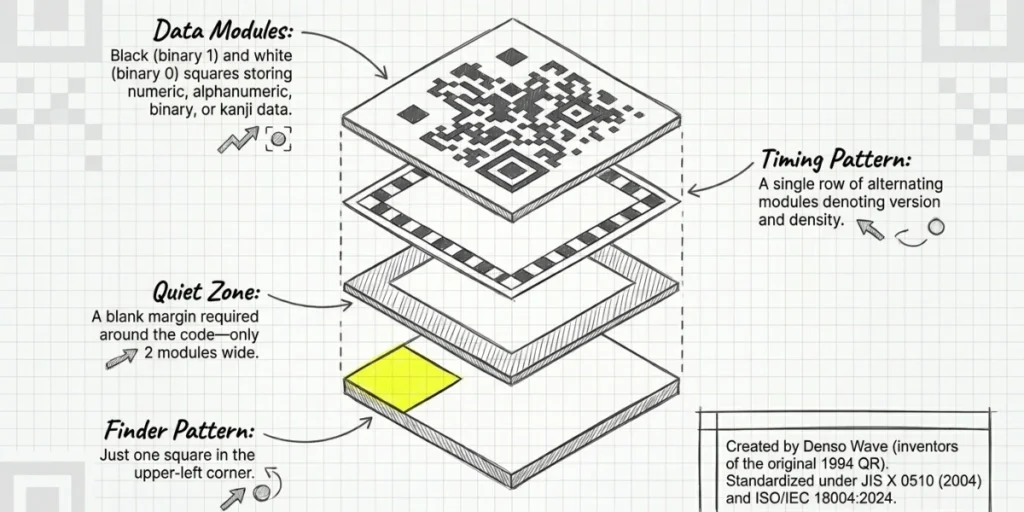
A Micro QR Code has four structural components. Understanding them helps you decide when and how to use one.
Data Modules
These are the black-and-white square dots that make up the body of the code. Black modules represent binary 1; white modules represent binary 0. Their arrangement encodes the data in numeric, alphanumeric, binary, or kanji format.
Finder Pattern
This is the large square in the upper-left corner. It helps scanners locate and orient the code. A standard QR Code has three finder patterns, one at each corner except the bottom-right. A Micro QR Code has just one. That single change is the main reason Micro QR Codes can be printed so small.
Timing Pattern
A row of alternating black-and-white modules runs along the top and left edges of the code. It tells the scanner the code’s version and density. A Micro QR Code uses a single timing pattern.
A standard QR Code uses multiple. The quiet zone, the blank margin around the code, only needs to be two modules wide for a Micro QR Code. A standard QR Code requires four modules on all sides.
C. What are the versions of Micro QR Code?
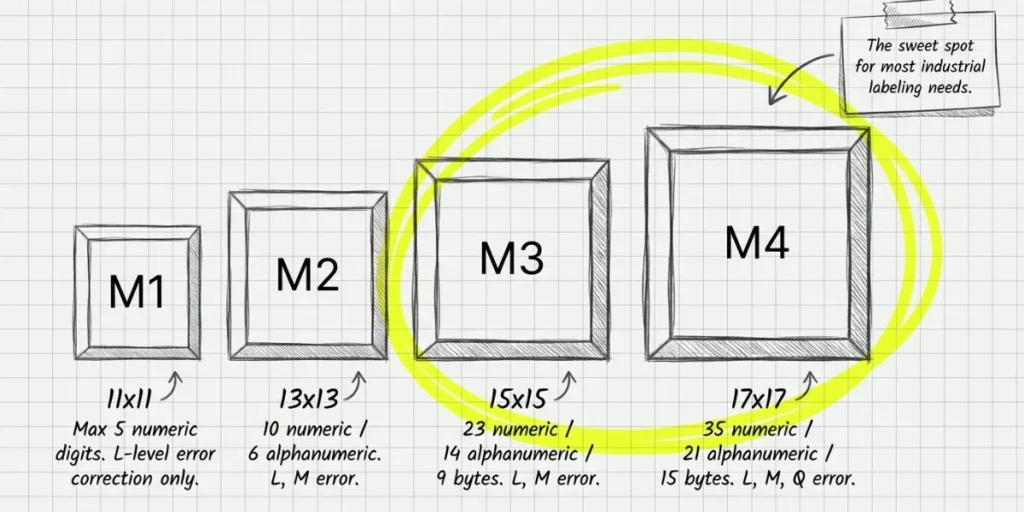
There are four Micro QR Code versions: M1 through M4. Each is larger than the last and holds more data. Here is what each version stores at its lowest error correction level.
|
Version |
Module Size |
Max Numeric |
Max Alphanumeric |
Max Binary |
Error Correction |
|
M1 |
11 x 11 |
5 digits |
Not supported |
Not supported |
L only |
|
M2 |
13 x 13 |
10 digits |
6 characters |
Not supported |
L, M |
|
M3 |
15 x 15 |
23 digits |
14 characters |
9 bytes |
L, M |
|
M4 |
17 x 17 |
35 digits |
21 characters |
15 bytes |
L, M, Q |
M1 is the most limited. It stores up to 5 numeric digits and only supports L error correction.
M4 is the largest version, handling up to 35 numeric digits, 21 alphanumeric characters, or 15 bytes of binary data. For most industrial labeling needs, M3 or M4 is the right choice.
Denso Wave, the inventor of the format, explains that a Micro QR Code “has only one position detection pattern, compared with a regular QR Code that requires a certain amount of area because position detection patterns are located at the three corners.” That single structural difference is what makes all the size savings possible.
D. What are the differences between a Micro QR Code and a Standard QR Code?
The most common question I get is simple: when should you use a Micro QR Code instead of a standard one? Here is a direct comparison.
|
Feature |
Micro QR Code |
Standard QR Code |
|
Minimum size |
11 x 11 modules |
21 x 21 modules |
|
Max data capacity |
35 numeric digits |
7,089 numeric digits |
|
Finder patterns |
1 |
3 |
|
Quiet zone |
2 modules |
4 modules |
|
Error correction levels |
L, M, Q (version-dependent) |
L, M, Q, H |
|
Best for |
Small components, short identifiers |
URLs, marketing, payments |
|
Consumer smartphone readable |
With compatible app |
Yes (native camera) |
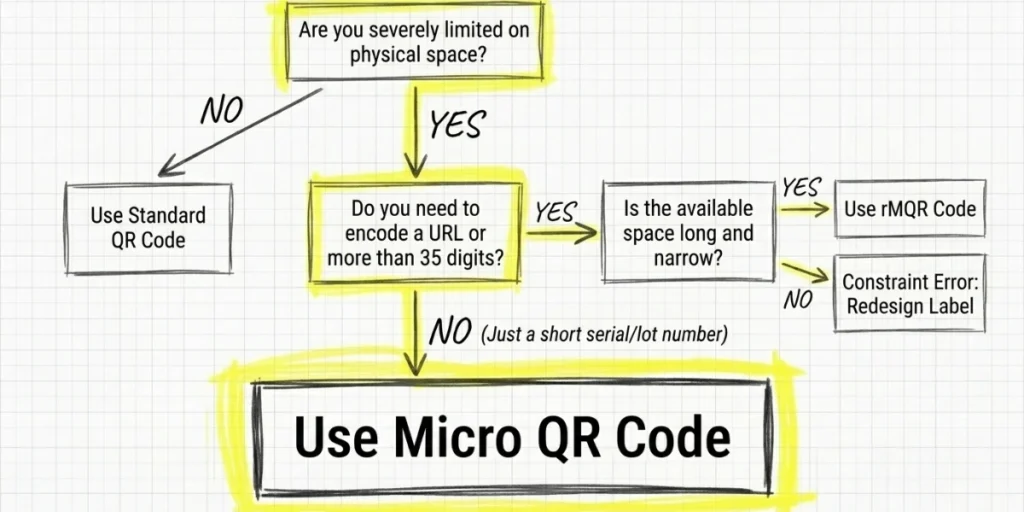
The short answer: if your data fits within 35 numeric characters or 21 alphanumeric characters, and space is genuinely limited, a Micro QR Code is the right tool. If you need to encode a URL or anything longer, use a standard QR Code.
One important note: most native smartphone cameras are built to read standard QR Codes. Micro QR Codes often require a dedicated scanner app or industrial hardware.
As Scandit, a leading barcode scanning platform, explains: “To scan a micro QR Code, a device needs to run image processing, decoding, and error correction algorithms” that standard camera apps may not support. For consumer-facing use cases, this is a real limitation.
E. Where are micro QR Codes used?
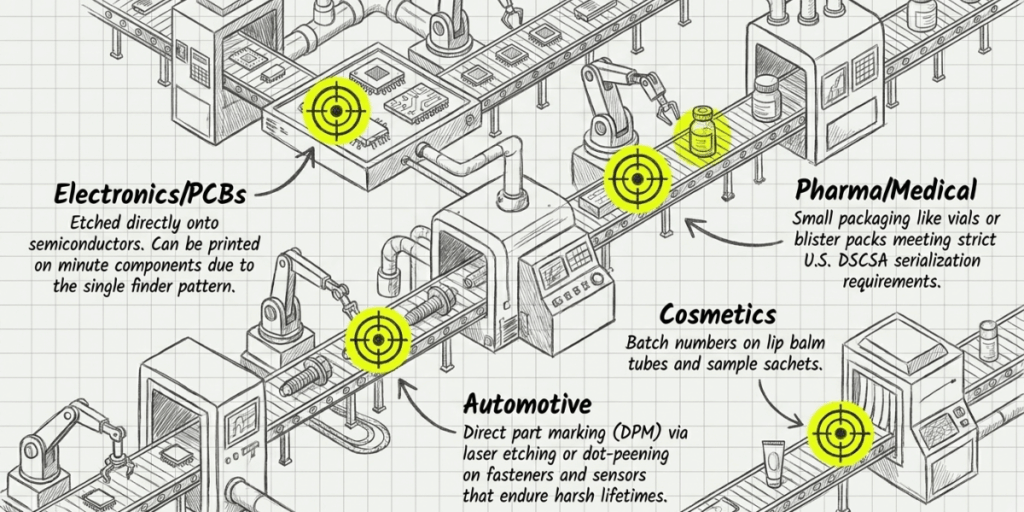
Micro QR Codes have a specific home: industrial and technical labeling, where space is at a premium. Here are the most common real-world applications.
1. Electronics and Circuit Boards
Micro QR Codes are etched or printed directly onto PCBs, semiconductors, and small components. A serial number, part ID, or manufacturing date fits into a code that takes up almost no surface area.
Keyence, a major supplier of industrial barcode readers, notes that Micro QR “can be printed on minute components such as printed circuit boards” precisely because of its single finder pattern.
2. Pharmaceuticals and Medical Devices
Pharmaceutical producers are under increasing regulatory pressure to serialize every unit.
The U.S. Drug Supply Chain Security Act (DSCSA) required manufacturers to encode the National Drug Code, serial number, lot, and expiry into 2D barcodes on every unit by November 2024.
For small packaging such as vials or blister packs, Micro QR Codes can carry the required data with a very tight footprint.
3. Cosmetics and Small Product Labels
Small cosmetic packaging, from lip balm tubes to sample sachets, has very little room for labeling. A Micro QR Code can encode a batch number or expiry date without overwhelming the package design.
4. Automotive Parts
The automotive industry relies heavily on direct part marking (DPM). Micro QR Codes can be applied via laser etching or dot peening to small fasteners, sensors, and housings.
Unlike printed labels, etched codes do not peel, fade, or fall off over a component’s lifetime.
5. Manufacturing and Supply Chain
In factories, every component needs to be tracked from production through assembly. Micro QR Codes make that possible on parts that are simply too small for a standard barcode.
They can also support traceability in industries subject to recall regulations, where tracking lot and batch data at the unit level is mandatory.
Scanova’s internal observations suggest that industrial teams creating compact QR formats most frequently prioritize lower error correction levels to preserve scan reliability at smaller print sizes. However, manufacturers working in high-wear environments such as automotive and medical packaging often shift toward higher correction settings despite reduced data capacity. — Scanova Research Team
F. What are the differences between a static and a dynamic micro QR Code?
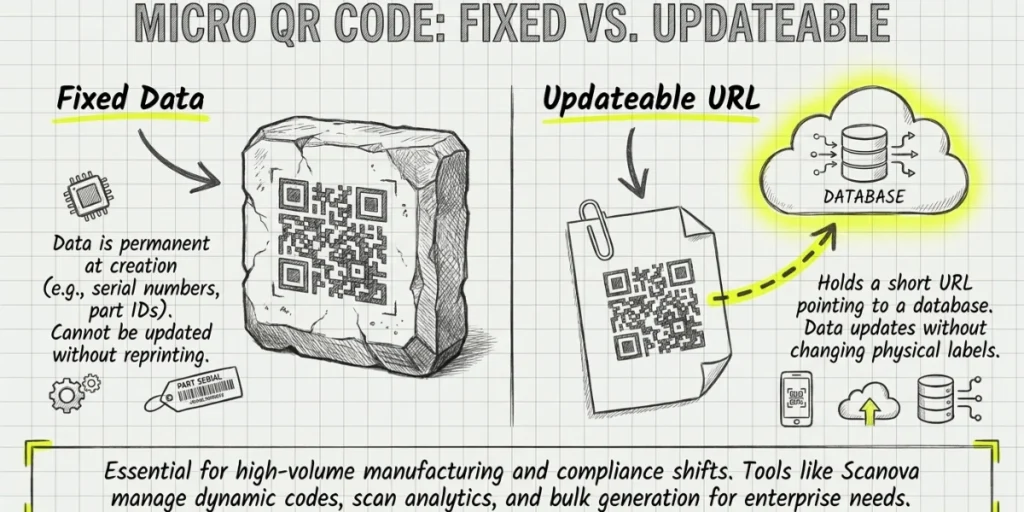
Like standard QR Codes, Micro QR Codes can be either static or dynamic. The difference matters more than most people realize.
A static Micro QR Code has its data fixed at creation. Once printed or etched, you cannot change what it says. If the information changes, the code becomes outdated. Static codes work well for permanent data, such as serial numbers or part IDs.
A dynamic Micro QR Code holds a short URL pointing to a database. The data behind that URL can be updated at any time without reprinting the code. If a product recall occurs or compliance data needs updating, a dynamic code enables that without replacing physical labels.
For high-volume manufacturing where labels are printed in bulk, and regulatory data may change, dynamic codes are the smarter long-term choice.
Tools like Scanova let you create dynamic QR Codes with real-time editing, scan analytics, and access controls.
Scanova’s platform is built for business and enterprise use, where managing hundreds or thousands of codes across product lines and compliance windows is a real operational need.
Limitations to Know Before You Use One
Micro QR Codes are powerful in the right context. But they have real limits worth understanding before you commit to a labeling design.
- Low data capacity. The maximum is 35 numeric digits or 21 alphanumeric characters. Anything longer than 100 characters cannot be stored in a Micro QR Code.
- Limited scanner compatibility. Most native smartphone cameras do not read Micro QR Codes. Dedicated third-party apps or industrial scanners are typically required. In consumer-facing scenarios, this is a dealbreaker.
- Fewer error correction options. M1 only supports L-level error correction, which can restore about 7% of damaged data. Standard QR Codes support up to H-level, which restores around 30%. In harsh physical environments, this matters.
- No structured append. Standard QR Codes can split large amounts of data across multiple codes, which can be reconstructed into a single code. Micro QR Codes do not support this feature.
- Not suitable for URLs. A typical URL is 40 to 100 characters. That already exceeds what any Micro QR Code version can store. Do not use them for web links.
G. What is a rectangular micro QR Code (rMQR)?
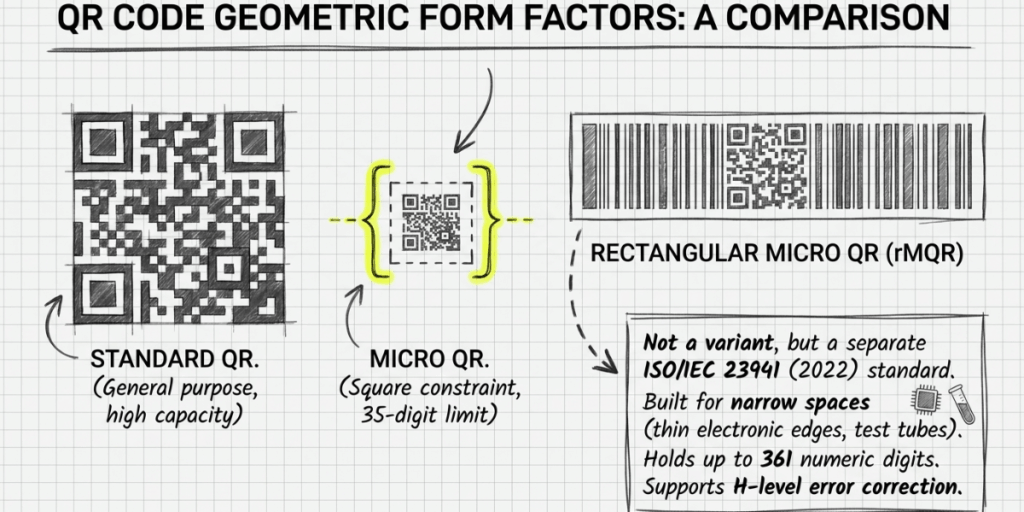
If you need more data than a Micro QR Code can hold, but still need to fit a narrow, rectangular space, there is a newer format worth knowing.
The Rectangular Micro QR Code (rMQR), standardized by Denso Wave in 2022 under ISO/IEC 23941, is designed for long, narrow surfaces like thin electronic components, shipping labels, and medical devices.
The rMQR Code is not a variant of the Micro QR Code. It is a separate format. It stores up to 361 numeric characters, 219 alphanumeric characters, or 150 bytes of binary data. It supports both M and H error correction levels.
If a standard QR Code is too wide and a Micro QR Code holds too little data, rMQR may be exactly the right fit for your application.
H. How to generate a micro QR Code?
Steps to generate a Micro QR Code.
Generating a Micro QR Code requires a tool that specifically supports the Micro QR format. Not all QR Code generators do.
Here is how to do it on Scanova, using a Website URL QR Code as an example.
Step 1: Log in and start a new QR Code
Go to Scanova and log in to your account. From the dashboard, click Create QR Code. You will see a list of QR Code types. Select Website URL. This is the content type you are encoding into the Micro QR Code.
Step 2: Enter your destination URL
Paste your website URL into the URL field. Keep it as short as possible. Micro QR Codes have significantly tighter data capacity than standard QR Codes, so long URLs with query strings or UTM parameters will push you into larger, less practical versions. Use a clean, short URL whenever possible.
Step 3: Select the Micro QR format
In Scanova’s QR Code settings, navigate to the format or advanced options section and select Micro QR Code as your output format. This tells Scanova to generate the compact Micro QR structure rather than a standard QR Code matrix.
Step 4: Choose your version
Scanova will let you select from the available Micro QR versions: M1, M2, M3, and M4. For a Website URL, M3 or M4 is the right choice for most real-world labeling needs. M1 is only suitable for numeric values with fewer than 5 digits and will not accommodate a URL. Pick the lowest version that fits your data to keep the code as compact as possible.
Step 5: Set your error correction level
Select your error correction level based on where the label will be used. Choose L if you want maximum data capacity, and the label will be in a clean, controlled environment. Choose M or Q if the label will be exposed to physical wear, heat, moisture, or chemical contact. Higher error correction improves the code’s resilience but slightly increases its size.
Step 6: Customize your QR Code design
Add any Scanova design customizations, such as your brand colors, logo, or finder pattern style. Keep it minimal for Micro QR Codes. Heavy design changes can affect scannability at small print sizes, so test after any customization.
Step 7: Download at the right resolution
Download your Micro QR Code at a resolution appropriate for your intended print size. Keep in mind that the smallest usable Micro QR Code is roughly 1 x 1 cm. Printing smaller than that will sharply reduce scan reliability, regardless of how well the code was generated.
Step 8: Test before you print or publish
Use Scanova’s built-in scan test to do a first check. Then scan the code with the actual device your end users will have. Industrial scanners and smartphone camera apps behave differently, and a code that reads perfectly on one may struggle on the other. Only commit to print once you have confirmed reliable reads across both.
For standard QR Codes in marketing, packaging, and business use, Scanova handles dynamic QR Codes, scan analytics, bulk generation, and access controls across large campaigns or product lines.
If you are not sure where to start, Scanova’s free trial is a low-friction way to see what the format can do for your workflow.
I. What are the frequently asked questions about Micro QR Code?
1. Can a smartphone scan a Micro QR Code?
Yes, but not always with the default camera app. Most smartphones need a dedicated third-party app that supports the Micro QR format. Industrial barcode scanners handle them natively and reliably.
2. What is the maximum size of a Micro QR Code?
The largest Micro QR Code is version M4, which is 17 x 17 modules. In print, the minimum recommended size for reliable scanning is about 1 x 1 cm.
3. Is a Micro QR Code the same as a small QR Code?
No. A small QR Code is a standard QR Code printed at a reduced size. A Micro QR Code is a different format entirely, with a different structure, fewer modules, and lower data capacity. They are not interchangeable.
4. What is the difference between a Micro QR Code and an rMQR Code?
A Micro QR Code is square and can hold up to 35 numeric digits. An rMQR Code is rectangular, stores up to 361 numeric digits, and is designed for long, narrow spaces. They are separate formats defined under different ISO standards.
5. Are Micro QR Codes royalty-free?
Yes. Denso Wave holds the patent rights but has waived them. Micro QR Codes are in the public domain, just like standard QR Codes. As Denso Wave confirms, the format is “a public domain 2D code whose specifications are made publicly available.”
6. What industries use Micro QR Codes most?
Electronics manufacturing, automotive, pharmaceuticals, and medical devices are the primary users. These industries need to label small components with traceable data in a space where a standard QR Code simply will not fit.
7. What data can a Micro QR Code store?
Micro QR Codes support four encoding modes: numeric (digits 0-9), alphanumeric (digits, uppercase letters, and certain symbols), 8-bit binary (ISO-8859-1 character set), and kanji (Shift JIS double-byte characters). Not all modes are available in all versions. M1 only supports numeric mode.
Wrapping Up
Micro QR Codes solve a specific problem: carrying just enough data in the smallest possible space. If you work in manufacturing, electronics, or pharmaceuticals, understanding them in depth will help you make better decisions about labeling, compliance, and traceability.
If your use case involves URLs, marketing campaigns, or consumer-facing scans, a standard dynamic QR Code serves you far better. The right format depends entirely on what you need to encode, where it will be printed, and who will be scanning it.
If you are looking to get started with QR Codes for business use, Scanova offers a free trial with dynamic QR Codes, scan analytics, and enterprise-grade tools for everything from product labeling to marketing campaigns. It is worth exploring before settling on a format or workflow.