How I Run a QR Code Scavenger Hunt: The Complete Guide

In a nutshell (TL;DR): I’ve planned QR Code scavenger hunts for corporate teams, school classrooms, and brand activations, and the format works every time. In this post, I walk you through exactly how I set one up: which QR Code types I use, how I map stops, and how I track participation in real time using Scanova’s Dynamic QR Codes and analytics dashboard. If you want to skip to the step-by-step process, jump to the ‘How I Set Up a QR Code Scavenger Hunt’ section below.
A QR Code scavenger hunt is one of my favorite ways to make an event interactive, and I’ve used it for everything from a 15-person office team-building morning to a 400-student school science week.
The idea is simple: you place scannable QR Codes at physical locations or share them digitally, and each scan unlocks a clue, challenge, or piece of content that moves participants closer to a final goal.
What I love about the format is the flexibility. Unlike paper-clue hunts, I can update a destination URL mid-event without touching the physical code. I can see in real time which stops have low scan counts and react immediately. And participants need nothing beyond their phone camera; no app, no login, no friction.
In this guide, I’m sharing my full setup process, the QR Code types I rely on, six creative formats worth trying, and how I use Scanova’s analytics to measure what actually worked.
A. What is a QR Code scavenger hunt, and why does it work so well?
In my experience, a QR Code scavenger hunt works because it removes every barrier between a participant and their next clue. There’s no paper to lose, no link to mistype, and no app to download. One scan, and the experience continues.
Here’s what the format looks like in practice: I place (or share) a series of QR Codes, each linking to a page I’ve built that contains the next clue, a challenge, or a puzzle. When a participant scans the code, they get the content immediately on their phone.
When they complete the challenge, I either redirect them to the next code or give them a physical clue pointing them to it.
Compared to traditional formats, the advantages I rely on most are:
- Instant updates: I can change where a clue leads without reprinting a single sheet
- Real-time scan data: I see exactly which stops are working and which aren’t
- Rich media delivery: clues can be videos, audio clips, or interactive pages — not just text
- No app required: the built-in phone camera handles everything
The data backs this up, too. According to a 2024 survey by the Event Technology Institute, 74% of corporate event planners reported that interactive digital elements, including QR-based activities, significantly improved attendee engagement scores compared to traditional formats. (Source: Event Technology Institute.) That matches what I’ve seen firsthand.
B. Why do I use QR Codes instead of an app or a paper hunt?
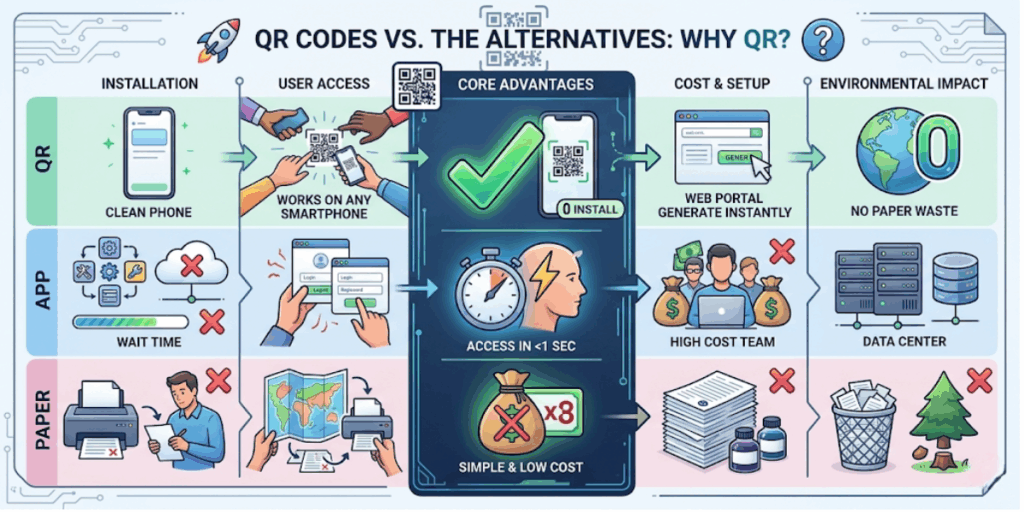
I’ve tried all three formats. Paper hunts are fun but inflexible; once printed, you’re committed.
App-based platforms offer great gamification, but lose a third of their audience the moment they’re asked to download something. QR Codes sit in the middle: zero friction for participants, full control for me.
Here’s the comparison I now use when helping someone choose a format:
|
Format |
What I like |
Why I moved on |
|
Paper clue hunts |
No tech needed; familiar to everyone |
Can’t update mid-event; no scan data; printing cost |
|
App-based hunts |
Gamification and leaderboards built in |
App download kills participation rate; not accessible to all |
|
QR Code hunts |
No app needed; real-time tracking; easily updated; rich media |
Needs smartphone and internet — but that’s rarely a barrier in 2025 |
“The biggest advantage of QR-based activities is that the organizer stays in control even after everything is set up. With Dynamic QR Codes, you can change where a clue leads mid-hunt without touching the physical code. That level of flexibility is impossible with any printed medium.” — Siddharth Pangtey, Product Manager, Scanova
C. How do I set up a QR Code scavenger hunt step by step?
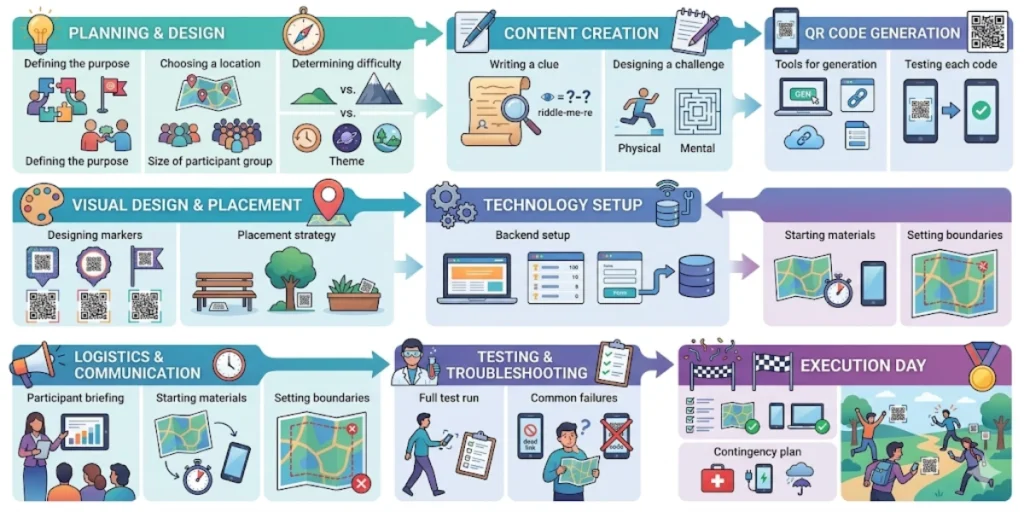
My setup process for a basic 10-stop hunt takes about two to three hours. Here’s exactly what I do, in order.
Step 1: I define my goal and audience first
Before I create a single QR Code, I nail down what the hunt is actually for. Is it team-building (goal: get people talking across departments), education (goal: reinforce a lesson or topic), or brand activation (goal: drive product discovery or leads)? Every other decision, number of stops, content format, prize structure, and what I track- flows from this.
I also think about my audience’s comfort with technology. A group of 60-year-old executives needs simpler QR Code designs with large quiet zones and high contrast. A classroom of university students can handle more complex interactive content. I adjust accordingly.
Step 2: I map out my stops on paper first
I always sketch my stop sequence on paper before touching any tool. For a physical hunt, I walk the actual route and note how visible each location is. Is there a natural shelter if it’s outdoors? Is the lighting good enough for a camera to scan reliably? I aim for 6 to 12 stops; fewer feels too light, more risks fatigue.
For virtual hunts, I list the pages, forms, or content pieces that each code will lead to. I make sure the sequence makes logical sense and that no stop accidentally reveals too much about the next one.
Step 3: I create Dynamic QR Codes, never static ones
This is the single most important technical decision I make, and I’ll say it plainly: always use Dynamic QR Codes for scavenger hunts. Here’s why this matters from painful experience: a Static QR Code permanently encodes its destination. If you spot a typo in your clue page at stop 3 mid-event, you have to reprint and re-place the code. With a Dynamic QR Code, I log into my Scanova dashboard, update the destination URL, and the fix is live in seconds — the physical code stays exactly where it is.
I create all my hunt codes through Scanova’s QR Code Generator. I set each one to Dynamic, name them clearly (“Hunt Stop 1”, “Hunt Stop 2”, etc.) so I can find them in my dashboard, and then use Scanova’s Design Studio to add the event logo and brand colors. Branded QR Codes are scanned more often; they look intentional rather than generic.
Step 4: I build the clue content for each stop
Each QR Code links to a page I’ve built that contains three things: the clue or challenge, clear instructions for what to do next, and a way to confirm completion. For most hunts, I use Scanova’s Mobile Landing Pages; they’re fast to build, mobile-optimized, and I don’t need a developer to set them up.
For hunts that require answer verification, I embed a short Google Form on each landing page that participants submit before receiving the next clue.
Step 5: I test the full route before anyone else touches it
I test every single code with both an Android phone and an iPhone. I scan from the same distance and angle a participant would use.
Also, I check that the sequence is correct, that no clue accidentally reveals the answer to the next stop, and that every form submission triggers the right confirmation message.
A broken experience at stop 4 of a 10-stop hunt ruins the momentum of the entire event, testing takes 20 minutes, and saves hours of damage control.
Step 6: I place the codes and brief the participants
For outdoor placements, I laminate every printout or use waterproof sticker paper. For indoor events, I usually tape codes at eye level on flat vertical surfaces, walls, and columns, not curved surfaces or glass, where glare kills scannability.
I keep my participant briefing under 2 minutes: here’s what you’re doing, here’s the goal, and here’s how to scan if you haven’t before. Simple.
D. Which types of QR Codes do I use for each stop?
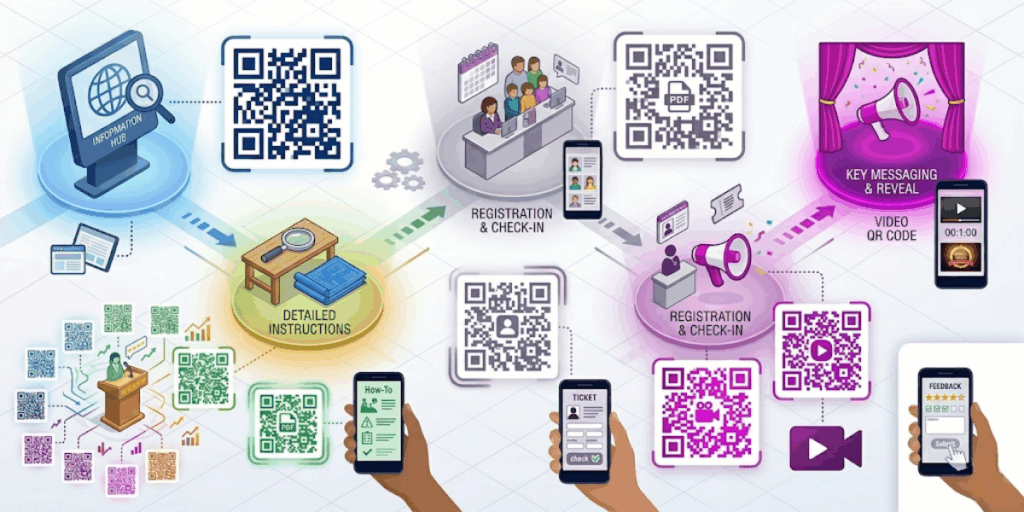
My honest answer: I use Dynamic URL QR Codes for almost every stop in every hunt. But the content I point those codes at varies based on what I want the stop to do. Here’s how I match QR Code types to use cases:
|
QR Code Type |
What I use it for |
My go-to scenario |
|
Links to a clue page, landing page, or form |
My default for all stops — maximum flexibility |
|
|
Opens a PDF directly on scan |
Detailed instructions or educational content at a stop |
|
|
Plays a video the moment someone scans |
Dramatic reveals: CEO video message at the final stop |
|
|
Opens an answer submission form |
Stops where I need participants to prove completion |
|
|
Editable destination; real-time scan analytics |
Every stop, every hunt — non-negotiable for me |
E. What are my favorite QR Code scavenger hunt ideas?
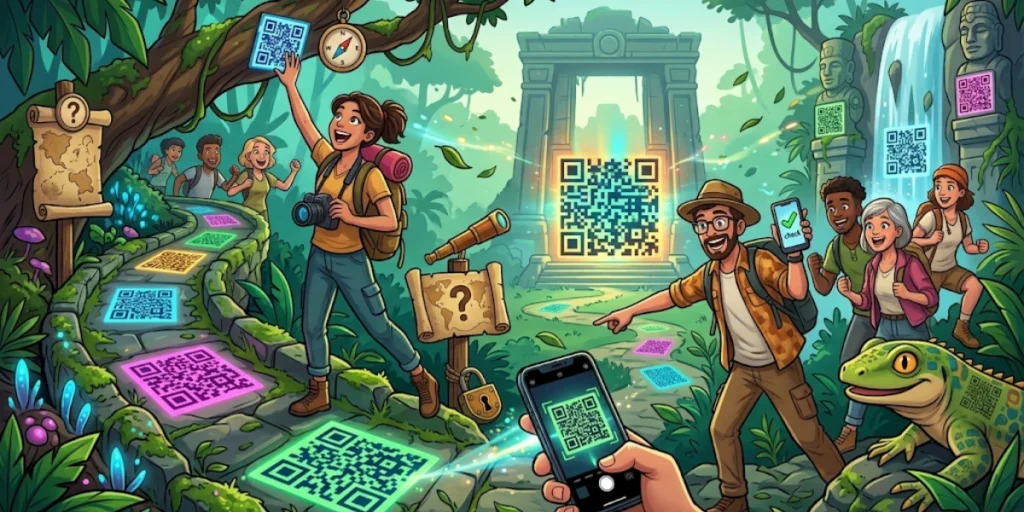
Over time, I’ve found six formats that consistently work, each suited to a different audience and goal. I’m sharing the ones I keep coming back to.
1. Office team-building hunt
I place QR Codes around the office, in the kitchen, at reception, near the printer, each linking to a riddle or trivia question about company history or values. The final code reveals a shared prize (team lunch, an afternoon off, a gift card).
I’ve run this in under 45 minutes with a 20-person team, and it gets people talking to colleagues they’d barely spoken to before. Low cost, high return.
2. Classroom learning hunt
I’ve helped teachers set up QR Codes around the classroom or hallway, each linking to a short quiz on a topic from the term. Students scan, answer, and earn points.
Because each code goes to a Google Form, the teacher gets response data without doing any manual collection. It turns revision into a race, and students actually enjoy it.
3. Product launch or retail activation
I’ve used this format for brand activations where QR Codes appear on product displays, shelf talkers, or window decals. Each scan unlocks a product feature explanation, a discount code, or a prize draw entry.
The goal is dwell time and direct product engagement, and scan analytics let me measure exactly which displays drove the most interaction.
4. Museum or heritage trail
Cultural institutions I’ve worked with use QR hunts to make exhibits interactive. Visitors scan a code next to an artifact, and the scan reveals bonus context, a curator video, or a question to answer.
It turns passive viewing into active exploration. For children especially, the hunt mechanic makes a visit something they actually want to do.
5. Remote team virtual hunt
For distributed teams, I run the hunt entirely online. I share QR Codes as images in Slack or email, each code links to a puzzle, and solving it reveals a URL where the next code is hidden. The final stop links to a virtual social activity or a shared experience that the whole team does together.
6. City tour or neighborhood activation
For outdoor activations, I place QR Codes at local landmarks. Each scan delivers a story, a photo challenge, or a location clue pointing to the next stop.
Participants explore an area while engaging with the brand or campaign. I’ve seen this work brilliantly for hospitality brands, tourism initiatives, and local business districts.
F. How do I track who’s participating in real time?

Tracking is honestly one of the things I enjoy most about running QR hunts now.
When I create a code in Scanova, each Dynamic QR Code automatically generates a real-time scan record.
From my Scanova dashboard, I can see:
- Total scans per stop — how many times each location was visited
- Unique vs. repeat scans — I can spot if someone is revisiting a stop they’re stuck on
- Device type and OS — useful if a stop has unusually low engagement; sometimes it’s a platform-specific rendering issue
- Scan timing — I can see which stops took the longest, which tells me where my clues were too hard or too easy
- Location data (where enabled) — confirms scans happened at the intended spot, not from someone at home who got a photo of the code
I use this data during the hunt and after it.
During: if stop 6 has 40% fewer scans than stop 5, I know something is wrong, the clue is unclear, the code is hidden too well, or it’s not scanning in that lighting. I can fix the destination URL from my phone while the event is running.
After: I use the scan drop-off data to improve my next hunt design.
For hunts that need verified completion at each stop, I pair each QR Code with a Google Form or a Scanova Mobile Landing Page that includes an answer field. Participants type in a keyword they find at that location and submit it. I get a clean completion record, and participants get a satisfying moment of confirmation before moving on.
G. Frequently Asked Questions: QR Code Scavenger Hunt

1. Do participants need a special app to scan QR Codes in a scavenger hunt?
No, and this is one of the main reasons I use QR Codes over app-based platforms. All modern smartphones, both Android and iPhone, can scan QR Codes with the built-in camera app, with no download required. In my experience, I’ve never had a participant who couldn’t scan once I showed them how to point their camera at the code and hold still for a second.
2. How many stops should my QR Code scavenger hunt have?
I’ve found that 6 to 12 stops is the sweet spot for most adult and student audiences. Below 6, the hunt feels too brief; above 12, fatigue sets in, especially if the hunt is timed or competitive. For younger children, I keep it to 4-6 stops with very short clues. The goal is to maintain energy throughout the entire code.
3. Can I run a QR Code scavenger hunt outdoors?
Yes, and I do it regularly. My rule: always laminate, always test in real conditions. Waterproof sticker paper also works well for semi-permanent placements. The biggest issue I’ve encountered outdoors isn’t rain, it’s glare. Strong direct sunlight on a glossy laminated sheet makes scanning difficult. I use matte laminate for outdoor codes, and I test them at the same time of day the event will run.
4. What is the difference between a static and dynamic QR Code in a scavenger hunt?
A Static QR Code permanently encodes its destination inside the code itself. You can’t change it once it’s printed. A Dynamic QR Code stores a redirect link; you can change the destination any time through your Scanova dashboard without touching the physical code. For scavenger hunts, I always use Dynamic. The edit-on-the-fly capability alone is worth it.
5. Can I run a QR Code scavenger hunt for a virtual or hybrid event?
Absolutely, I’ve done both. For fully virtual hunts, I share QR Codes as images in Slack or email. Each code links to a web puzzle; solving it reveals where the next code is hidden online. For hybrid events, I run a physical hunt at the venue and share the same QR Codes with remote participants, so everyone experiences the hunt simultaneously.
My Final Advice Before You Build Your First Hunt
The format is more forgiving than it sounds. Even my first QR Code scavenger hunt, hastily planned and imperfectly tested, got a genuinely positive response because the experience of scanning a code and discovering something is inherently fun. The framework I’ve shared here is what I’ve built up across many events to make the format reliable, not just enjoyable.
If I had to give one piece of advice before you start, it would be to use Dynamic QR Codes from the beginning. It’s the decision that saves you mid-event panic, gives you real data to improve on, and lets you build hunts that get better every time you run them.
I create all of mine on Scanova; the dashboard is clean, the analytics are genuinely useful, and the Design Studio makes it easy to produce code that looks like it belongs at a professional event.