Eventbrite QR Code Generator: How to Create a QR Code for Your Event Page


In a nutshell (TL;DR): Eventbrite does not include a QR Code generator for your event page. It only creates unique QR Codes on attendee tickets after someone registers. To put a scannable code on a poster, flyer, or ad, you need a separate Eventbrite QR Code generator such as Scanova. A Dynamic QR Code lets you edit the destination after printing and track every scan by city, device, and time of day.
Your event is live on Eventbrite. The posters go to the printer on Friday. Someone on the team asks for “the QR code”, and you spend twenty minutes clicking through the Eventbrite dashboard looking for a generator that is not there.
That is the gap this article closes. An Eventbrite QR Code generator is a third-party tool that turns your event listing URL into a scannable code you can put on anything printed. Eventbrite handles ticket QR Codes automatically, but it does not create a QR Code for your event page, so this step always happens outside the platform.
Did you know that 68% of US adults said they had used a QR Code in the previous year? Source: TEAM LEWIS 2024 survey of 1,000 US adults. Separately, eMarketer data published via Statista forecast 102.6 million US smartphone QR scanner users in 2026.
Below, I walk through what Eventbrite does and does not generate, how to build the code in Scanova step by step, why the static-versus-dynamic choice matters more for events than almost any other use case, and what to track once the code is out in the world. At the end, I also look at whether Eventbrite is still the right home for the ticketing itself.
A. Does Eventbrite have a built-in QR Code generator?
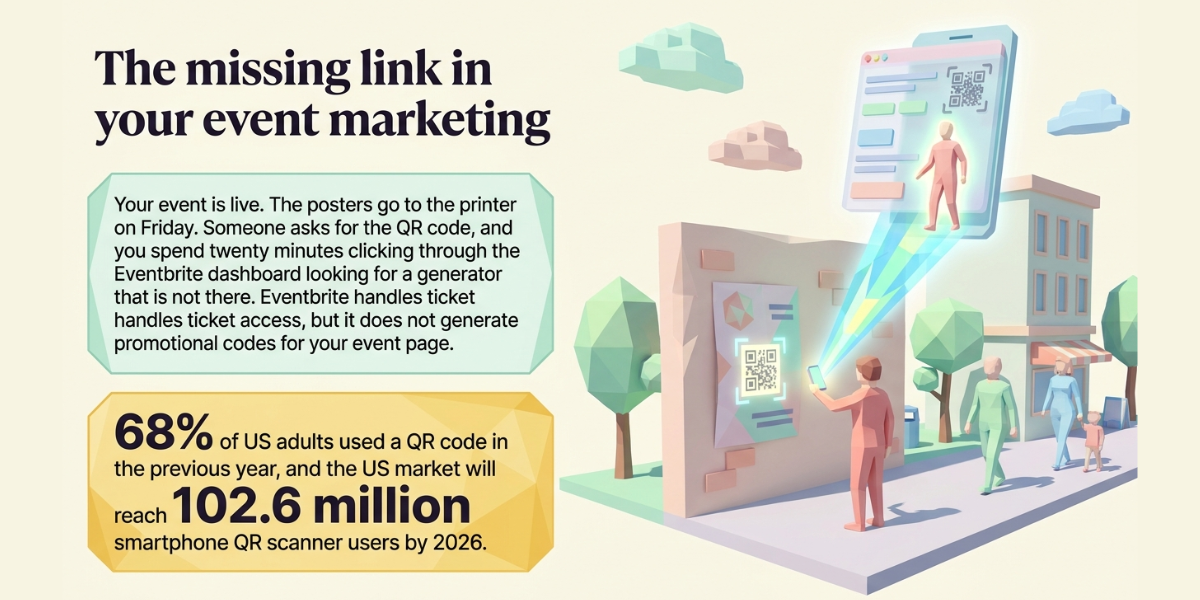
No. Eventbrite does not offer a QR Code generator for your event page or listing URL. The QR Codes you see inside Eventbrite are attendee ticket codes, generated automatically when someone completes registration and scanned by the Eventbrite Organizer app at the door.
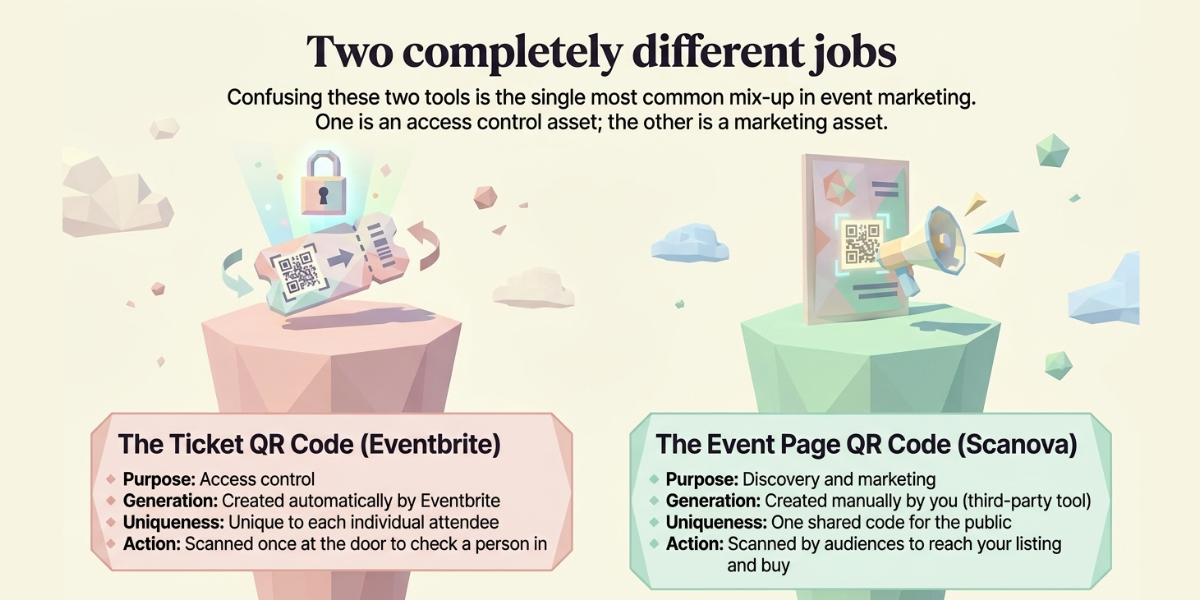
These are two completely different jobs, and confusing them is the single most common mix-up I see:
- Ticket QR Code: unique to each attendee, created by Eventbrite automatically, scanned once at entry to check that person in.
- Event page QR Code: one shared code, created by you, scanned by the public to reach your listing and buy a ticket.
When people search for one of these tools, they almost always want the second one. It is a marketing asset, not an access control asset. It lives on a poster, not on a ticket.
Because Eventbrite leaves that job to you, any reliable URL-to-QR tool will work. What separates them is whether you can edit the destination after printing and whether you get scan data back.
B. What can you actually do with an Eventbrite QR Code?
An Eventbrite QR Code sends anyone who scans it straight to your event listing, which makes it useful anywhere your audience meets you offline. The code removes the step where someone has to type a long URL into a phone, and that step is where most offline-to-online interest quietly dies.
The placements that consistently earn their space:
- Posters, flyers, and street-level signage, where a scan replaces a URL nobody will retype
- Table tents and counter cards in partner cafes, bars, co-working spaces, and bookshops
- Print ads in local press, community newsletters, and programme booklets
- Business cards and lanyards, so speakers and hosts can push the listing during conversations
- Window decals and A-frames at the venue itself, promoting the next date while this one runs
- Presentation slides, so a room full of people can register before you finish the sentence
- Packaging, receipts, merchandise tags, and delivery inserts for retail and hospitality events
- Sponsor and partner assets, where a distinct code lets you prove exactly what the partnership delivered
Pro Tip: create a separate QR Code for each placement rather than reusing one code everywhere. Same destination, different codes. Scanova’s tags and folders then group them into one campaign view, so you can see both the total and which specific poster, partner, or ad actually drove the scans.
C. How do you create an Eventbrite QR Code with Scanova?
Copy your Eventbrite event URL, paste it into Scanova’s Website URL QR Code generator, keep it Dynamic, design it, and download a print-ready file. The whole process takes under five minutes.
Here is the exact sequence:
- Copy your Eventbrite event URL. In your Eventbrite dashboard, open the event and use “Copy link”. Use the full public listing URL, not a preview or draft link, and confirm the event is published first.
- Open the Website URL QR Code generator on Scanova and select that category.
- Paste the Eventbrite link into the URL field and click Continue.
- Name the code and keep Dynamic selected. Dynamic is the default. Name it something you will recognise in six months, for example “Autumn Session 3 – tube posters”, not “QR 1”.
- Design it. Add your logo at the centre, set brand colours, adjust the eye and data patterns, and add a call-to-action frame with text such as “Scan to book tickets”.
- Assign a tag or folder. This is the step most people skip, and it is the one that makes the analytics useful later.
- Download in the right format. SVG or EPS for anything going to print, PNG for digital and social. Scanova also exports JPG, PS, and PDF.
- Test before the print run. Scan it on both an iPhone and an Android device, at the final printed size, in the lighting the code will actually live in.
If you would rather send scanners to a richer destination than the raw Eventbrite listing, Scanova can also host a mobile landing page with your schedule, venue map, RSVP form, and a button through to Eventbrite. That is worth considering when the Eventbrite page alone does not carry enough of your branding.
Pro Tip: if your event repeats, do not create a fresh code every cycle. Keep one Dynamic code per placement type and update the destination each season. You keep the full scan history across every edition, which is far more useful than a dozen disconnected codes with a few hundred scans each.
Ready to build it? Create your Eventbrite QR Code on Scanova. Fourteen-day free trial, no credit card required.
D. Should you use a static or dynamic QR Code for your Eventbrite event?
Use a Dynamic QR Code. Event URLs change far more often than organizers expect, and a Static code is locked to whatever you encoded on day one. Once it is printed, it is printed.
Four scenarios that come up constantly in event work, all of which break a Static code:
- The event is postponed and Eventbrite issues a new listing URL for the new date
- You sell out early and want the code to point at a waitlist page instead of a dead “sold out” listing
- The run ends but the posters are still up, and you would rather push people to the next date than to an expired page
- You need to answer “did anyone actually scan the posters?” and a Static code simply cannot tell you
|
Difference |
Static QR Code |
Dynamic QR Code |
|---|---|---|
|
Edit destination after printing |
No |
Yes, any time |
|
Scan tracking and analytics |
None |
Location, device, OS, time, unique vs total |
|
Useful after the event ends |
No, points at a dead page |
Yes, redirect to the next event |
|
Scan history across URL changes |
Not applicable |
Preserved |
|
Best for |
One-off codes you will never need to change |
Anything printed, and anything you need to measure |
The architecture explains the difference. A Static code encodes the destination directly into the pattern, so nothing sits between the camera and the page and there is nothing to log. A Dynamic code encodes a short redirect URL, so every scan touches Scanova’s server first, gets logged, and is forwarded on instantly. That server layer is what makes both editing and tracking possible.
Scanova’s own platform data reflects how one-sided this has become: around 98% of QR Codes created on Scanova today are Dynamic.
E. What should you track once your Eventbrite QR Code is live?
Track total versus unique scans, scan location, device and operating system, and time of day. Then push that data into Google Analytics with UTM parameters so QR traffic sits beside your other acquisition channels instead of in a separate silo.
What each metric actually answers for an event campaign:
- Scan volume over time. Whether interest is sustaining or spiking and dying. A flat line three weeks out is your early warning to change something while there is still time to sell tickets.
- Unique versus total scans. Your honesty check. If totals are high and uniques are low, a small group is scanning repeatedly, which usually means the destination did not give them what they expected.
- Location, down to city level. Whether your posters are in the right neighbourhoods. If one district produces 70% of scans, your placement budget has an obvious answer next time.
- Device and OS breakdown. Your conversion diagnostic. If most scanners are on iOS and the Eventbrite checkout has an issue in Safari, that gap stays invisible without this data.
- Time of day. The most underused metric in event marketing. Peak scan windows tell you when to send the email and when to post, not just where to put the poster.
On Scanova, advanced analytics covering location, device, handset, browser, and operating system sits on the Standard plan and above, while Google Analytics integration and webhooks are available from Lite upward. There is a fuller breakdown in Scanova’s guide to the best QR Code generator with tracking, and the current tiers are on the pricing page.
F. How do you design an Eventbrite QR Code people will actually scan?
Give the code a reason to be scanned and enough contrast to be readable. A framed code with a short instruction consistently outperforms a bare black square, because the frame answers the question the bare square leaves open: what happens if I scan this?
The design rules that matter most for printed event material:
- Add a call-to-action frame. “Scan to book tickets” or “Scan for the full line-up” beats no instruction at all
- Put your logo in the centre. It signals that the code is legitimate, which matters more every year as QR scams get more attention
- Keep the code dark on a light background. Inverted codes, light on dark, fail on a lot of older scanning apps
- Respect the quiet zone. Leave clear space around the code and never let artwork or text crowd it
- Size for scanning distance. Around 2 cm square is the practical floor for something held in the hand; a poster read from three metres needs to scale up substantially
- Export vector for print. SVG or EPS stay sharp at any size, unlike a stretched PNG
- Never distort the aspect ratio. A squashed code is an unscannable code
Pro Tip: test the code on the actual printed material, not on your monitor. Matte paper, glossy laminate, and dark backgrounds all behave differently from a screen, and the failure only shows up once the run is already paid for. Scanova’s QR Code design tools let you keep brand styling without pushing contrast past the point where scanners struggle.
G. Is there a better alternative to Eventbrite for the ticketing itself?
If Eventbrite’s per-ticket fees are part of why you are reading this, then yes, it is worth looking. Ticket Generator is a commission-free ticketing platform built by Trycon, the same company behind Scanova, and it is designed for organizers who already have an audience and do not need a marketplace to find one.
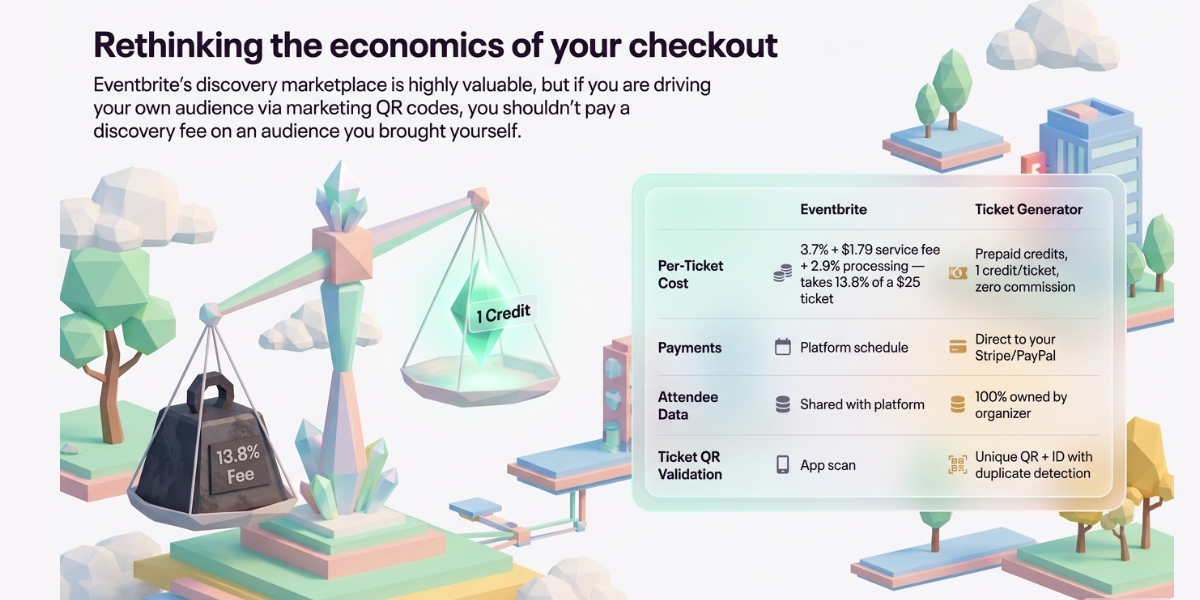
The fee maths is the usual trigger. As published in mid 2026, Eventbrite charges US organizers a service fee of 3.7% plus $1.79 per paid ticket, plus 2.9% payment processing per order.
On a $25 ticket that lands around $3.44, roughly 13.8% of face value. The fixed $1.79 is what does the damage, because it hits cheap tickets hardest, which is exactly the price band most community events, comedy nights, and workshops sell in.
To be fair to Eventbrite: its marketplace discovery is a real asset. If a meaningful share of your attendees find you by browsing Eventbrite rather than through your own channels, that reach is worth paying for and no standalone platform replicates it. The calculation only flips when you are effectively paying a discovery fee on an audience you brought yourself.
|
Difference |
Eventbrite |
Ticket Generator |
|---|---|---|
|
Per-ticket cost |
3.7% + $1.79 service fee, plus 2.9% processing |
Prepaid credits, one credit per ticket, no commission on sales |
|
Payments |
Processed by Eventbrite, payouts on their schedule |
Straight to your own Stripe, PayPal, or Razorpay account |
|
Attendee data |
Shared with the platform, which markets other events |
Fully owned by the organizer |
|
Branding |
Eventbrite branding on the listing |
White-label, no platform watermarks |
|
Ticket QR Codes |
Unique code per ticket, scanned via Organizer app |
Unique QR plus unique ticket ID, with duplicate detection |
|
Discovery marketplace |
Yes, a genuine strength |
No, built for organizers who already have an audience |
There is one distinction worth being precise about, because it is where the two halves of this article meet. The QR Code you build in Scanova is a marketing code: one code, shared by everyone, pointing at your event page. A ticket QR Code has to be the opposite, unique to each attendee, and validated once at the gate.
“The most common mistake we see is organizers using a generic QR generator and realizing that this way every attendee will have the same code. Also, those generators can’t help you stop duplicates.” Anshul Singh Bisht, Head of Event Technology, Ticket Generator
Ticket Generator handles that second job: every ticket carries its own QR Code and ticket ID, a dedicated validator app flags duplicates and expired tickets instantly, and multiple gates can scan at once. The platform has issued over 1,000,000 tickets across 30,000+ events in 100+ countries, including four consecutive years of the Heartland Emmys, which has run 3,433+ tickets across 10+ events on it. If you want the full picture, there is a detailed breakdown of Eventbrite alternatives and of how Eventbrite pricing actually works on the Ticket Generator blog.
So which tool do you actually need?
Two jobs, two tools, and they are not in competition. If Eventbrite is working for you as a ticketing platform, keep it, and use Scanova to build the marketing QR Code that Eventbrite does not provide. A Dynamic code gets you an editable destination, scan analytics, and a poster that stays useful after the date changes.
If the fee maths has stopped working, that is a separate decision from the QR Code question, and Ticket Generator is worth a look on commission-free pricing, direct payouts, and full data ownership. Either way, the QR Code on the poster is the cheapest, fastest part of the whole campaign to get right, and it is the one most teams leave until Thursday night.
Create your Eventbrite QR Code in Scanova, edit the destination whenever your event does, and see exactly which posters are working. Start your 14-day free trial, no credit card required.
H. FAQs: Eventbrite QR Code Generator
1. Does Eventbrite generate a QR Code for my event page?
No. Eventbrite generates unique QR Codes on attendee tickets after someone registers, but it does not create a QR Code for your event listing URL. You need a separate QR Code generator such as Scanova to produce a code you can put on posters, flyers, or ads.
2. Can I change where my Eventbrite QR Code points after it has been printed?
Yes, if you created it as a Dynamic QR Code. The printed pattern never changes, only the destination behind it, and your full scan history carries across the update. Static QR Codes cannot be edited once generated, which is why they are a poor fit for anything with a date attached.
3. Is there a free QR Code generator for Eventbrite events?
Plenty of tools will produce a free Static QR Code that links to your Eventbrite page, and for a genuinely one-off use that is fine. The catch is that free Static codes cannot be edited or tracked, so if the event moves or you want to know which poster worked, you are stuck. Scanova offers a 14-day free trial with no credit card so you can test Dynamic codes before committing.
4. What size should an Eventbrite QR Code be on a poster?
Scale it to the distance it will be scanned from. Roughly 2 cm square works for something held in the hand such as a flyer or business card, while a poster read from two to three metres away needs to be considerably larger. Always leave a clear quiet zone around the code and test at the final print size before the run.
5. Can I track how many people scanned my Eventbrite QR Code?
Yes, with a Dynamic QR Code. Scanova logs total and unique scans, city-level location, device and operating system, and time of day, and you can append UTM parameters so the traffic appears in Google Analytics alongside your other channels. Static QR Codes provide no tracking at all.
6. Do I still need Eventbrite if I switch to Ticket Generator?
No. Ticket Generator handles event pages, registration, payments through your own gateway, and QR ticket validation, so it replaces Eventbrite rather than sitting alongside it. What it does not replace is Eventbrite’s discovery marketplace, so if a large share of your attendees currently find you by browsing Eventbrite, weigh that before switching.