Rectangle QR Code Generator: Make One That Scans

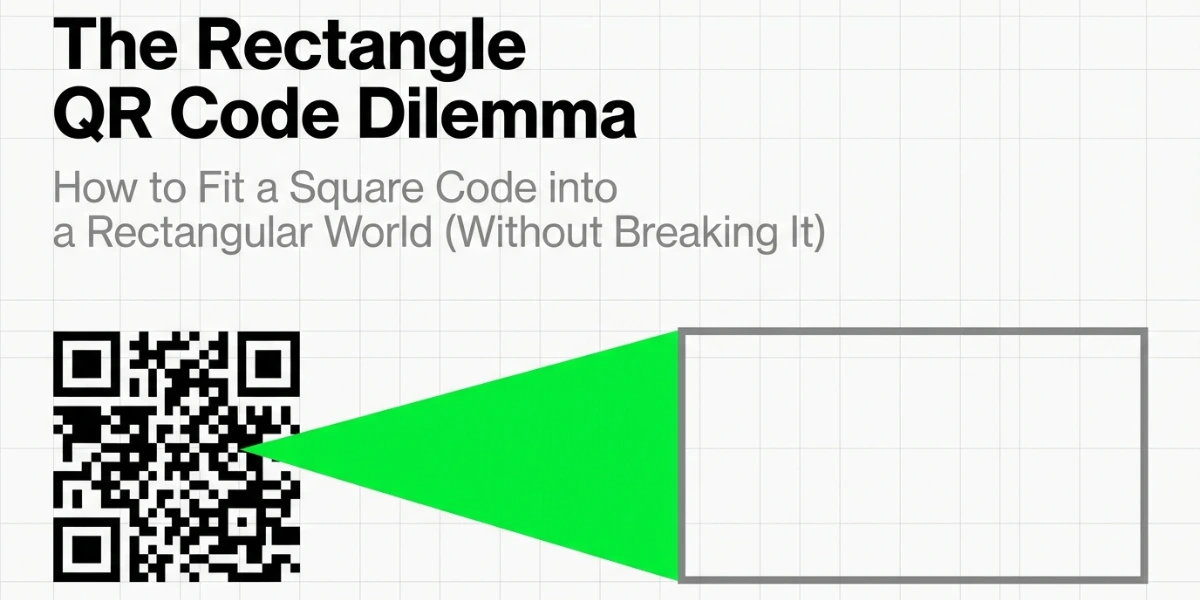
In a nutshell (TL;DR): “Rectangle QR Code” can mean either a standard square QR Code placed inside a rectangular design or a true rectangular Micro QR (rMQR). A framed square QR Code works with virtually all smartphones, while rMQR, despite being an ISO standard, has limited support in phone cameras. For most public use, stick with a framed square QR Code. Use rMQR only for specialized industrial applications.
Yes, a QR Code can live in a rectangle, but the honest answer is that it splits in two, and only one half scans on the phone in your pocket.
Here is why the question keeps coming up right now. GS1 is moving retail away from old line barcodes and towards 2D codes, in an initiative it calls Sunrise 2027.
GS1 reports pilots running in 48 countries, covering 88% of the world’s GDP. So brands are now trying to fit a square code into the long, thin strip where the barcode used to sit. That strip is a rectangle, and the code is a square, which means something has to give.
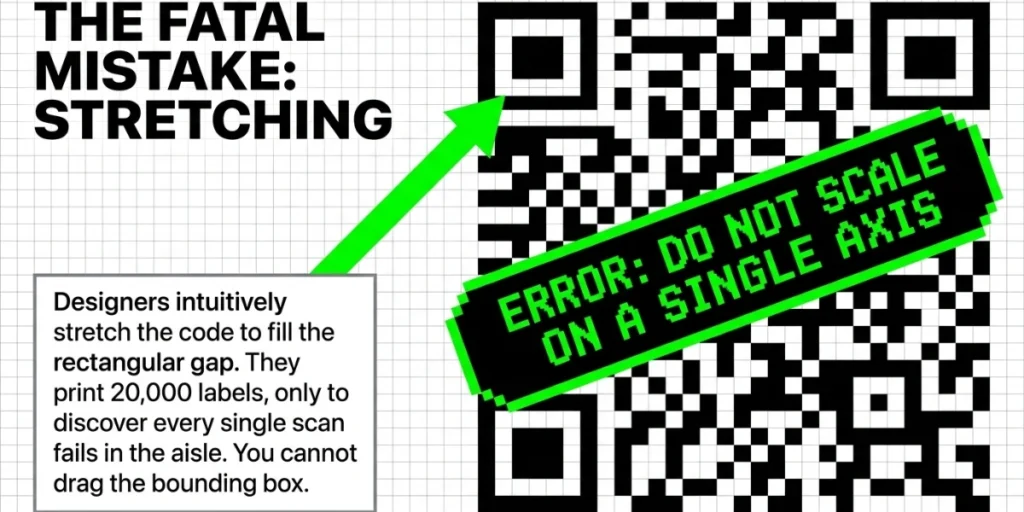
I have watched teams solve this the wrong way more than once. They stretch the code, squash it to fit, print 20,000 labels, and then discover that the scans fail in the aisle.
So let me walk through both of the real options. I will cover how each one is built, which phones can actually read them, and how to choose between them without burning a print run. Now, let’s take a deep dive into the Rectangle QR Code Generator.
A. Can a QR Code actually be rectangular?
Yes, but in two very different ways.
The first way is a design choice. You keep the QR symbol square, then place it inside a wide or tall frame that holds your logo, a call to action, and your brand color. The scannable part is still a square, and the rectangle is really just packaging around it.
The second way is a different code format altogether, called rMQR, short for Rectangular Micro QR Code. Here, the symbol itself is a rectangle because the data modules sit in a wide grid rather than a square one.
Both are valid, and they serve different purposes, just as circles and other custom QR Code shapes solve their own problems. In my experience, most people searching for a rectangle QR code generator want the first option and have no idea the second one exists.
B. Why are standard QR Codes square in the first place?
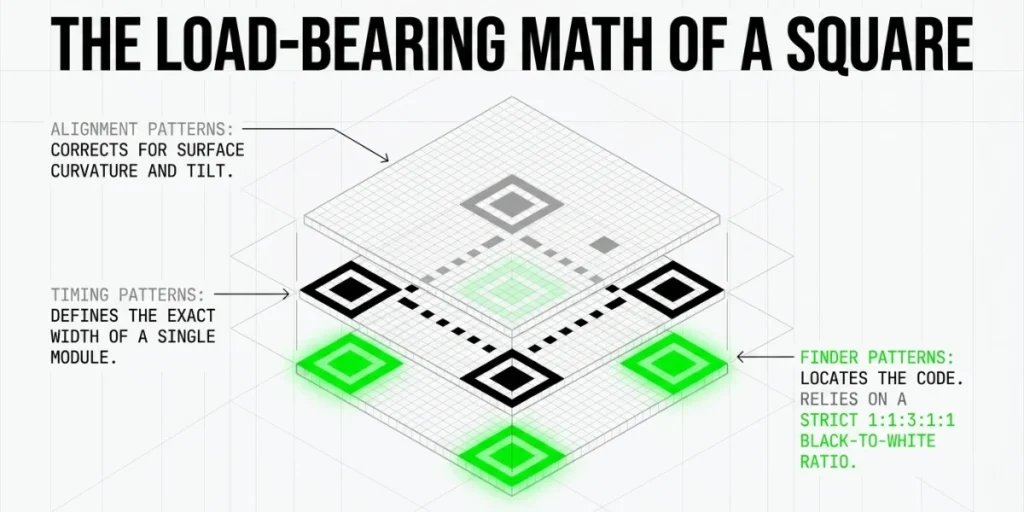
The square is not a style choice. It is load-bearing.
Masahiro Hara invented the QR Code at Denso Wave in 1994 while trying to fix a factory problem. Line barcodes held only about 20 characters, so workers had to scan the same part repeatedly. In Denso Wave’s account of the story, Hara says, “Developing a barcode that had increased capacity was required.”
His answer was to store data in two directions at once, across and down, which is exactly what makes a code two-dimensional.
Three parts of the QR Code structure depend on that square grid:
- Finder patterns. The three big squares in the corners. A scanner uses them to locate the code and work out its angle.
- Timing patterns. The dotted lines between the corners. They tell the scanner how wide one module is.
- Alignment patterns. Smaller squares that correct for tilt and curve.
The finder patterns use a black-to-white ratio of 1:1:3:1:1. Hara’s team chose that ratio because it almost never appears in ordinary printed matter, so a scanner can spot it quickly and rarely gets a false hit.
Change the grid, and you break the maths behind all three of those parts. That is why a normal QR Code stays square. You can wrap it in any shape you like, but you cannot reshape the symbol itself.
C. What is an rMQR Code, and how is it different?
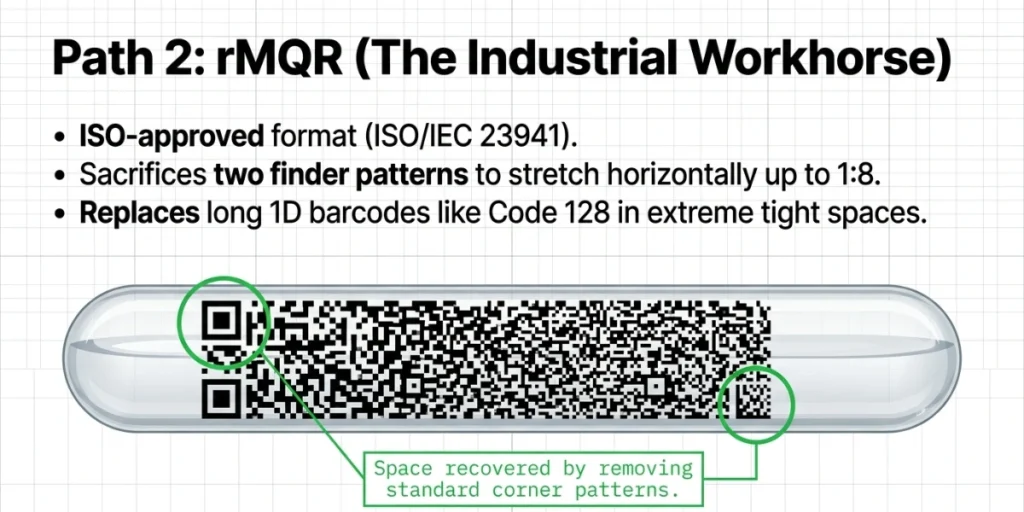
rMQR is the real rectangular member of the QR family, and it is the option almost nobody writes about.
Denso Wave built it and secured ISO approval in May 2022, under the formal name ISO/IEC 23941. Like the original QR Code, it sits in the public domain and is free for anyone to use.
The clever bit is what happened to the finder patterns. A normal QR Code carries three of them, but Denso Wave cut that down to one full pattern plus a smaller one in the opposite corner. That frees up a surprising amount of room, so the code can stretch sideways without growing any taller.
Here is what it can hold:
|
Feature |
QR Code |
Micro QR Code |
rMQR Code |
|
Shape |
Square |
Square |
Rectangle |
|
Smallest size |
21 x 21 modules |
11 x 11 modules |
7 x 43 modules |
|
Largest size |
177 x 177 modules |
17 x 17 modules |
17 x 139 modules |
|
Max numeric data |
7,089 characters |
35 characters |
361 characters |
|
Standard |
ISO/IEC 18004 |
ISO/IEC 18004 |
ISO/IEC 23941 |
|
Phone camera support |
Yes |
Patchy |
No |
The widest version runs 17 modules tall and 139 modules wide, a ratio of roughly 1:8. That shape fits a shelf edge, a cable wrap, or the curved rim of a test tube.
rMQR was designed to replace line barcodes such as Code 128 and Code 39, and it holds far more data in the same strip of space. It also keeps Reed-Solomon error correction, so it still reads when part of the label is scratched, smudged, or dirty.
There is one more rectangular option worth knowing about. Denso Wave’s iQR Code also supports rectangular symbols, running from 5 x 19 up to 43 x 131 modules. But iQR is a Denso Wave trademark rather than an open ISO standard in the same sense, and it is mostly used in Japanese industrial settings.
D. Will a rectangular QR Code scan on a normal phone?
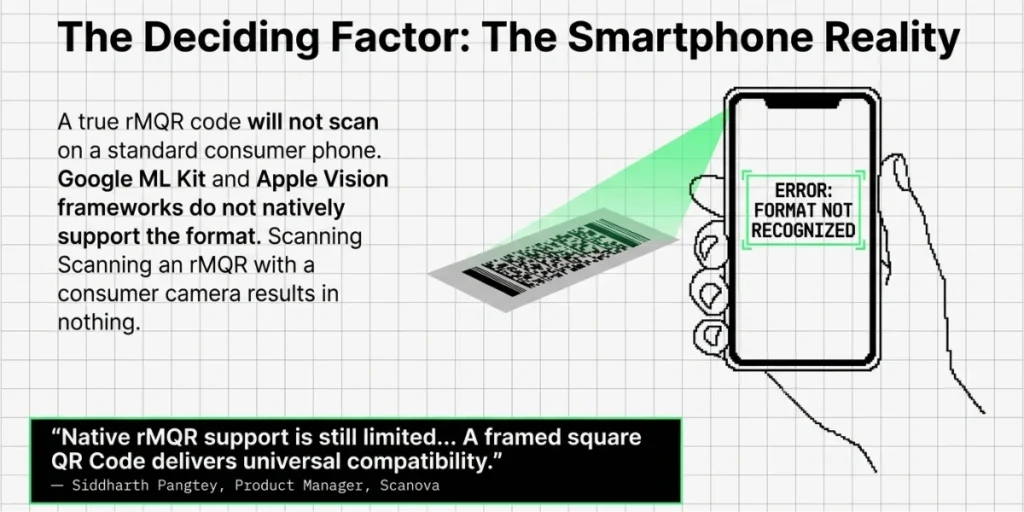
A framed square code will. A true rMQR Code will not.
This is the part nobody else on page one tells you, so let me be direct about it.
Android phones read codes through Google’s ML Kit, and Google’s own documentation lists the 2D formats it supports: Aztec, Data Matrix, PDF417, and QR Code. rMQR is not on that list, and neither is Micro QR.
So if you print an rMQR Code on a poster and a shopper points a phone at it, nothing happens. No banner, no link, just a confused customer walking away.
rMQR does work well with dedicated hardware and paid scanning SDKs, and several barcode libraries already support it. The camera app on an ordinary phone simply does not.
That single fact settles most of these decisions for me. If a member of the public has to scan it, use a square symbol. If a trained worker with a proper scanner has to scan it, rMQR belongs on the table.
The rule I use: consumer eyes get a framed square. Warehouse scanners get rMQR.
“Our goal is maximum scan reliability across every smartphone and scanner. That’s why we build rectangular layouts around standard square QR Codes instead of generating rMQR symbols. A framed square QR Code delivers the visual flexibility designers want while preserving universal compatibility, whereas native rMQR support is still limited across many consumer scanning apps.” — Siddharth Pangtey, Product Manager, Scanova
E. How do I make a rectangle QR Code that works today?
Here is the workflow we use at Scanova. It takes about five minutes from start to finish.
1. Open your browser
Use any modern desktop browser: Chrome, Safari, Edge, or Firefox. Work on a desktop or laptop, not a phone. You will be picking frame sizes, checking color contrast, and downloading print files, and all of that is easier on a bigger screen.
2. Go to app.scanova.io
Type app.scanova.io into the address bar. If you already have an account, log in. If you do not, sign up with your email or your Google account. There is a free trial, so you can build and test code before you commit to anything.
3. Start a new QR Code
From the dashboard, click Create QR Code. You will land on a screen showing all the content types we support, grouped by the code they use.
4. Pick your content type
Choose what the code should do. A website URL is the most common pick. You can also link a PDF, a vCard, an app download page, or a social media hub. Decide this first. The content type controls how much data is included in the code, which affects how dense the final pattern appears.
5. Choose dynamic over static
A static code bakes the destination into the pattern itself. Change the link, and you have to reprint. A dynamic code stores a short redirect, so you can point it to a new location at any time. When it comes to packaging that sits on shelves for two years, that flexibility matters far more than design does. Dynamic codes also report scan data back to you: how many scans, when, where, and on which device.
6. Generate the plain code first
Get a clean black-and-white square working before you touch anything visual. This is your baseline. If the finished design fails to scan later, you will know a design choice broke it and not the data.
7. Add a rectangular frame
Click Edit Design, then open the Frame tab. We offer over 70 QR Code frame templates. The frame is what turns the square into a rectangle. Pick a wide, landscape frame for a shelf strip, a table tent, or a banner. Pick a tall, portrait frame for a bookmark, a door hanger, or a poster margin. Match the frame shape to the space it will live in.
8. Add your call to action
This is the real reason to use a rectangle. The extra room gives you space for words, and words lift scan rates. Name the reward clearly. “Scan for allergens” beats a bare code every time. So does “Scan to see the fit guide” or “Scan for the setup video.” Keep it under six words so it still reads from a few feet away.
9. Set your colors
Keep a strong contrast between the dark modules and the light background. Dark pattern on a light background is the safest combination. Avoid inverting it. Light shades like yellow or pastel on white often fail under store lighting, even when they look fine on your monitor. Test the contrast, do not eyeball it.
10. Raise the error correction level if you added a logo
The logo sits atop the pattern, obscuring the data. Error correction rebuilds what gets hidden. Level H handles up to 30% damage, so use it whenever a logo sits in the center. Keep the logo small too, roughly a fifth of the code’s width or less.
11. Export as a vector
Download SVG or EPS, not PNG. Vector files scale from a business card to a billboard with no fuzzy edges. PNG works for a screen or an email footer. It does not work for print. Hand your printer the vector file and let them size it.
12. Test before you print
More on this below. At minimum, scan the final file on two phones, one iOS and one Android, from the distance a real customer would stand at.
F. When should I use a frame instead of a true rMQR Code?
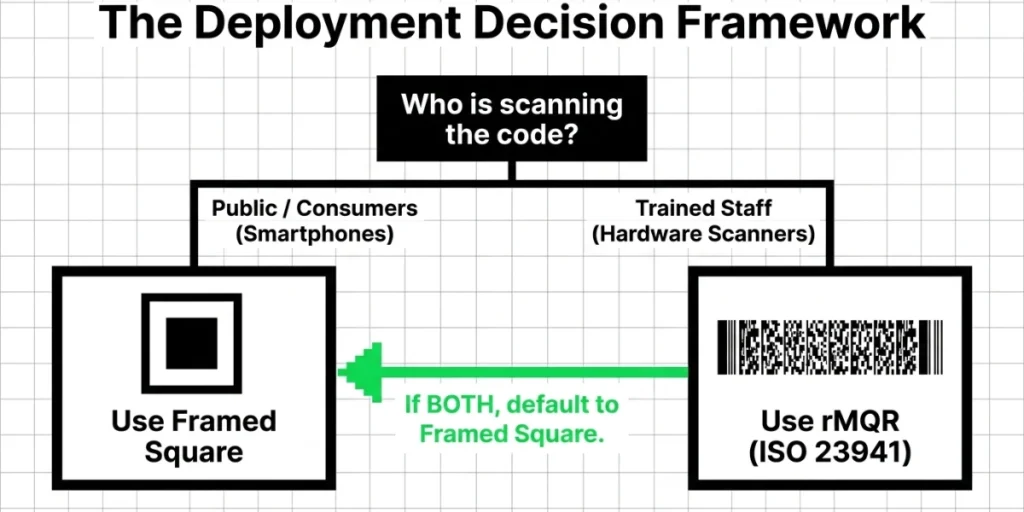
Use this table. It answers the question faster than another 500 words would.
|
Your situation |
Best option |
Why |
|
Poster, flyer, or ad |
Framed square |
Anyone can scan it with a phone |
|
Business card |
Framed square |
Small space, public scanning |
|
Retail packaging (consumer scan) |
Framed square |
Shoppers use phone cameras |
|
Shelf-edge label |
Framed square |
Staff and shoppers both scan it |
|
Wide web banner |
Framed square |
Digital, and phones must read it |
|
Cable, pipe, or wire tag |
rMQR |
Trained staff, proper scanners |
|
Test tube or vial |
rMQR |
Curved and very narrow |
|
Circuit board marking |
rMQR |
Tiny footprint, industrial reader |
|
Warehouse bin strip |
rMQR |
Replaces a Code 128 barcode |
|
Retail POS scanning under GS1 |
GS1 QR Code (square) |
POS scanners expect standard 2D codes |
If your answer is “both public and staff need to scan it,” pick the square. Always.
G. Where rectangular QR Codes actually earn their keep
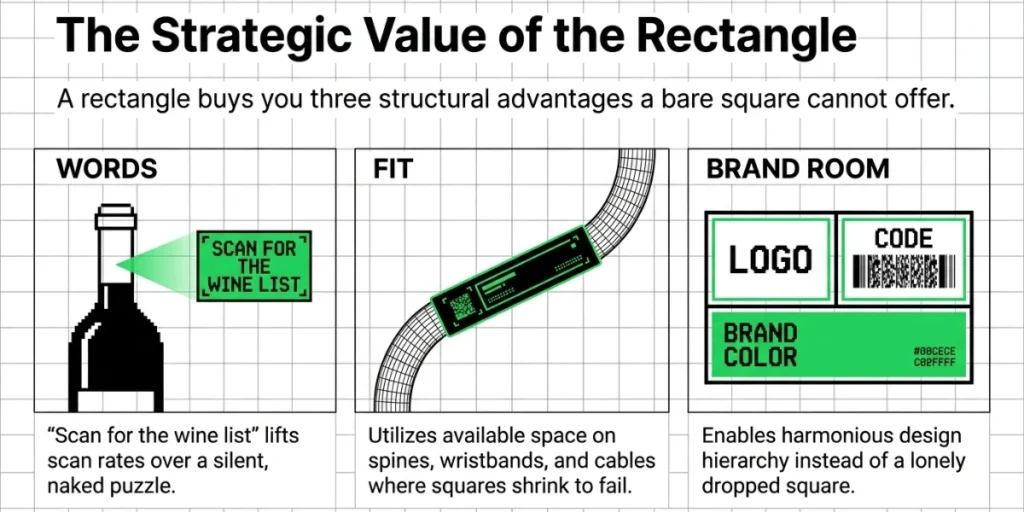
A rectangle is not just a look. It buys you three things a square cannot.
It buys you words. A square code on its own is silent, but a rectangle gives you a line of text right beside it. Telling people what they get in return lifts scan rates, because “Scan for the wine list” is a reason to act, while a bare square is just a puzzle.
It buys you fit. Plenty of surfaces are simply not square, including pens, luggage tags, box spines, wristbands, and cable labels. In those places, a square code has to shrink until it stops working, whereas a rectangle uses the space you actually have.
It buys you brand room. Logo on the left, code on the right, brand color running behind both. Designers can build something with that layout, while they tend to struggle with a lone black square dropped into a corner.
The packaging angle deserves a note of its own. GS1 wants 2D codes working at checkout by the end of 2027, and its industry statement says retailer POS systems need to read both 1D and 2D barcodes, pointing to over 85% of POS systems meeting that requirement by that date. Renaud de Barbuat, President and CEO of GS1, has described the goal as “a single barcode that has the power to provide all the information consumers need”.
Large brands are already moving on this. Unilever, for example, is rolling out GS1 Digital Link 2D barcodes across 45,000 products.
Here is the practical catch that trips people up. That checkout code has to be a standard square GS1 QR Code, because POS scanners expect it. So the rectangle on your pack is a design frame wrapped around a square symbol, and it is not an rMQR.
H. What breaks a rectangular QR Code?
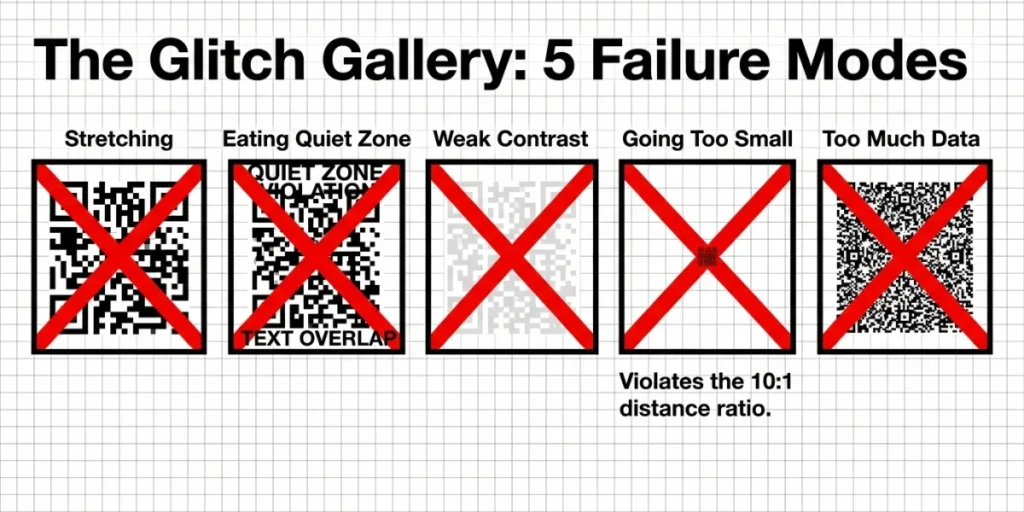
Almost every failure I have seen comes from one of these five mistakes.
Stretching the symbol. This is by far the most common one. Someone drags a corner handle, the square becomes a rectangle, and the modules end up oblong. The timing patterns no longer match the grid, so scanners choke on it. Never scale a QR Code on a single axis; hold Shift when resizing.
Eating the quiet zone. Every QR Code needs a blank space around it, and the standard requires four modules on each side. Rectangular frames tempt designers to crowd the code with text and icons. Keep the margin intact, even when the frame looks a little empty as a result.
Weak contrast. Light grey on white looks elegant on screen and scans terribly in the real world. Keep the modules dark and the background light, then check the result under the lighting the code will actually live in. Bathroom spotlights and freezer cases both throw glare that kills a scan.
Going too small. A code on a narrow label almost always gets squeezed at the last minute. Our minimum size guide covers the numbers in detail, but the rule of thumb is a 10:1 ratio. A code scanned from one meter away needs to be roughly 10 cm across.
Too much data. More data means more modules, and more modules mean a denser code that fails in a small space. Use a dynamic code so the symbol always points to a short redirect link, and let the heavy content sit on the landing page instead.
I. How I test a rectangle QR Code before a print run
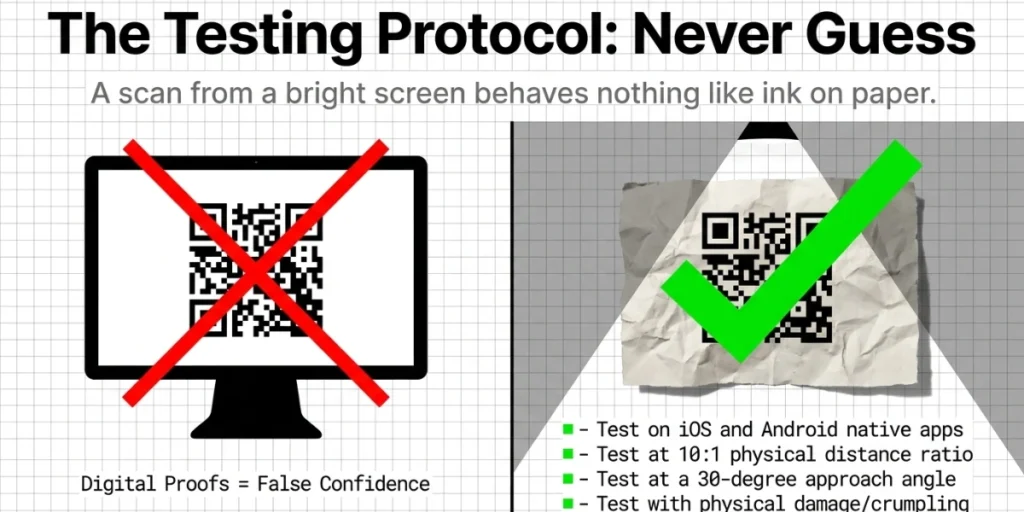
This checklist has saved me more than once. Work through it in order.
- Scan with an iPhone camera app.
- Scan with an Android camera app.
- Scan with Google Lens.
- Scan from a photo saved in the gallery.
- Scan at the real distance people will use.
- Scan at a 30-degree angle from each side.
- Scan in low light and in bright glare.
- Print one physical proof at the final size, then scan it.
- Scan the proof after crumpling one corner.
- Confirm the landing page loads fast on mobile.
Skip step eight, and you are guessing, because a scan from a bright screen behaves nothing like a scan from ink on paper or film.
If you are about to print thousands of something, print one of them first. Always.
J. Why I keep recommending a framed square
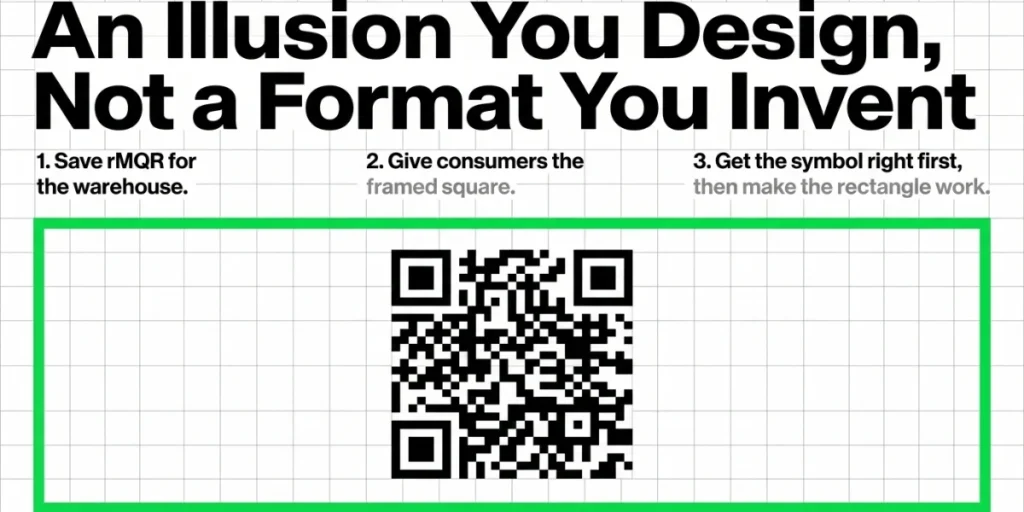
I want to be plain about what we do and do not do here, because that matters more than a sales pitch.
Our generator creates square QR symbols, and then lets you wrap them in rectangular frames, add a call to action, and match your brand colors. We do not generate rMQR symbols at all.
That is a deliberate choice. Almost every QR Code we see in the wild gets scanned by a member of the public holding an ordinary phone, and for that job, a square symbol inside a rectangle is the only option that works everywhere.
What the platform adds on top is the part that pays for itself:
- Dynamic codes so you can change the destination after printing.
- Over 70 frames, so the rectangle looks designed rather than bolted on.
- Scan tracking so you learn which placements actually work.
- Vector export so print teams get files that hold up at any size.
K. FAQs: Rectangle QR Codes
1. Can a QR Code be rectangular?
Yes, in two ways. You can place a square QR code inside a rectangular frame so every phone can read it. Or you can use a true rMQR Code, which is genuinely rectangular but is not read by normal phone cameras.
2. What is an rMQR Code?
rMQR stands for Rectangular Micro QR Code. Denso Wave developed it, and ISO approved it in 2022 as ISO/IEC 23941. It ranges from 7 x 43 modules to 17 x 139 modules and can hold up to 361 numeric characters.
3. Do QR Codes have to be square?
The scannable symbol does, for standard QR Codes. The finder and timing patterns rely on a square grid. Any other shape you see is a design template built around that square.
4. Will an rMQR Code scan with my phone?
Almost certainly not. Google’s ML Kit supports Aztec, Data Matrix, PDF417 and QR Code, but not rMQR. You need an industrial scanner or an app built on a barcode SDK that supports the format.
5. Can I stretch a QR Code to make it fit a rectangle?
No. Stretching distorts the modules and breaks the timing patterns. Scale the code evenly, then use a frame or extra whitespace to fill the rectangle.
6. What size should a rectangle QR Code be?
Size the square symbol first, not the frame. Use a 10:1 ratio between the scan distance and the code width, and maintain a four-module quiet zone on all sides.
The short version
A rectangle QR Code is almost always a square code wearing a rectangular suit. That is not a compromise; it is the right answer for anything a customer will scan with a phone.
Save rMQR for the places it was actually built for: narrow industrial labels, curved surfaces, and trained staff carrying real scanners.
Get the symbol right first, then make the rectangle work as hard as it can for your brand.
Build your framed rectangle QR Code and test it on a real phone