Social Media Business Cards: A Practical Guide to Designing One That Actually Gets Followed (2026)

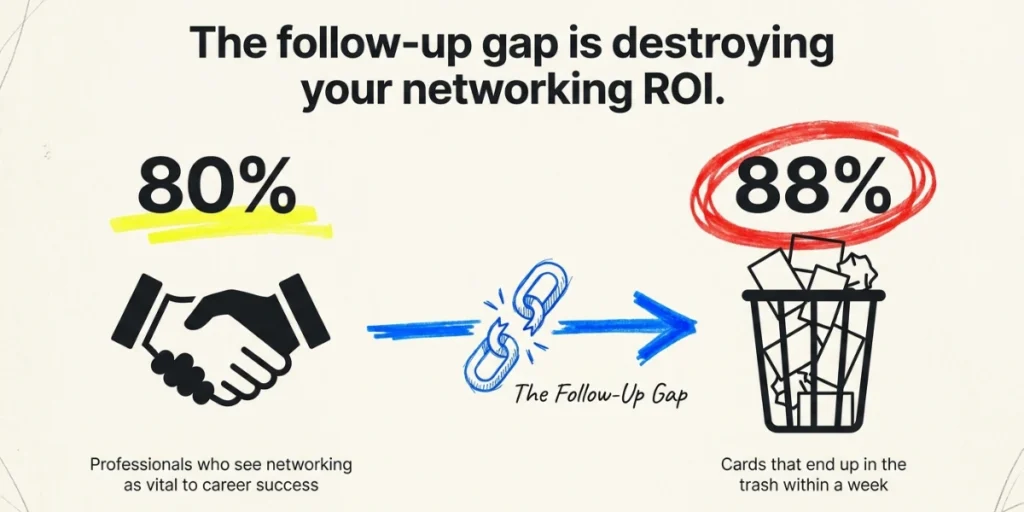
In a nutshell (TL;DR): Networking still drives careers. A global LinkedIn survey found that 80% of professionals see it as important to career success. Yet 88% of business cards get thrown away within a week. The problem is not the introduction. It is the follow-up. A social media business card fixes that by giving people an easy way to stay connected. In this guide, you’ll learn about social media business cards, which platforms fit your industry, and how to measure whether your card is actually working.
A. Why social media belongs on a modern business card?
A business card without social media is a dead end. The person you just met can call or email you, sure. But most won’t. They will lose the card before they get the chance.
Adding your handles or a scannable link changes that. The card stops being just a name and number. It becomes a door into your work, your portfolio, and your point of view.
The numbers back this up. Business cards already convert at around 12%, which beats the 2.35% average website conversion rate by a wide margin. Social ties that convert to something lasting. A follow on LinkedIn or Instagram keeps you visible long after the card ends up in a drawer.
There is also the trust factor. People look you up online before they trust you. A clear social profile, linked right from your card, lets you shape that first impression. You decide what they see first.
One thing worth saying upfront. Social media business cards do not replace your printed card. In my experience, the strongest setup pairs the two. A clean printed card with a QR Code, or a digital card backed by an NFC chip. You get the warmth of a real exchange and the staying power of a digital trail.
“The networking moment is no longer the handshake. It is the follow-up action that happens in the next 30 seconds. Business cards that create an instant digital connection consistently outperform cards that rely only on memory or manual search.” — Scanova Research Team
B. What are the three ways to add social media to a business card?
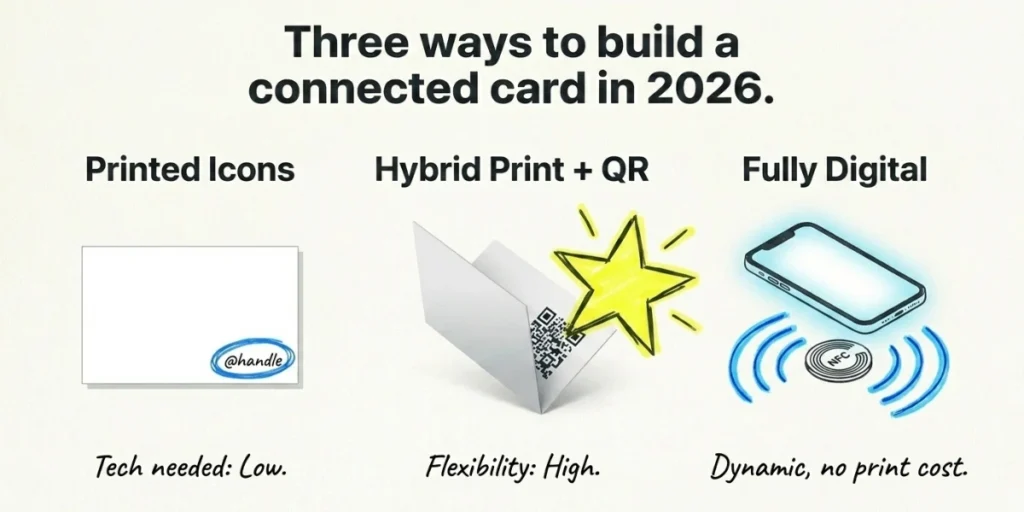
There are three formats that actually work in 2026. Each one fits a different work style.
Option 1: Printed icons and handles. You add the platform logos and your usernames straight onto the card. Simple, familiar, and it works without any tech on the receiver’s end.
Option 2: Printed card with a QR Code. A scannable code links to your profile or a landing page with all your handles. The card stays clean. The receiver scans and saves you with one tap.
Option 3: Fully digital business card. Your whole card lives on the phone. You share it through a QR Code, NFC tap, or a link. Every social profile becomes clickable, and you can update everything in real time.
Most people pick one and stick with it. I think the right move is to combine. Print a clean physical card with a QR Code on the back. The QR points to a digital card with all your live social links. You cover both worlds without choosing.
C. Which option is right for you?
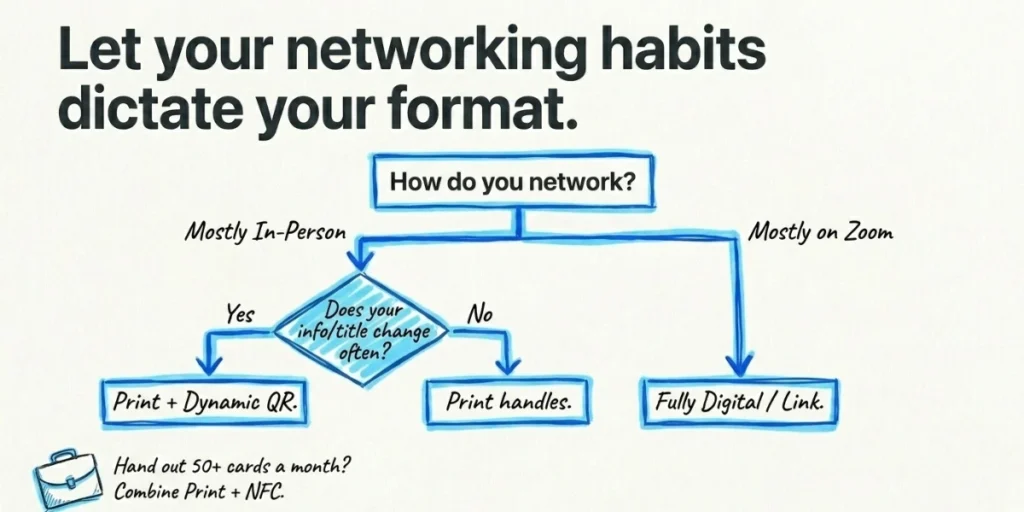
Pick based on three questions. They matter more than design taste.
How often do you meet people in person? If you network at events most weeks, a physical card still pulls weight. If most of your meetings happen on Zoom, a digital card is enough.
How often does your info change? Job titles, phone numbers, and handles shift over time. If yours change every year, do not print them straight onto the card. Use a dynamic QR Code that you can edit anytime, without reprinting.
How many platforms do you need to show? One or two handles fit fine on a printed card. Four or more is too much. Use a QR Code or a digital card to keep things tidy.
Here is the rough call I’d make:
- In-person, one platform, stable info: print the handle. Done.
- In-person, many platforms, or shifting info: print the card with a dynamic QR Code.
- Mostly remote, multi-platform creator or consultant: skip print. Use a fully digital card.
- Sales reps, agents, anyone who hands out 50+ cards a month: combine print and digital, ideally with NFC for one-tap sharing.
This framework keeps you from spending on cards you cannot update.
“The best setup for most professionals today is hybrid. A physical card creates the exchange, while a dynamic QR Code keeps the information flexible and always up to date.” — Siddharth Pangtey, Product Manager at Scanova
D. Which social platforms should you include?
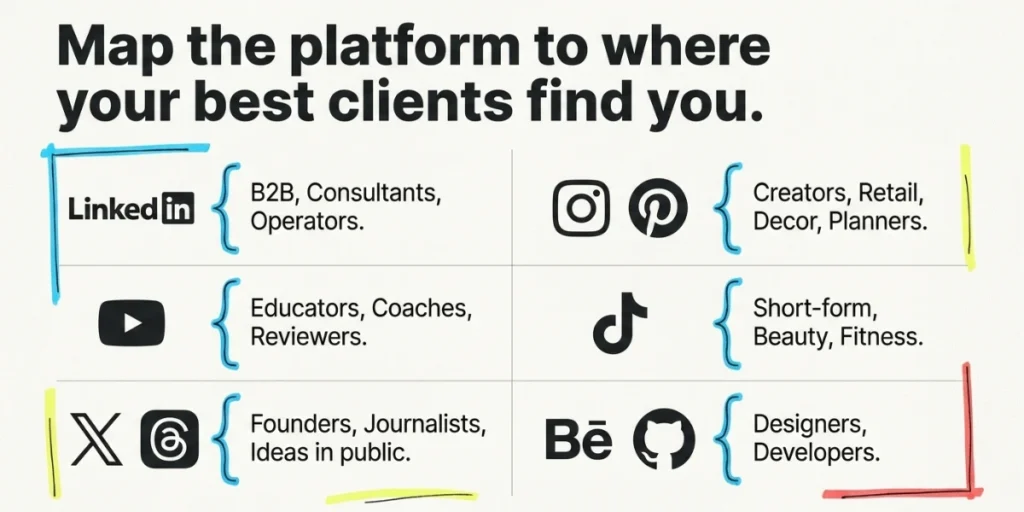
Not every platform belongs on your card. Pick the ones your audience already uses.
Here is how I sort it by role.
LinkedIn. The default for B2B, consultants, recruiters, and anyone selling to professionals. 84% of people use LinkedIn to grow their professional network. If you sell to teams or operators, LinkedIn is your first choice.
Instagram. The right fit for creators, photographers, designers, retail, hospitality, and personal brands. Visual work belongs here. For professionals who rely on visual content, using an AI photo enhancer can help improve profile images and portfolio assets before directing people to their social profiles.
YouTube. Strong for educators, coaches, product reviewers, and anyone who teaches with video. A YouTube link tells people you have depth, not just polish.
TikTok. Useful for creators in beauty, food, fitness, and short-form education. Skip it for traditional B2B.
X and Threads. Good for journalists, founders, builders, and anyone who shares ideas in public. Lower fit for service businesses.
Behance, Dribbble, GitHub. Niche, but vital for designers and developers. A portfolio link is often worth more than a social handle.
Pinterest. Worth including for wedding planners, interior designers, home decor brands, and food creators.
The rule I follow is simple. Pick three at most. List the ones where you actually post. A dead account on your card hurts trust faster than no account at all.
If you struggle to choose, ask one question. Where do my best clients first find me? Put that platform on the card.
E. How to design a social media business card that gets used?
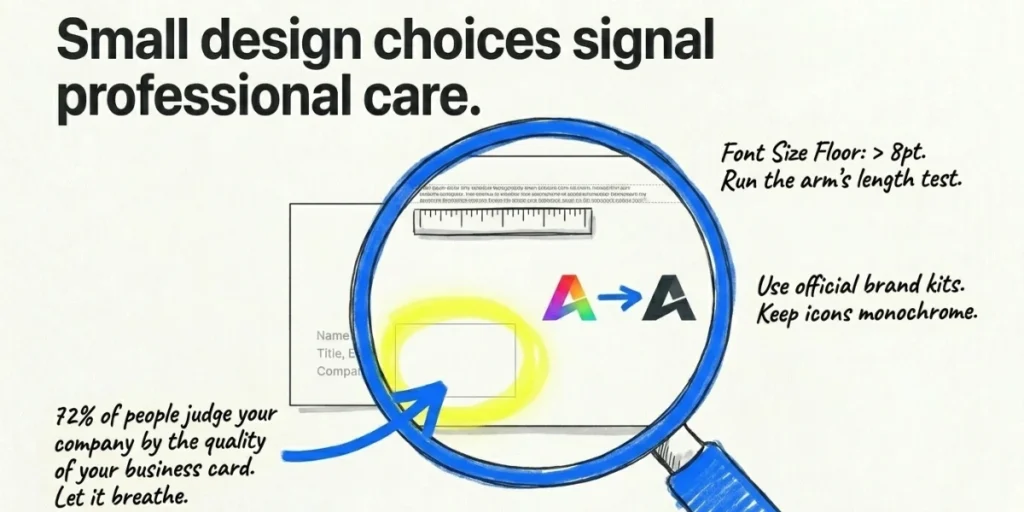
Design rules matter here. A bad layout can make even the right info invisible.
Use the 70/30 rule. Keep 70% of the card for your name, title, and contact info. The other 30% is for social handles, icons, or a QR Code. This keeps the card readable.
Use official brand kits. Download icons from Meta’s Brand Resources and LinkedIn’s Brand Guidelines. Do not recolor, stretch, or rotate them. Big platforms have strict rules, and breaking them looks amateur.
Keep icons monochrome. A single color, matched to your brand, looks cleaner than the full-color logos. It also keeps your card from looking like an ad reel.
Set a font size floor. Anything under 8pt becomes hard to read. Print a test card before placing a full order. Hold it at arm’s length. If you cannot read your own handle, neither can anyone else.
Pick a side and stick to it. Front for name, title, and primary contact. Back for social icons and the QR Code. A two-sided layout reads cleaner than a crowded single side.
Add white space. Cards that breathe look more premium. Cards crammed edge-to-edge feel cheap. The data backs this. 72% of people judge your company by the quality of your business card.
Small choices add up. A clean layout signals care, and care builds trust.
F. The QR Code route, done right
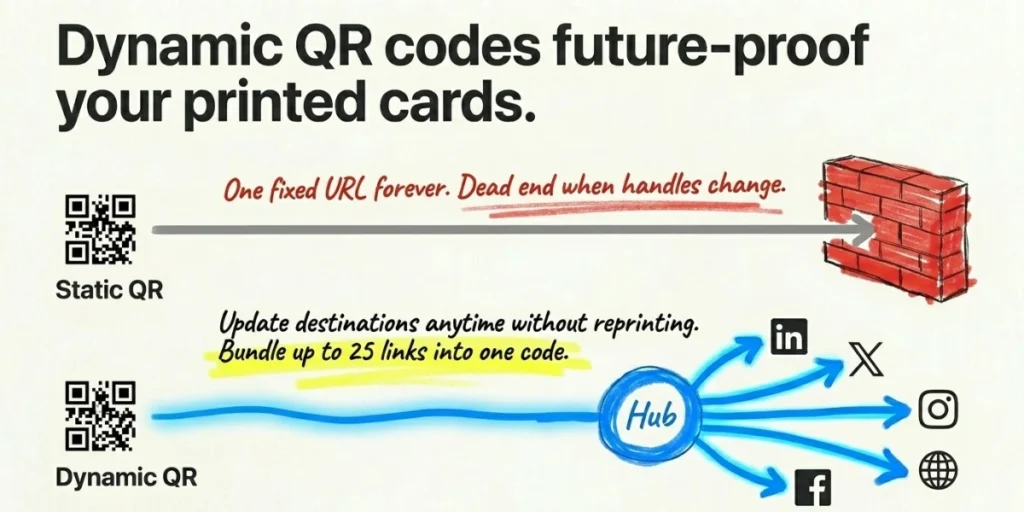
If you can only do one upgrade, do this one. A QR Code on your business card does more than save space. It turns a static card into a live tool.
There are two kinds. Static QR Codes link to one fixed URL forever. Dynamic QR Codes let you change the destination at any time, without reprinting the card. For social media, dynamic wins almost every time. Handles change. Profiles change. Your card should not need to.
Here is how I’d set it up. Use a QR Code generator that supports one landing page with multiple social profile links. Tools like Scanova let you bundle up to 25 social profiles into a single Business Card QR Code, along with contact details, a photo, and an “Add to Contacts” button. You get one scan, one save, and every link in one place.
Two design tips for the QR Code itself:
- Size it right. Print at no smaller than 0.8 by 0.8 inches. Smaller codes fail to scan in low light.
- Add a CTA frame. “Scan to connect on LinkedIn” or “Follow me on Instagram” lifts scan rates. A code without a prompt looks like a barcode.
The other reason dynamic codes matter: analytics. Good tools show you how many people scan, when, where, and from which device. That data tells you if your card is actually pulling its weight, or just looking pretty.
I’ll come back to measurement in a minute. First, the mistakes to avoid.
G. What are the mistakes that quietly kill your follow rate?
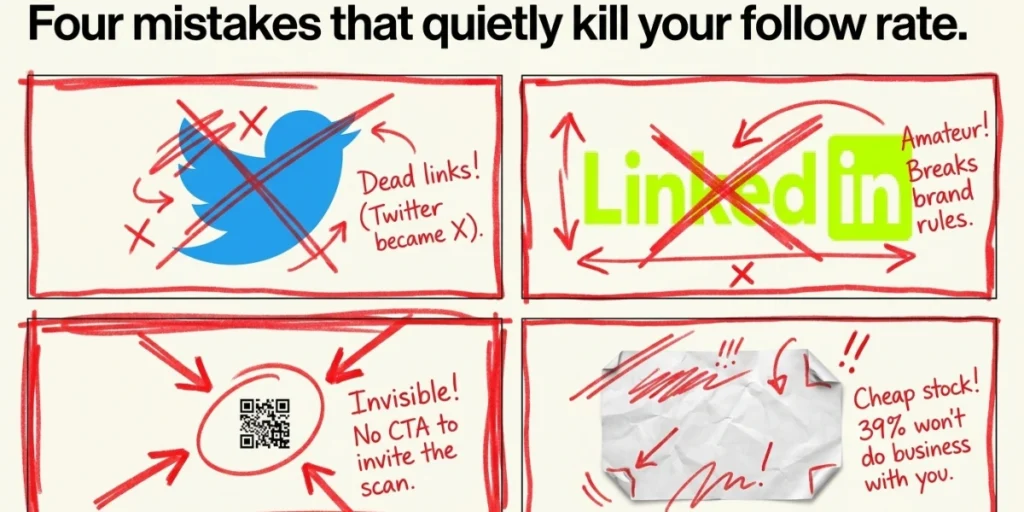
I have seen smart professionals hand out bad cards. Same mistakes, over and over.
Listing every platform you have ever joined. If your card lists six handles, none of them get followed. Pick three. Drop the rest.
Printing handles you might lose. Twitter became X. Accounts get banned. Static print plus shifting platforms is a recipe for dead links.
Modifying social logos. Stretched, recolored, or rotated icons break the platform’s brand rules and look amateur. Use the official files.
A QR Code too small to scan. Anything below 0.8 inches starts failing on phones in dim rooms. Test it before the print run.
No CTA next to the code. A bare QR Code does not invite a scan. A short prompt makes the difference.
Skipping the test scan. Print one sample card. Scan it on three phones. Confirm the link works before you order 500 more.
Using a static QR Code for handles. If you change your Instagram username or move companies, a static code becomes a dead end. Dynamic code solves this in a single edit.
Cheap card stock. 39% of people won’t do business with someone who hands them a cheap-looking card. The paper matters as much as the layout.
None of these are hard to fix. They just need a checklist before the print order goes in.
H. What are the industry quick-takes?
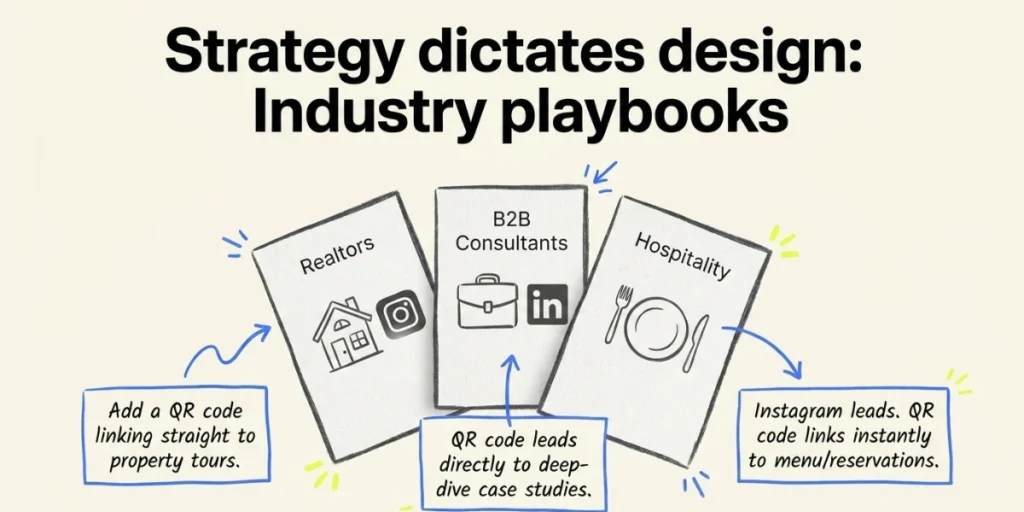
Not every card needs the same setup. Here is how I think about it by role.
Realtors. Put LinkedIn and Instagram on the card. Add a QR Code that links to your listings page. A property tour builds trust more than any tagline.
Photographers and videographers. Lead with Instagram. Add a Behance or portfolio link via a QR Code. Skip LinkedIn unless you serve corporate clients.
B2B consultants and agency leaders. LinkedIn is non-negotiable. Add a QR Code to your case studies or your podcast. Drop everything else.
Creators and influencers. Use a digital card or a Linktree-style landing page behind a QR Code. List your three biggest platforms. Make the strongest one the destination.
Sales reps and recruiters. Combine print with NFC or a QR Code. Add LinkedIn and your work email. Track scans to see which events convert.
Restaurant and hospitality owners. Instagram and Google Business Profile lead. Add a QR Code that links to your menu or reservation page. The card sells the visit.
Coaches and educators. YouTube and LinkedIn together. A QR code for your course or newsletter signup turns a card into a lead-capture.
Match the card to where your buyers spend their time. The rest is detail.
I. How to measure if your card is working?
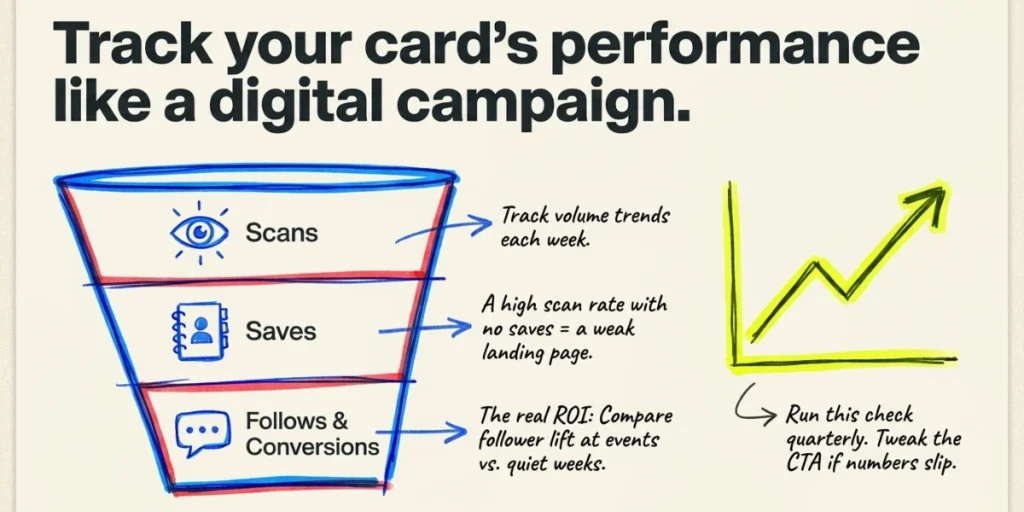
This is where most people stop short. They print, they hand out, and they hope. There is a better way.
If you use a dynamic QR Code, you already have the data. Track these four numbers.
- Scan volume. How many people scan the code each week or month? Trend matters more than any single number.
- Save-to-contact rate. How many of those scans result in a saved contact? A high scan rate with no saves means your landing page is weak.
- Follower growth from the card. Compare follower count at events vs. quiet weeks. The lift is your card’s real ROI.
- Conversion to DM or website visit. The end goal. A scan that leads to a real conversation is the only thing that pays back the print cost.
Run this check every quarter. If the numbers slip, tweak the CTA on the card or the landing page behind the QR Code. Small edits move the line.
J. FAQs: Social media business cards
1. How many social media handles should I put on a business card?
Three at most. Pick the platforms you actually post on. A dead account hurts trust more than no account at all.
2. Should I use icons or just text handles?
Icons read faster than text. Use the official brand kit logos in a single color. Keep the handle next to each icon so people know where to find you.
3. Are QR Codes still in style for business cards?
Yes. QR Code use is at an all-time high, and cards with QR or NFC features see around 30% more engagement. They are now the standard, not the exception.
4. Static or dynamic QR Code for a business card?
Dynamic. Handles, jobs, and links change. A dynamic QR Code lets you edit the destination at any time, without reprinting. You also get scan analytics.
5. Where should the social media handles go on the card?
Either at the bottom of the front or across the back of the card. Back placement keeps the front clean for your name and title.
6. Can I use Facebook, Instagram, or LinkedIn logos on my card?
Yes, as long as you follow each platform’s brand rules. Download the icons from the official brand resources page. Do not recolor, rotate, or stretch them.
7. What is the best free tool to make a social media business card?
A free QR Code generator like Scanova lets you create a Business Card QR Code with up to 25 social profile links, contact details, and an “Add to Contacts” button. No design software needed.
The Bottom Line
Your card has one job. Turn a meeting into a relationship.
Adding social media gives the other person a clear way to stay close to your work. A QR Code makes that route one tap away. A dynamic one means your card never goes stale.
Whatever tool you pick, design with the receiver in mind. Three platforms, clean layout, real handles, and a code they can actually scan. That is the whole formula.
If you are ready to test it, build a free Business Card QR Code in five minutes. Edit it as often as you need. Track every scan. And let your card do the work long after the handshake is done.