How to Use QR Codes for Social Media Marketing: A Complete Guide

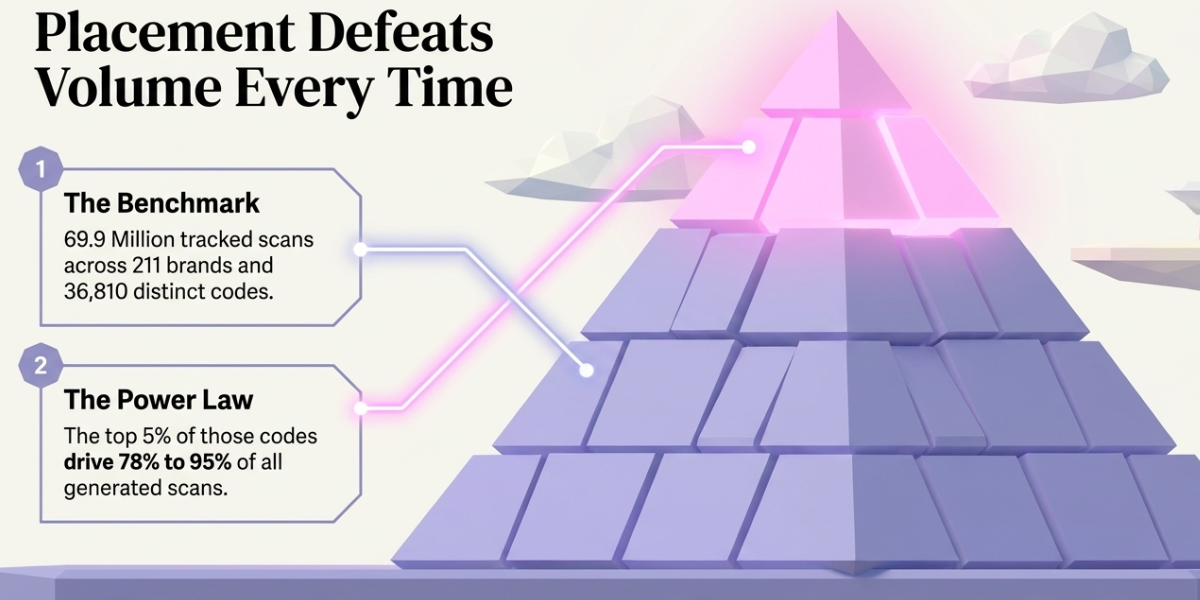
In a nutshell (TL;DR): A social media QR Code turns any printed or on-screen surface into a one-tap route to your profiles. One code can hold every platform you run. The built-in codes for Instagram, TikTok, and LinkedIn are free, but each links to a single profile and reports zero scans. A Dynamic QR Code can be edited after printing and tracked scan by scan. The best spots are packaging, store signage, events, receipts, print ads, and video end screens. Design decides the scan rate. And across the 69.9 million scans in our 2026 benchmark report, the top 5% of codes drive 78% to 95% of all scans. Placement beats volume, every time.
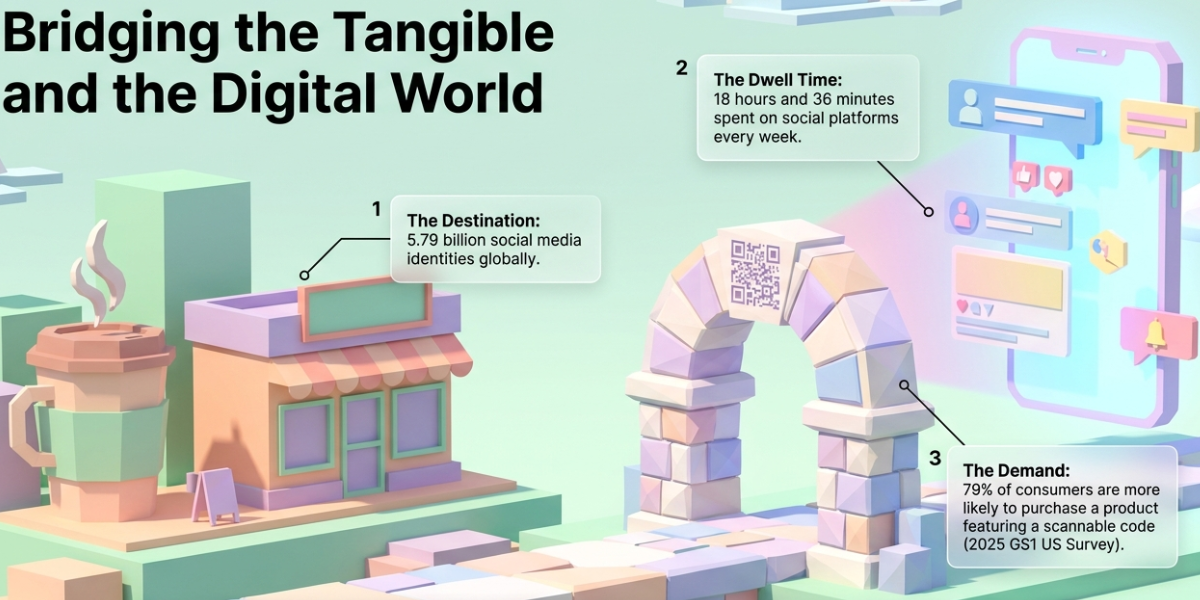
There are now 5.79 billion social media user identities worldwide, per DataReportal's April 2026 update. That is 69.9% of the planet. The average user visits 6.5 platforms a month and spends 18 hours and 36 minutes a week on them.
So your audience is already there. That is not your problem.
Your problem is the other direction. People hold your product. They walk past your store. They sit at your event. And none of that can be clicked. You print "Follow us @brandname" and ask for six steps: remember the handle, unlock the phone, open the app, tap search, type it, hope the spelling was right.
A QR Code asks for one step.
The demand is real. In a 2025 GS1 US consumer survey, "79% of consumers are more likely to purchase products with a scannable QR Code" that gives them more information. Marketers noticed. Bitly surveyed 250 of them and found 93% had increased QR Code usage in the previous year.
The problem is that most of those codes are wasted. They point at a profile nobody can measure. They sit in the wrong place. They ask for nothing.
I work on QR Code campaigns at Scanova, so I see the scan data behind both outcomes. This guide covers what separates them: how to build one code for every profile, where to put it, what each platform can and cannot do, how to design for scan rate, and how to prove the result.
A. What Is a Social Media QR Code?
A social media QR Code is a scannable square that opens your social profile when scanned with a phone camera.
There are two kinds, and they are not the same thing.
A single-profile code points at one URL, like instagram.com/yourbrand. Scan it, the app opens, the profile loads.
A multi-profile code opens a mobile landing page first. That page lists every profile you run. The scanner picks the one they already use. With Scanova's Social Media QR Code, you can hold 25+ profiles behind a single code.
That second type matters more than it sounds. Your print run is fixed. Your social stack is not. A carton printed in March should not become useless because you launched a TikTok account in June.
Static or dynamic: the choice that decides everything
A static code stores the URL inside the pattern itself. It is free and it never expires. It also cannot be changed or tracked. The destination is baked into the ink.
A dynamic code stores a short redirect URL instead. That redirect points wherever you tell it, and you can change the destination at any time. Every scan is logged.
For social media, dynamic wins on both counts. Handles change. Platforms fall out of favor. Campaigns end. And a code you cannot measure is a code you cannot defend in a budget meeting.
B. Why Do QR Codes Work So Well for Social Media?
Because the two things share a device.
Social media is a phone habit. QR scanning is a phone habit. There is no gap to cross, no app to install, no password to type. Most people now scan with the native camera, which means zero friction between a printed code and a profile page.
Scanning is also still growing. Bitly's 2026 trends report analysed 1.9 million codes and found global scans up 6.2% year over year. More telling: scans are rising far faster than new codes are being created, which means people are returning to existing codes.
The scale proof is older but still the best one. In 2022, Coinbase ran a 60-second Super Bowl ad that was nothing but a bouncing QR Code. No voiceover. No logo. It drove more than 20 million hits in one minute and crashed the app for about an hour. The company's chief product officer called the response "historic and unprecedented."
You do not need a 14 million dollar ad slot to use the lesson. People scan when the code is visible, the context is clear, and the payoff is obvious.
C. How Do I Create a QR Code for All My Social Media Profiles?
Six steps. It takes about five minutes.
Step 1. Collect your profile URLs. Open each app, copy the public link, paste it into a note. Check every one in a browser where you are logged out.
Step 2. Pick the code type. Choose a Social Media QR Code if you want all profiles behind one scan. Choose a URL QR Code if you want to send people to one specific profile, post, or Reel.
Step 3. Set it to dynamic. This is the step people skip. It is also the one that makes the code editable and trackable later.
Step 4. Build the landing page. Order the profiles by the ones you want to grow. Add your logo and your brand colours. Keep the list short enough to read in one screen.
Step 5. Design the code. Add a logo in the centre and your brand colour in the pattern. Keep the pattern dark and the background light.
Step 6. Test before you export. Scan it with an iPhone and an Android, from the distance people will really stand at. Then download a vector file (SVG, EPS, or PDF) for anything going to print.
D. Where Should I Put a Social Media QR Code?
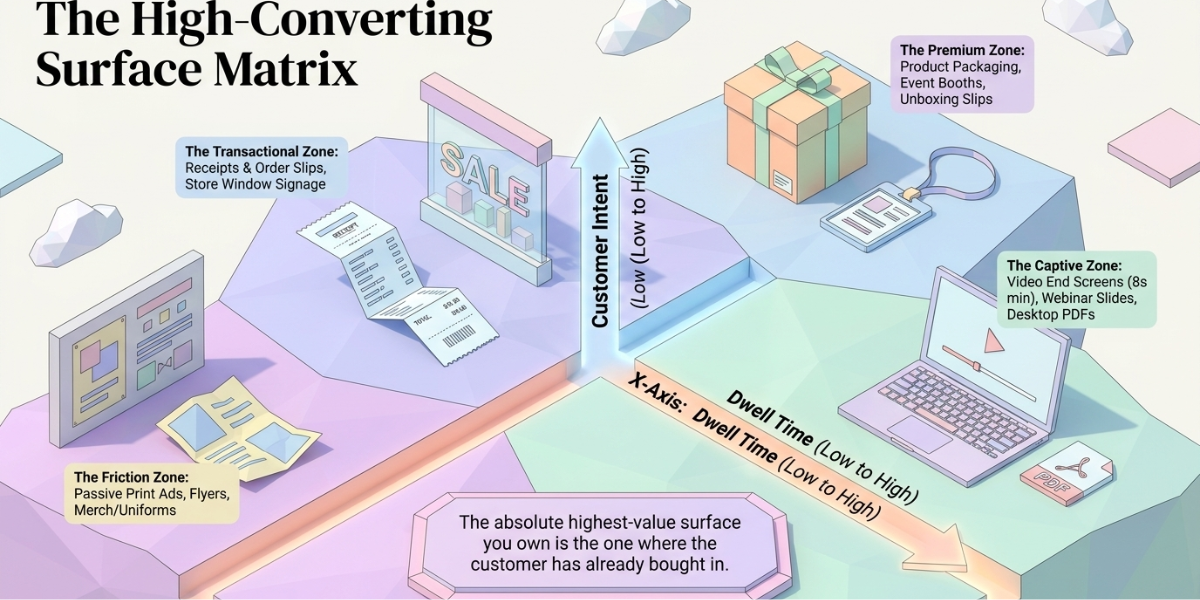
This is where campaigns are won or lost. Here are 11 placements that earn scans, and the tip that makes each one work.
1. Product packaging. The highest-value surface you own, because the customer already bought in. Put it on the back panel near the ingredients, not hidden under a flap. Our consumer goods data shows packaging codes keep earning scans for years after the print run.
2. Store windows and shelf talkers. Print it big. A window code is read from two metres away, so it needs to be far larger than a packaging code.
3. Event booths and stage screens. Events are the single best scan-to-follow moment, because people are already holding their phones. Put the code at eye level, not on the table.
4. Receipts and order slips. Cheap, high volume, and timed perfectly. The customer is standing still with the phone already out.
5. Business cards and event badges. One code, every profile. It beats listing four handles in four-point type.
6. Print ads, flyers, and direct mail. Add a reason to scan, not just a code. "Scan for the recipe" outperforms "Follow us."
7. Video end screens and TV ads. Leave the code on screen for at least eight seconds. Anything shorter and people are still reaching for the phone when it disappears.
8. Shipping boxes and packing slips. The unboxing moment is when people most want to share. Point the code at a hashtag page, not a generic profile.
9. Influencer and PR kits. Give creators a code that opens your profile hub. Give each one a separate code so you can see who actually drove follows.
10. Merch, cups, and uniforms. Curved and soft surfaces distort the pattern. Print larger than you think and add error correction.
11. Email signatures and PDFs. This one works on desktop, where the reader has a second screen in their hand.
E. Which Social Media Campaigns Work Best With QR Codes?
Placement gets the scan. The campaign decides whether it was worth anything.
- Scan to follow. The simplest play. A code at the counter, the booth, or on the pack, with a clear line: "Scan to follow us on Instagram."
- Contests and giveaways. Entry is the scan. Add a follow or a tagged post as the condition. Promotional codes convert well because the reward is instant and obvious.
- User-generated content drives. Point the code at a page that shows the hashtag, the rules, and the prize. Put it where the product is used, not where it is bought.
- Exclusive content drops. Behind-the-scenes clips, early access, a creator collab. Scarcity is a strong reason to scan.
- Social commerce. Link the code straight to the shoppable post or product tag, not to the profile. Every extra tap loses people.
- Scavenger hunts. Multiple codes, multiple locations, one reward. Gamified campaigns give people a reason to scan more than once.
F. How Does Each Platform Handle QR Codes?
Most platforms give you a free code. Nearly all of them are static, single-purpose, and silent on data. Here is where each one stands.
|
Platform |
Built-in code |
Where it sends people |
Scan analytics |
Editable after sharing |
|
|
Yes, in the app menu |
Your profile only |
No |
No |
|
TikTok |
Yes, in the profile menu |
Your profile only |
No |
No |
|
|
Yes, mobile app only |
Member profiles, not Pages |
No |
No |
|
Snapchat |
Yes, Snapcode |
Your profile |
No |
No |
|
X |
Yes, profile share menu |
Your profile |
No |
No |
|
|
Varies by build |
Page or Messenger chat |
No |
No |
|
YouTube |
Share link only |
Channel or video |
No |
No |
|
|
Retired (Pincodes) |
Not available |
No |
No |
|
|
Yes, click-to-chat |
A chat with you |
No |
Limited |
Three things to take from that table.
Native codes are fine for a handshake. Instagram's code replaced the old Nametag feature in 2020 and works well when two people are standing together. It was built for that, and nothing more.
None of them report a single scan. You will never know if the 50,000 cartons worked. For a campaign with a budget attached, that is disqualifying.
They break when you rename. Change your handle or your vanity URL and the printed code is dead. A dynamic code survives it, because you just repoint the redirect.
My rule is simple. Use the native code to swap details with a person. Use a dynamic code for anything you print, publish, or pay for.
G. Do QR Codes Work Inside a Social Media Post?
Partly, and it depends on the screen.
The old objection was that nobody can scan a code on the same phone they are scrolling with. That is now only half true. On an iPhone, you can screenshot the post and open the code from Photos. On Android, Google Lens reads codes straight from the gallery.
So a code in a post is still useful. It just will not match the scan rate of a printed one.
Where it does work well:
- Second-screen content. Webinar slides, livestream overlays, a screen behind a stage.
- Pinterest Pins and infographics. People save these, then come back on another device.
- Carousels on desktop. LinkedIn and X get heavy desktop use, and a desktop reader has a phone next to them.
Where it fails: a feed post meant to be read on one phone with no reason to screenshot. In that case use the link sticker, the bio link, or the caption. For a deeper breakdown, see our guide on QR Codes on social media posts.
H. How Do I Design a QR Code People Actually Scan?
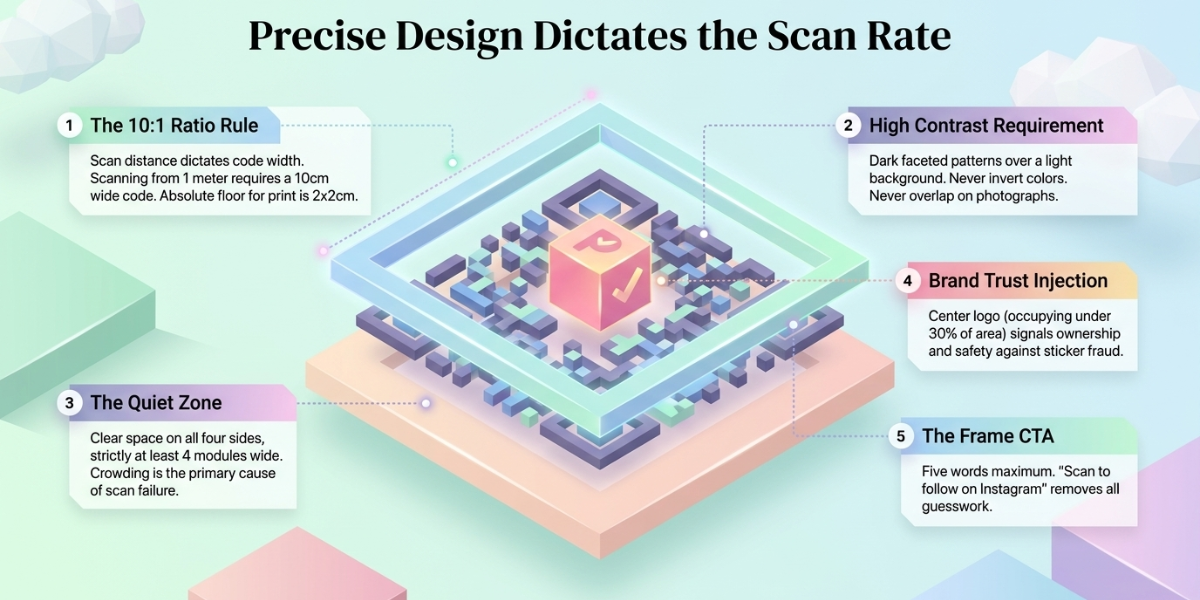
Design is not decoration here. It is scan rate.
Size. The working rule is a 10:1 ratio of scan distance to code width. Scanning from one metre needs a code about 10 cm wide. For print, 2 x 2 cm is the floor, never the target.
Contrast. Dark pattern on a light background. Never invert it. Never put the code over a photo.
Quiet zone. Leave clear space around all four sides, at least four modules wide. Crowding the code is the most common reason a scan fails. Our design guidelines cover the rest.
Logo. A centre logo helps. It signals who the code belongs to, which matters for trust. Keep it under about 30% of the code area.
Call to action. A bare code gets ignored. Say what happens next. "Scan to follow on Instagram" tells the person the platform, the action, and the payoff in five words.
Frames. A frame with a short line of text lifts scans because it removes the guesswork.
Then test. Bright light, low light, through a shop window, at an angle, on an older Android. One bad print run costs more than ten minutes of testing.
I. How Do I Measure a Social Media QR Code Campaign?
This is the part that turns QR Codes from a gimmick into a channel.
A dynamic code gives you scan analytics out of the box:
- Total scans and unique scans
- Date, time, and day of week
- City and country
- Device and operating system
Those four alone answer questions print never could. Which store location pulled? Which day of the event? iPhone or Android, and does your landing page work on both?
Then layer on two things.
One code per placement. Do not print the same code on the carton, the poster, and the receipt. Print three. Now you can track scans by surface and kill what does not work.
UTM parameters on the destination. Scans tell you the physical side. UTMs carry the campaign into GA4, so you see what happened after the tap.
Set a benchmark before you start. In our analysis of 69.9 million scans across 211 brands and 36,810 codes, the top 5% of codes drove between 78% and 95% of all scans. That concentration is the real insight. A few well-placed codes carry almost everything. Printing more codes is not a strategy.
[YELLOW: confirm the 69.9M / 211 brands / 36,810 codes figures against the live benchmark report at publish time, in case the dataset has been refreshed.]
J. What Mistakes Should I Avoid?
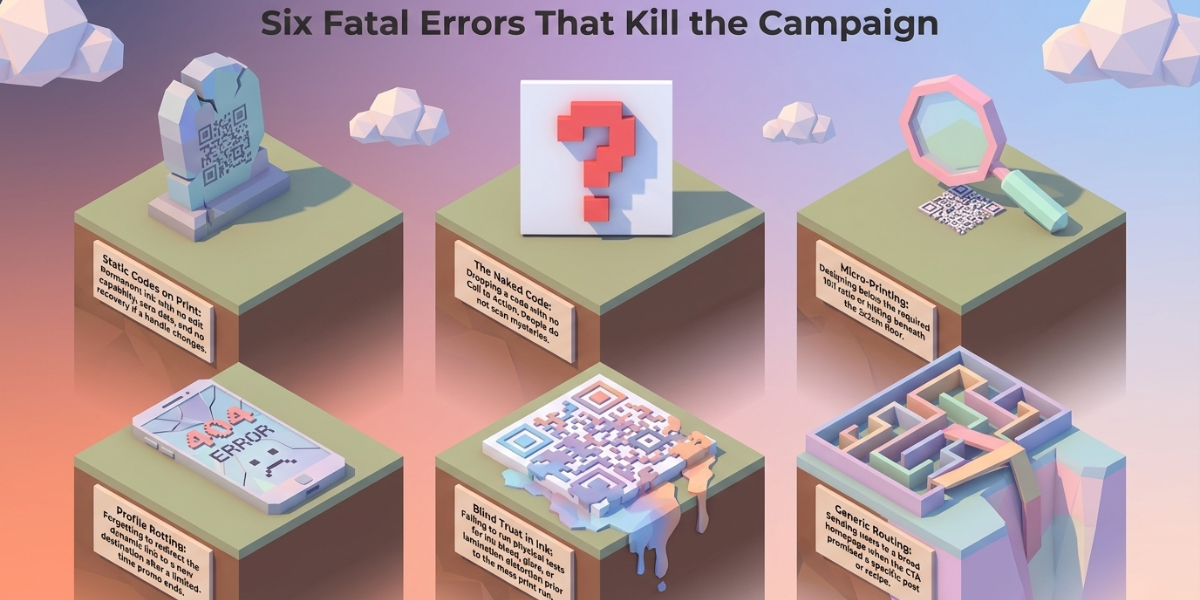
The same six come up again and again.
- Using a static code on a print run. No edits, no data, no recovery when the handle changes.
- No call to action. A naked code is a question mark. People do not scan question marks.
- Printing it too small. The most expensive mistake, because you only find out after delivery.
- Sending everyone to a profile. If the post is the reason they scanned, link the post.
- Never testing after print. Ink bleed, glare, and lamination all change the result.
- Letting the destination rot. The code outlives the campaign. Point it somewhere useful when the promo ends, or redirect it.
Bitly's marketer survey points at the same wall from the audience side. Over half, 55%, said customers simply did not understand how to use the codes. Another 21% blamed poor placement. Both of those are design problems, not technology problems.
K. Are Social Media QR Codes Safe?
The technology is. The trust around it needs work.
The US Federal Trade Commission has warned that "scammers hide harmful links in QR Codes to steal personal information," in a consumer alert that is still the clearest public guidance available. People have read those warnings. Some now hesitate before scanning anything.
Four things reduce that hesitation:
- Use a branded short domain. When the URL preview shows your brand instead of a random string, people tap through.
- Put your logo in the code. Ownership is visible before the scan.
- Say where the code goes. "Scan to follow us on Instagram" is its own safety signal.
- Protect physical codes. Sticker fraud is real. Use tamper-evident placement and check public-facing codes on a schedule.
L. Which QR Code Generator Should I Use?
Judge on five things, not on price alone.
- Dynamic codes and editing. Can you change the destination after printing?
- Analytics depth. Scans by time, place, and device, with export.
- Design control. Logo, colours, frames, and vector export for print.
- Multi-profile support. One code that holds every platform you run.
- Reliability. Your code lives on the provider's redirect. If that goes down, so does your campaign.
Plenty of tools cover one or two of these. Free generators usually cover none, because a free static code cannot be edited or measured.
We built Scanova's Social Media QR Code around all five, which is why it holds 25+ profiles behind a single code with full scan analytics and vector export. Compare it against whatever else is on your shortlist. The criteria above are what matter, whichever tool you land on.
Frequently Asked Questions
1. Can I create one QR Code for all my social media accounts?
Yes. A Social Media QR Code opens a mobile landing page that lists every profile you run. The scanner picks the platform they already use. You can add or remove profiles later without reprinting anything.
2. Does Instagram have its own QR Code?
Yes. Open your profile, tap the menu, and select QR Code. It replaced the Nametag feature in 2020. It only points to your profile, it cannot be edited, and it reports no scan data.
3. Can I track how many people scan my social media QR Code?
Only with a dynamic code. Static codes and the built-in platform codes cannot be tracked. A dynamic code logs total scans, unique scans, time, location, and device.
4. How big should a social media QR Code be?
Use a 10:1 ratio of scan distance to code width. Scanning from 50 cm needs about 5 cm. Scanning from 1 metre needs about 10 cm. For print, 2 x 2 cm is the absolute minimum.
5. Are free social media QR Code generators safe?
Most generate static codes, which are safe but permanent and untrackable. The risk sits with free dynamic codes, because the redirect belongs to the provider. If they shut down or start charging, your printed code can stop working.
6. What should the call to action say?
Name the platform and the payoff. "Scan to follow on TikTok" works. "Scan me" does not. Five words is usually enough.
7. Do QR Codes expire?
No. Static codes work forever. Dynamic codes work for as long as the subscription behind them stays active.
The Bottom Line
Social media is where your audience already spends 18 hours a week. A QR Code is the shortest route from everything you own in the physical world to that feed.
The parts that decide the outcome are not technical. Use a dynamic code so you can edit and measure it. Put it where people are already holding a phone. Tell them exactly what they get. Then read the scan data and move the budget to whatever worked.