Wedding Website With QR Code: All You Need To Know


In a nutshell (TL;DR): A wedding website with QR Code gives guests every detail in one scan. Print the code on invites, signs, and favors. Guests scan it to RSVP, find the venue, and share photos. Per The Knot, 49% of couples now add QR Codes to wedding stationery. This guide covers the six setup steps, print and size rules, etiquette (yes, the “tacky” debate), and 11 smart places to use your code.
Here is the short answer. A wedding website with QR Code is the easiest way to get guests from paper to your wedding page. You turn your website link into a scannable square. Guests point their phone camera at it. Your site opens. No typing, no lost links, no “what’s the website again?” texts.
Couples have voted on this already. According to The Knot’s 2025 Real Weddings Study, 49% of couples added a QR Code to their save-the-dates or invitations in 2024. Usage has grown 42% since 2021.
The problem is that most couples print the code and hope. Some codes are too small to scan. Some point to half-built pages. Some go dead before the big day.
I work on QR tools at Scanova, so I see both the wins and the failures. In this guide, I share what works: how to create the code, where to place it, how big to print it, and when to leave it off the invite. I also quote stationery designers on both sides of the etiquette debate.
A. What is a wedding website QR Code?
A wedding website QR Code is a scannable square that stores your wedding website link. When a guest scans it with a phone camera, the site opens in their browser. One code can carry your RSVP form, venue map, dress code, registry, and schedule, because your website carries them.
The scan habit is now mainstream. Scanova’s 2026 QR Code statistics report found that 44.6% of internet users scan a QR Code at least once a month.
Your guests already scan codes to pay bills and read menus. A wedding code asks nothing new of them.
Static vs. dynamic: the one choice that matters
You must make one decision before you create anything: static or dynamic. Here is the difference.
|
Difference |
Static QR Code |
Dynamic QR Code |
|---|---|---|
|
Link storage |
Baked into the printed square |
On an editable redirect |
|
Change the link after printing |
No |
Yes |
|
Scan tracking |
No |
Yes |
|
Cost |
Free |
Free trial; paid plans |
|
Best for |
Simple, final links |
Anything already at the printer |
A static QR Code is free and permanent, but the link can never change. A dynamic QR Code lets you change the destination at any time, even after 200 invites are in the mail.
Moved your RSVP page? Changed website builders? A dynamic code survives that. It also counts scans, so you know the code works.
My take: if the code goes on printed stationery, choose dynamic. Print is unforgiving. The edit button is worth it.
B. Why pair your wedding website with a QR Code?
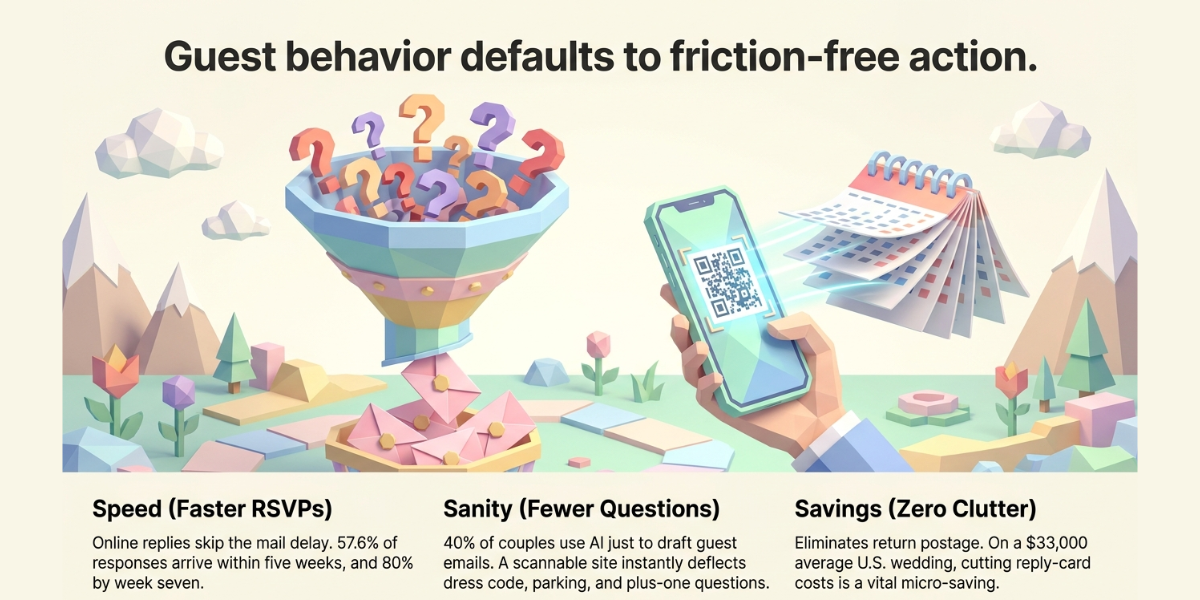
Because guests act on what is easy, and a scan is easier than typing a link. The numbers back this up in three ways.
- RSVPs come back faster. RSVPify analyzed 500,000+ digital wedding RSVPs. It found 57.6% of responses arrive within five weeks, and about 80% by week seven. Online replies also skip the mail delay. A scan takes guests straight to the form, so fewer replies stall.
- It cuts cost and clutter. Reply cards need printing plus return postage. A code on the invite you already printed costs nothing extra. The average U.S. wedding ran $33,000 in 2024, per The Knot. Small savings matter.
- It answers questions before they reach you. Zola’s 2026 First Look Report (11,500+ couples) shows how heavy guest communication has become — 40% of couples even use AI to draft guest emails. A scannable website deflects the dress code, parking, and plus-one questions on its own.
One more win: updates. Venues shift. Timelines slip. You fix the website once, and every printed code stays correct. Paper can never do that.
It helps most when guests are far away. For a destination or multi-day wedding, the website holds travel routes, hotel blocks, and a day-by-day schedule. Guests scan the same code all weekend. If you host two guest lists — say, ceremony-only and reception — give each invite its own code and page. Everyone sees only what applies to them.
C. How do you create a QR Code for a wedding website?
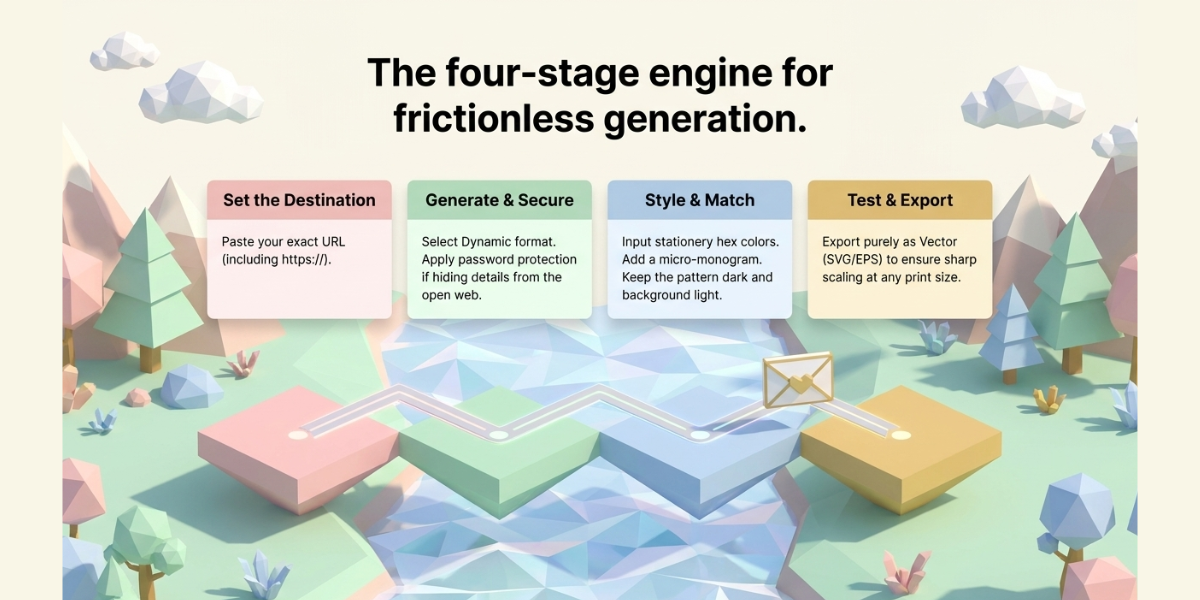
Creating a wedding website QR Code comes down to four moves: open an account, paste your website link, pick dynamic, then design and download the code.
The whole setup takes about 15 minutes, and most of that goes into making the code look right on your stationery. I ran a fresh setup on our own generator while writing this guide, so the steps below match the screens you will actually see.
Before you start, have these three things ready:
- Your wedding website URL, copied exactly, including the
https:// - Your wedding color codes (hex values from your stationery designer, if you have them)
- Your monogram or logo file, ideally a PNG with a transparent background
Step 1: Finish your wedding website first
Get the RSVP form, date, venue, and schedule live before you generate anything. Open every page on your phone and tap through it the way a guest would.
Guests scan early, sometimes the day the envelope arrives, so a half-built page is a wasted first impression. Never point a code at a “coming soon” placeholder.
Step 2: Create your account and log in
Go to our sign-up page and enter your email address and a password. Confirm your email if you are prompted to. Your free trial starts immediately, runs for 14 days, and does not ask for a credit card. If you already have an account, use the log-in page instead.
You land on the dashboard. Everything you create lives here, which matters later: this is where you will edit the link and check scans after your invites are in the mail.
Step 3: Start a new code and pick the Website URL category
Click Create QR Code in the left sidebar. You will see a grid of categories such as Website URL, Business Card, Image, and Event. Choose Website URL.
This is the right pick for a wedding site because it sends every scan straight to a live web page. Ignore the wedding-specific templates for now if all you want is a link to your own site.
Step 4: Paste your wedding website link
Drop the URL into the content field and click Continue. Paste it rather than typing it, since one wrong character sends every guest to a 404.
There is also a conditional redirection setting here, which routes scans to different pages based on the guest’s country, device, or operating system. Most couples can skip it. It earns its keep for destination weddings where, say, guests in one country need a different travel and visa page.
Step 5: Name the code, then choose static or dynamic
Give the code a name you will still recognize a year from now, something like “Wedding site, invitations.” Tags are optional and only useful if you plan to create several codes, for example one for the invite and another for the photo gallery.
Now pick the type. This is the one choice you cannot undo after printing:
- Dynamic for anything going to a printer. You can change the destination later and see how many people scan.
- Static only for screen-only save-the-dates, where a reprint costs nothing.
On dynamic codes you can also turn on password protection, which helps if you would rather your address and schedule not sit on the open web. Then click Create QR Code.
Step 6: Design it to match your stationery
Your code appears in plain black and white. Open the design options and make it yours:
- Colors. Swap black for your wedding palette using your hex codes. Keep the pattern dark and the background light. Light-on-dark and low-contrast pairings like gold on blush are the most common reason a pretty code fails.
- Center image. Add a monogram or logo in the center. Keep it small so it does not cover too much of the pattern.
- Frame. Pick a frame and set the caption to something instructional, like “Scan to RSVP.” A bare square gets ignored; a labeled one gets scanned.
- Shape. Some couples go further with a heart-shaped QR Code for save-the-dates.
Every change previews live, so you can see the moment a design choice starts eating into readability.
Step 7: Test a printed proof, not the screen
Scanning off your laptop proves nothing about paper. Print one sample at the exact size it will appear on your stationery, on the actual paper stock if your printer can send you a proof.
Then scan it three ways: an iPhone, an Android, and the oldest phone you can borrow. Test it under warm dim light too, because reception lighting is nothing like your desk lamp. If any phone hesitates for more than a second or two, go back to Step 6 and raise the contrast or the size before you approve the run.
Step 8: Download print-ready files
Download a vector file, meaning SVG, EPS, or PDF, and send that to your printer. Vector files stay sharp at any size, so the same file works on a 2 cm RSVP card and a 6-inch welcome sign. If your printer insists on a raster file, export at 300 DPI or higher. PNG is fine for screens and digital save-the-dates.
Save the files somewhere you will find them in six months. You will want them again for signage, favors, and thank-you cards.
Two things that go wrong most often, and the fix: if the code scans on your phone but not a guest’s, it is almost always printed too small or too low in contrast. If it scans perfectly but lands nowhere, the link was mistyped or the page moved, which is a two-minute dashboard fix on a dynamic code and a reprint on a static one.
Setting up your site this week? You can create a wedding website QR Code and test the flow for free before your stationery deadline.
D. What should your wedding website include before guests scan?
Before any code goes to print, your website needs seven things live. A scan that lands on a thin page wastes the whole setup. Here is my pre-print checklist:
- Your names, date, and venue: with a tap-to-open map link
- The RSVP form: one tap from the landing page, working on phones
- Schedule: start times for ceremony, cocktails, and reception
- Dress code: the question guests ask most, answered in one line
- Travel and stay: hotel blocks, parking, and shuttle details
- Registry links: listed on the site, so the invite never has to mention gifts
- An FAQ: plus-ones, kids, weather plans, and photo rules
Walk through the site on your own phone before approving stationery. Slow pages and tiny buttons show up fast on mobile.
If your site has a password, print it right beside the code. And keep the page current after printing. The code is a doorway; the website is the room guests actually stand in.
E. Where should you use your wedding QR Code? 11 smart ideas
Use one code across the whole wedding journey, not just the invite. Here are 11 placements I have seen work, in timeline order.
|
Stage |
Placement |
What guests get |
|---|---|---|
|
6–12 months out |
1. Save-the-dates |
Date, city, hotel blocks |
|
2–3 months out |
2. Invitation details card |
Full site + RSVP |
|
2–3 months out |
3. RSVP card |
|
|
Wedding day |
4. Welcome sign |
Schedule and Wi-Fi |
|
Wedding day |
5. Seating chart sign |
|
|
Wedding day |
6. Table cards |
|
|
Wedding day |
7. Menus and programs |
Ingredients, ceremony order |
|
Wedding day |
8. Guest book station |
Written or video messages |
|
Wedding day |
9. Livestream cards |
Stream link for remote guests |
|
Send-off |
10. Favors and koozies |
Playlist or thank-you note |
|
After |
11. Thank-you cards |
Photo gallery reveal |
Three of these earn extra attention:
Photo collection is the sleeper hit. A table card that says “Scan to share your photos tonight” turns every guest into a second photographer. Guests upload to a shared gallery from their browser. No app, no email chains. You get the candid shots your photographer missed, the same night.
Livestream cards include everyone. Mail a small card to guests who can’t travel. One scan opens the stream; no login walls, no long links to mistype.
The welcome sign saves your phone. Print the code big on day-of signage. Late guests find the schedule. Early guests find the bar menu. Nobody texts you at the altar.
Thank-you cards close the loop. After the wedding, point your dynamic code at the photo gallery. The same code that collected RSVPs now delivers memories. That reuse is only possible with an editable QR Code.
F. How big should a wedding QR Code be? Print rules that save reprints
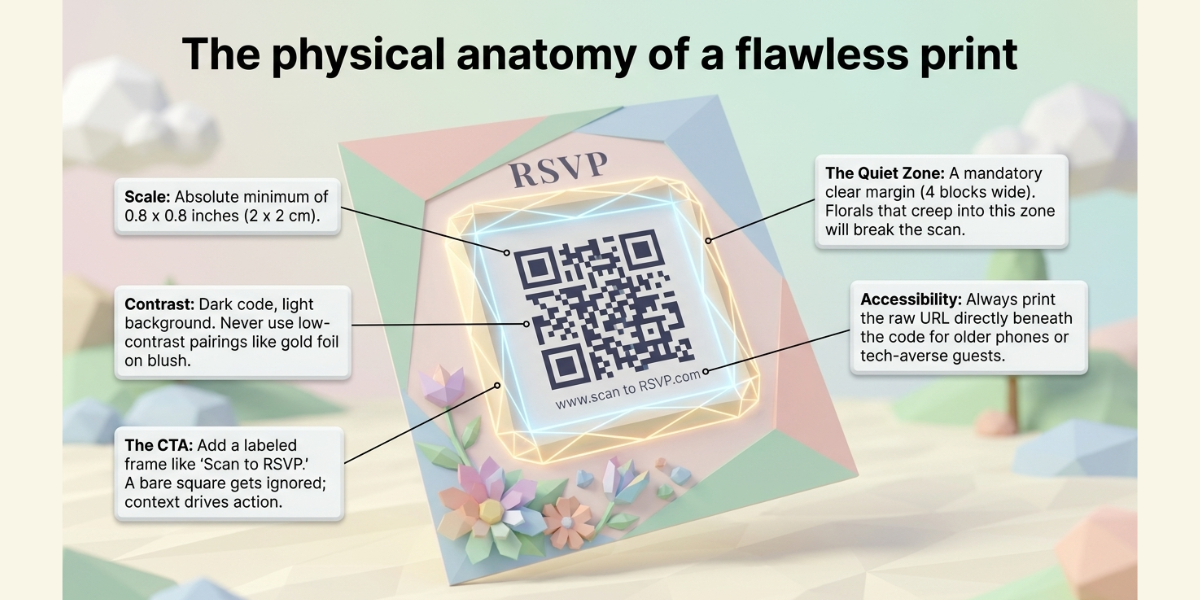
Print the code at least 0.8 × 0.8 inches (2 × 2 cm) on stationery. Below that, older phone cameras struggle. For signs, use the 10:1 rule — the code should be one-tenth of the scan distance. A welcome sign read from 5 feet needs a 6-inch code. Full sizing math is in Scanova’s minimum QR Code size guide.
Four more rules protect your print run:
- Keep contrast high. Dark code, light background. Gold foil on blush looks lovely and scans terribly. If the suite is dark, place the code in a light box rather than inverting the colors.
- Respect the quiet zone. Leave a clear margin around the code — about the width of four of its smallest squares. Florals that creep into the margin break scans.
- Print the URL under the code. One short line: “Scan or visit knotandkey.com.” It rescues guests with older phones and, per accessibility basics, anyone who can’t use a camera.
- Add a call to action. “Scan to RSVP” outperforms a bare square. Codes without context get ignored; guests need to know the reward.
If you add a logo or heavy styling, generate the code at high error correction so decoration never eats data.
G. Is it tacky to put a QR Code on a wedding invitation?
No, but placement decides everything. Nearly half of couples now use one, so guests are not surprised by it. The real debate is where it sits, and stationery designers split on this.
The case against is aesthetic. Sally Thompson, founder of letterpress studio Sal Studios, puts it bluntly: “A QR Code on an invitation is a sticky note on a painting.” Her fix: keep the main invite pure and print “RSVP at [your site]” in matching type.
The case for is guest experience, with limits. Stationery designer Claudia Owen draws the line well: “A QR Code should support your invitation, not replace the important details.” Date, names, and venue stay printed. The code carries the extras.
My advice sits between them, and it matches what The Knot’s Chapelle Johnson recommends in her QR stationery guide: keep the code off the front of a formal invite. Put it on the details card, the RSVP card, or the back.
For casual invites, signs, and favors, place it anywhere. And for older guests, always print the URL, or list a phone number for RSVPs. A code should add a lane, never remove one.
H. Which wedding QR Code mistakes should you avoid?
Six mistakes cause almost every failed wedding code. All six are cheap to prevent.
- Printing before testing. Always scan a true-size printed proof with three phones. Screens hide print problems.
- Linking a placeholder page. Guests scan early. If the site isn’t live, the first impression is a dead end.
- Using a free-trial dynamic code. When the trial lapses, the code goes dark on every invite at once. Put it on a plan that outlives the wedding, or use static and accept the no-edits tradeoff.
- Going too small or too stylish. Under 2 × 2 cm, low contrast, or busy backgrounds — beauty that breaks scanning helps no one.
- Forgetting mobile. Every scan happens on a phone. If your RSVP form needs pinching and zooming, fix the page, not the code.
- Never checking scans. Scan tracking shows whether the code works and when guests engage. Zero scans by week two means something is wrong — and you still have time to fix it.
My Bottom Line
Pair your wedding site with a QR Code, and put the code everywhere except the front of a formal invite. Make it dynamic so print never locks you in. Print it at 2 × 2 cm or larger with the URL beneath.
Test it on real paper before the run. Half of couples already do this because it works: faster RSVPs, fewer questions, and one link that lives from save-the-date to thank-you card.
Tools-wise, stay picky. Any generator that offers dynamic codes, custom design, vector downloads, and scan tracking will serve you well. That exact list is why I’d point you to Scanova’s Wedding QR Code maker, design it to match your suite, edit the link anytime, and watch the RSVPs roll in.
FAQs: Wedding Website With QR Code
1. Are wedding website QR Codes free?
Static QR Codes are free forever from most generators, including Scanova. Dynamic codes, the editable, trackable kind, need a paid plan after any trial. For codes going to print, the small plan cost is lower than the cost of one reprint.
2. How big should a QR Code be on a wedding invitation?
Print at least 0.8 × 0.8 inches (2 × 2 cm) on invitations and cards. For signs, size the code at one-tenth of the scanning distance. When in doubt, print a proof and test it from arm’s length.
3. Can I change my wedding website after printing the QR Code?
Yes, if you used a dynamic QR Code. Log in to your generator and point the code at the new link; every printed copy updates instantly. Static code cannot be edited, so a site change requires reprinting.
4. Will older guests be able to use a QR Code?
Most will — any phone camera from roughly 2017 onward scans QR Codes natively. Still, print the website address under the code and offer a phone or mail RSVP option. The code should be one path to your details, not the only one.
5. Can guests scan a wedding QR Code from a screen?
Yes. Phone cameras scan codes off laptop and TV screens without trouble. Scanning from another phone’s screen also works, though phone-to-phone is fiddlier at small sizes. For digital save-the-dates, it is simpler to make the code image itself a tappable link.
6. What should I do with my wedding QR Code after the wedding?
Repoint it. If the code is dynamic, link it to your photo gallery or a thank-you video, then add it to thank-you cards. Codes on keepsakes keep working for years, so let the same square deliver the memories it once collected.